cancel
Showing results for 
Search instead for 
Did you mean: 

Learn from the best! Meet the four finalists headed to the FINALS of the Power BI Dataviz World Championships! Register now

Reply
gaccardo
Advocate II
Advocate II

Transform Data from SharePoint List

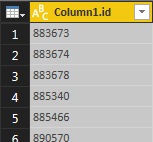
I have a table with a single column, and what I would like to do is transfrom this into a single, comma-separated value,

like this 883673,883674,883678...  How can I do this?


image.png

1 ACCEPTED SOLUTION

Hi,


The first item in your Text.Combine must be a list and not a table of records so you need to convert your


workItemTable[Column1]


to a list


https://msdn.microsoft.com/en-us/query-bi/m/table-tolist


Table.ToList(workItemTable[Column1])


/Erik

View solution in original post

3 REPLIES 3
donsvensen
Skilled Sharer
Skilled Sharer

Hi


In Power Query you can do use the Text.Combine

= Text.Combine(Table1[Column1.id],",")

In DAX you can create a measure with CONCATENATEX


Measure = CONCATENATEX(Table1,[Column1.id],";")


/Erik


Thank you very much for the solution.  When I use the following expression:

    #"Combine" = Text.Combine(workItemTable[Column1],",")


I get the following message:


Expression.Error: We cannot convert a value of type Record to type Text.
Details:
    Value=Record
    Type=Type


What have I missed?


Best Regards,

G

Hi,


The first item in your Text.Combine must be a list and not a table of records so you need to convert your


workItemTable[Column1]


to a list


https://msdn.microsoft.com/en-us/query-bi/m/table-tolist


Table.ToList(workItemTable[Column1])


/Erik

Helpful resources

Announcements
Join our Fabric User Panel

Join our Fabric User Panel

Share feedback directly with Fabric product managers, participate in targeted research studies and influence the Fabric roadmap.

March Power BI Update Carousel

Power BI Community Update - March 2026

Check out the March 2026 Power BI update to learn about new features.