Join us at FabCon Atlanta from March 16 - 20, 2026, for the ultimate Fabric, Power BI, AI and SQL community-led event. Save $200 with code FABCOMM.
Register now!The Power BI Data Visualization World Championships is back! Get ahead of the game and start preparing now! Learn more
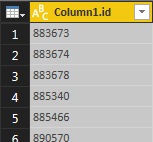
I have a table with a single column, and what I would like to do is transfrom this into a single, comma-separated value,
like this 883673,883674,883678... How can I do this?
Solved! Go to Solution.
Hi,
The first item in your Text.Combine must be a list and not a table of records so you need to convert your
workItemTable[Column1]
to a list
https://msdn.microsoft.com/en-us/query-bi/m/table-tolist
Table.ToList(workItemTable[Column1])
/Erik
Hi
In Power Query you can do use the Text.Combine
= Text.Combine(Table1[Column1.id],",")
In DAX you can create a measure with CONCATENATEX
Measure = CONCATENATEX(Table1,[Column1.id],";")
/Erik
Thank you very much for the solution. When I use the following expression:
#"Combine" = Text.Combine(workItemTable[Column1],",")
I get the following message:
Expression.Error: We cannot convert a value of type Record to type Text.
Details:
Value=Record
Type=Type
What have I missed?
Best Regards,
G
Hi,
The first item in your Text.Combine must be a list and not a table of records so you need to convert your
workItemTable[Column1]
to a list
https://msdn.microsoft.com/en-us/query-bi/m/table-tolist
Table.ToList(workItemTable[Column1])
/Erik
The Power BI Data Visualization World Championships is back! Get ahead of the game and start preparing now!
| User | Count |
|---|---|
| 39 | |
| 37 | |
| 33 | |
| 32 | |
| 29 |
| User | Count |
|---|---|
| 133 | |
| 88 | |
| 85 | |
| 68 | |
| 64 |