Join us in Barcelona for FabCon and SQLCon, September 28 - October 1, 2026.
This is best Fabric, Power BI, SQL and AI community event. How do we know? The last event sold out! Save €200 with code FABCMTY200.
Register now- Power BI forums
- Get Help with Power BI
- Desktop
- Service
- Report Server
- Power Query
- Mobile Apps
- Developer
- DAX Commands and Tips
- Custom Visuals Development Discussion
- Health and Life Sciences
- Power BI Spanish forums
- Translated Spanish Desktop
- Training and Consulting
- Instructor Led Training
- Dashboard in a Day for Women, by Women
- Galleries
- Data Stories Gallery
- Themes Gallery
- Contests Gallery
- QuickViz Gallery
- Quick Measures Gallery
- Visual Calculations Gallery
- Fabric Apps Gallery
- Notebook Gallery
- Translytical Task Flow Gallery
- TMDL Gallery
- R Script Showcase
- Webinars and Video Gallery
- Ideas
- Custom Visuals Ideas (read-only)
- Issues
- Issues
- Events
- Upcoming Events
The Fabric community is upgrading! Read all of the details including the timeline and what you can expect. Learn more
- Power BI forums
- Forums
- Get Help with Power BI
- Desktop
- Re: Transform Data Problem
- Subscribe to RSS Feed
- Mark Topic as New
- Mark Topic as Read
- Float this Topic for Current User
- Bookmark
- Subscribe
- Printer Friendly Page

- Mark as New
- Bookmark
- Subscribe
- Mute
- Subscribe to RSS Feed
- Permalink
- Report Inappropriate Content
Transform Data Problem
Hi All,
Good Morning.
I am working on a parking dataset where I have a column which has values like:
2P DIS M-SUN 0:00-7:30
4P DIS ONLY M-SUN
P/15 M-SUN 0:00-23:59- No Park
P/15 M-SUN 0:00-23:59 - No Park
I want to break this information like
Col1 Col2 Col3 Col4 Col5
2P DIS M-SUN 0:00-7:30
4P DIS ONLY 0:00-23:50
P/15 M-SUN 0:00-23:59 No Park
P/15 M-SUN 0:00-23:59 No Park
I am working on this method where first gran location of all spaces in between the text and then try to read individual records. Problem is this is returing data in LIST format (when I click on this LIST it shows data in a different table). Question is how can I use this List output (like an array) in power query or any other approach to break this data.
Regards
Gurpreet Sethi


- Mark as New
- Bookmark
- Subscribe
- Mute
- Subscribe to RSS Feed
- Permalink
- Report Inappropriate Content
Not sure what your problem is:
Does the list contain broken pieces of your original table already (like shown below) or does it contain positions separators (list of number only)? Or is this one list only?
Please post picture or share your code that we can work from there.

Imke Feldmann (The BIccountant)
If you liked my solution, please give it a thumbs up. And if I did answer your question, please mark this post as a solution. Thanks!
How to integrate M-code into your solution -- How to get your questions answered quickly -- How to provide sample data -- Check out more PBI- learning resources here -- Performance Tipps for M-queries
- Mark as New
- Bookmark
- Subscribe
- Mute
- Subscribe to RSS Feed
- Permalink
- Report Inappropriate Content
Hi ImkeF,
Well my data is stored like this
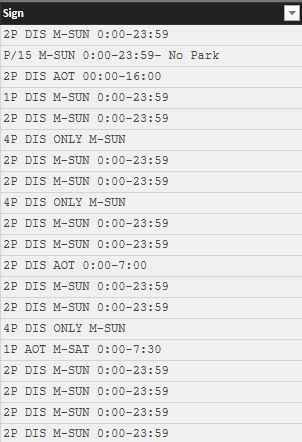
and i want to transform it to something like this
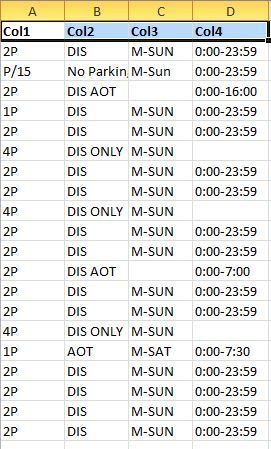
Hope I am able to explain myself.
Regards
Gurpreet Sethi


- Mark as New
- Bookmark
- Subscribe
- Mute
- Subscribe to RSS Feed
- Permalink
- Report Inappropriate Content
Sorry I posted on the wrong issue and I can't delete the post - please ignore
- Mark as New
- Bookmark
- Subscribe
- Mute
- Subscribe to RSS Feed
- Permalink
- Report Inappropriate Content
Strange that it comes in one column. Have you played around with the delimters and encoding?
However, this would be the code to split according to your example:
et
    Quelle = Csv.Document(File.Contents("D:\BI\Foren\CSVTest.csv"),[Delimiter=",", Encoding=1252]),
    PromoteHeaderOptional = Table.PromoteHeaders(Quelle),
    MergeDisOnly = Table.ReplaceValue(PromoteHeaderOptional,"DIS ONLY","DIS_ONLY",Replacer.ReplaceText,{"Column1"}),
    RemoveNoPark = Table.ReplaceValue(MergeDisOnly,"- No Park","",Replacer.ReplaceText,{"Column1"}),
    SplitColumn = Table.SplitColumn(RemoveNoPark,"Column1",Splitter.SplitTextByDelimiter(" ", QuoteStyle.Csv),{"Column1.1", "Column1.2", "Column1.3", "Column1.4", "Column1.5", "Column1.6"}),
    Column4 = Table.AddColumn(SplitColumn, "Column4", each if Text.Start([Column1.4],2)="0:" then [Column1.4] else if Text.Start([Column1.3],2)="0:" then [Column1.3] else ""),
    Column3 = Table.AddColumn(Column4, "Column3", each if Character.ToNumber(Text.Start([Column1.3],1))>58 then [Column1.3] else [Column1.2]),
    Column2 = Table.AddColumn(Column3, "Column2", each if Character.ToNumber(Text.Start([Column1.3],1))>58 then [Column1.2] else ""),
    CleanUp = Table.SelectColumns(Column2,{"Column1.1", "Column2", "Column3", "Column4"})
in
    CleanUp
Imke Feldmann (The BIccountant)
If you liked my solution, please give it a thumbs up. And if I did answer your question, please mark this post as a solution. Thanks!
How to integrate M-code into your solution -- How to get your questions answered quickly -- How to provide sample data -- Check out more PBI- learning resources here -- Performance Tipps for M-queries


- Mark as New
- Bookmark
- Subscribe
- Mute
- Subscribe to RSS Feed
- Permalink
- Report Inappropriate Content
What is your datasource?
- Mark as New
- Bookmark
- Subscribe
- Mute
- Subscribe to RSS Feed
- Permalink
- Report Inappropriate Content
Hi MrJolly,
My data source is a csv file. This column stores Parking Signs data.

Helpful resources

FabCon & SQLCon – Barcelona 2026
Join us in Barcelona for FabCon and SQLCon, the Fabric, Power BI, SQL, and AI community event. Save €200 with code FABCMTY200.

Power BI DataViz World Championships - June 2026
A new Power BI DataViz World Championship is coming this June! Don't miss out on submitting your entry.

| User | Count |
|---|---|
| 24 | |
| 22 | |
| 20 | |
| 18 | |
| 14 |


| User | Count |
|---|---|
| 31 | |
| 26 | |
| 23 | |
| 20 | |
| 20 |


