cancel
Showing results for 
Search instead for 
Did you mean: 

Try your skills in the Power BI Dataviz World Championship! Round one ends June 26. Join now

Reply
31Mathias
Regular Visitor

Transfer data beetween two tables

Hello,

I’m currently working on a project, which is suppost to show the sales results of different products by different categories.

In my first table I have the sales result of July of each article number but this table does not contain the different product categories.


In table 2 all available article numbers and the categories are listed. Column 2 in table 2 contains the article number, column 1 the category.

Right now I’m trying to find a formula which matches the article numbers and adds the category of the product numbers of table 2 in table 1. So for example in table 1 product number 123 is sold 55 times, number 124 40 times. Table 2 contains the information that number 123 is category A and 124 ist category B. These categories should be tranfered to table 1.


I hope you can help me with my issue.


Best regards, Mathias

1 ACCEPTED SOLUTION
Greg_Deckler
Community Champion
Community Champion

Example data would be great. Please see this post regarding How to Get Your Question Answered Quickly: https://community.powerbi.com/t5/Community-Blog/How-to-Get-Your-Question-Answered-Quickly/ba-p/38490


That being said, you should be able to use a Merge query to merge the records. Otherwise, you could create a new table in DAX using something like NATURALINNERJOIN or SUMMARIZE, or just create a relationship between the tables and not worry about duplicating data.


Follow on LinkedIn
@ me in replies or I'll lose your thread!!!
Instead of a Kudo, please vote for this idea
Become an expert!: Enterprise DNA
External Tools: MSHGQM
YouTube Channel!: Microsoft Hates Greg
Latest book!:
DAX For Humans

DAX is easy, CALCULATE makes DAX hard...

View solution in original post

2 REPLIES 2
v-frfei-msft
Community Support
Community Support

Hi @31Mathias,


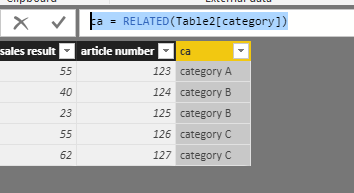
Based on your description, I made an sample here. Actually we can create relationship between Table1 and Table2 and use the RELATED function to add a calculated column.


ca = RELATED(Table2[category])

1.PNGCapture.PNG


For more details, please check the pbix as attached. If it doesn't meet your requirement, kindly share your sample data or pbix to me.


https://www.dropbox.com/s/md8vso55eef023o/Transfer%20data%20beetween%20two%20tables.pbix?dl=0


Regards,

Frank

Community Support Team _ Frank
If this post helps, then please consider Accept it as the solution to help the others find it more quickly.
Greg_Deckler
Community Champion
Community Champion

Example data would be great. Please see this post regarding How to Get Your Question Answered Quickly: https://community.powerbi.com/t5/Community-Blog/How-to-Get-Your-Question-Answered-Quickly/ba-p/38490


That being said, you should be able to use a Merge query to merge the records. Otherwise, you could create a new table in DAX using something like NATURALINNERJOIN or SUMMARIZE, or just create a relationship between the tables and not worry about duplicating data.


Follow on LinkedIn
@ me in replies or I'll lose your thread!!!
Instead of a Kudo, please vote for this idea
Become an expert!: Enterprise DNA
External Tools: MSHGQM
YouTube Channel!: Microsoft Hates Greg
Latest book!:
DAX For Humans

DAX is easy, CALCULATE makes DAX hard...

Helpful resources

Announcements
Fabric Data Days is here Carousel

Fabric Data Days 2026

Don't miss out on Data Days, June 15 through August 7. Learn Fabric, Power BI, SQL, AI and more.

May Power BI Update Carousel

Power BI Monthly Update - May 2026

Check out the May 2026 Power BI update to learn about new features.

Power BI DataViz World Championships carousel

Power BI DataViz World Championships - June 2026

A new Power BI DataViz World Championship is coming this June! Don't miss out on submitting your entry.