cancel
Showing results for 
Search instead for 
Did you mean: 

July 28 - August 9 | Final Round of the Power BI Dataviz World Championships. This is your chance. Learn more

Reply
st-mb
Frequent Visitor

Tracking role changes (LOOKUPVALUE?)

Hello,


I'm trying to create a report that tracks employees' tasks they've completed and the role they completed it as.


For example, all employees have a role at the beginning of this year, but some may be promoted. These changes are tracked in the Employees table:


UserID	Name	        Role	        Date
1	EmployeeA	Support	        1/1/2018
2	EmployeeB	Support	        1/1/2018
3	EmployeeC	Support	        1/1/2018
4	EmployeeD	Support	        1/1/2018
5	EmployeeE	Senior Support	1/1/2018
3	EmployeeC	Senior Support	3/18/2018
5	EmployeeE	Supervisor	6/4/2018

The tasks they've completed over the year so far are in the Tasks table:


TaskName	Date	        UserID
Task A	        2/1/2018	2
Task B	        2/1/2018	1
Task C	        3/1/2018	3
Task D	        3/25/2018	3
Task E	        5/5/2018	4
Task F	        6/3/2018	5
Task G	        6/4/2018	5

What I was thinking the output would be is similar to this:


TaskName	Date	          UserID   Role
Task A	        2/1/2018	  2	   Support
Task B	        2/1/2018	  1	   Support
Task C	        3/1/2018	  3	   Support
Task D	        3/25/2018         3	   Senior Support
Task E	        5/5/2018	  4	   Support
Task F	        6/3/2018	  5	   Senior Support
Task G	        6/4/2018	  5	   Supervisor

I can sort of achieve this with LOOKUPVALUE and UserID, but I'm having difficulties adding the date part (unless there's a more efficient way to go about doing this?).


Thanks in advance!

1 ACCEPTED SOLUTION
Ashish_Mathur
Super User
Super User

Hi,


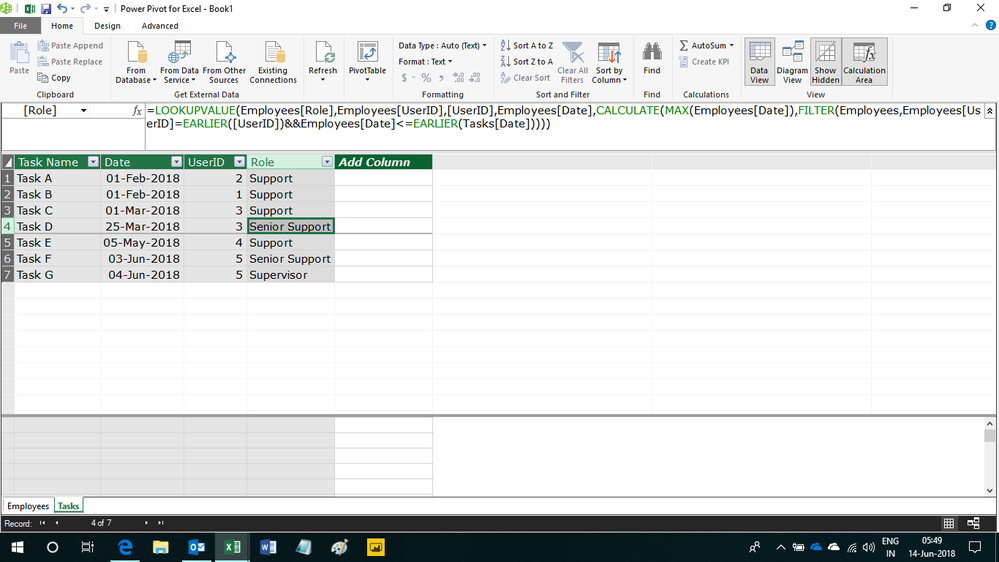
Write this calculated column formula


=LOOKUPVALUE(Employees[Role],Employees[UserID],[UserID],Employees[Date],CALCULATE(MAX(Employees[Date]),FILTER(Employees,Employees[UserID]=EARLIER([UserID])&&Employees[Date]<=EARLIER(Tasks[Date]))))


Hope this helps.


Untitled.png


Regards,
Ashish Mathur
http://www.ashishmathur.com
https://www.linkedin.com/in/excelenthusiasts/

View solution in original post

3 REPLIES 3
Ashish_Mathur
Super User
Super User

Hi,


Write this calculated column formula


=LOOKUPVALUE(Employees[Role],Employees[UserID],[UserID],Employees[Date],CALCULATE(MAX(Employees[Date]),FILTER(Employees,Employees[UserID]=EARLIER([UserID])&&Employees[Date]<=EARLIER(Tasks[Date]))))


Hope this helps.


Untitled.png


Regards,
Ashish Mathur
http://www.ashishmathur.com
https://www.linkedin.com/in/excelenthusiasts/

Thank you both! I used Ashish_Mathur's suggested formula and it worked perfectly.

Anonymous
Not applicable

Hey @st-mb


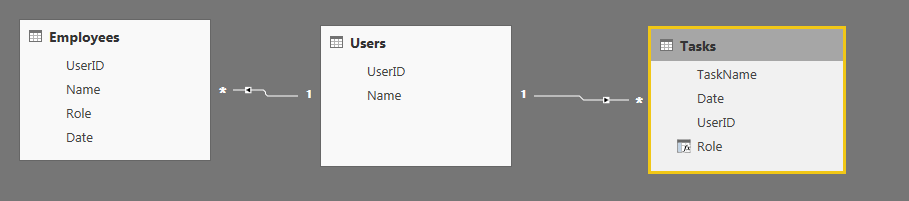
A couple of steps to calculate this. First, I create a table of unique UserID's to connect the Employees and Tasks table.


Pic1.PNG


Then you can calculate the new role column with the following formula:


Role = 
VAR CurrentUser = FIRSTNONBLANK(Tasks[UserID],1)
RETURN
CALCULATE(
    FIRSTNONBLANK(Employees[Role],1),
    TOPN(
        1,
        FILTER(
            Employees,
            Employees[UserID] = CurrentUser && Tasks[Date] >= Employees[Date]
        ),
        Employees[Date]
    )
)

This gives you the desired output, shown below:


Pic2.PNG


Let me know if you have any questions on the formula.


Hope this helps!

Parker

Helpful resources

Announcements
FabCon and SQLCon Barcelona 2026

FabCon & SQLCon – Barcelona 2026

Join us in Barcelona for FabCon and SQLCon, the Fabric, Power BI, SQL, and AI community event. Save €200 with code FABCMTY200.

Fabric Community Sticker Design Challenge Barcelona Carousel

Fabric Community Sticker Challenge - Barcelona 2026

If you love stickers, then you will definitely want to check out our community sticker challenge, Barcelona edition!

July Power BI Update Carousel

Power BI Monthly Update - July 2026

Check out the July 2026 Power BI update to learn about new features.

Power BI DataViz World Championships carousel

Power BI DataViz World Championships - June 2026

A new Power BI DataViz World Championship is coming this June! Don't miss out on submitting your entry.

Top Solution Authors