Join us at FabCon Atlanta from March 16 - 20, 2026, for the ultimate Fabric, Power BI, AI and SQL community-led event. Save $200 with code FABCOMM.
Register now!The Power BI Data Visualization World Championships is back! It's time to submit your entry. Live now!
Hi there!
I am trying to create a report that visualizes a platform's subscription data over time.
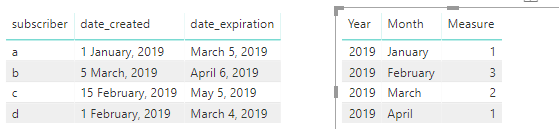
In the database there are 2 different timestamps created when a new subscription occurs:
1) the 'date_created' field which represents the date the subscription was created and
2) the 'date_expiration' field which represents the date when the subscription expires.
I'm looking to show cumulative subscribers each month that takes into account the subscribers gained(from date_created, and the subscribers lost (from date_expired), but I'm not quite sure how to attack this problem.
Thanks for any help \m/
Solved! Go to Solution.
Hi @JacktheYeti
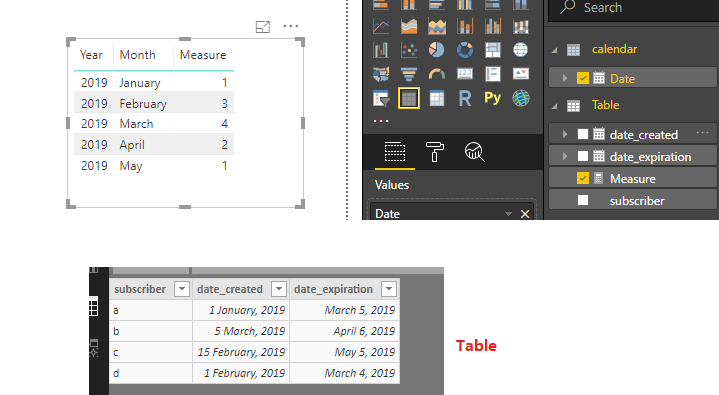
You may modify the formula like below:
Measure =
CALCULATE (
COUNT ( 'Table'[subscriber] ),
FILTER (
GENERATE ( 'calendar', 'Table' ),
'Table'[date_created] <= 'calendar'[Date]
&& DATE ( YEAR ( 'Table'[date_expiration] ), MONTH ( 'Table'[date_expiration] ), 1 ) > 'calendar'[Date]
)
)
Regards,
@v-cherch-msft This is great, thanks for much for your help.
The numbers look correct with regards to the # of subscribers who started their subscription that month but it doesn't seem to aggregate the numbers from the previous months.
In other words, if I had 8 subscriptions in January, and an additional 8 subscriptions in February, but 4 of them expire in February, my net subscriptions should be 12.
Hi @JacktheYeti
You may modify the formula like below:
Measure =
CALCULATE (
COUNT ( 'Table'[subscriber] ),
FILTER (
GENERATE ( 'calendar', 'Table' ),
'Table'[date_created] <= 'calendar'[Date]
&& DATE ( YEAR ( 'Table'[date_expiration] ), MONTH ( 'Table'[date_expiration] ), 1 ) > 'calendar'[Date]
)
)
Regards,
Hi @JacktheYeti
You may create a calendar table and use it.Then create a measure like below:
Measure =
CALCULATE (
COUNT ( 'Table'[subscriber] ),
FILTER (
GENERATE ( 'calendar', 'Table' ),
'Table'[date_created] <= 'calendar'[Date]
&& 'Table'[date_expiration] >= 'calendar'[Date]
)
)
Regards,
The Power BI Data Visualization World Championships is back! It's time to submit your entry.
Check out the January 2026 Power BI update to learn about new features.
| User | Count |
|---|---|
| 61 | |
| 49 | |
| 30 | |
| 25 | |
| 23 |
| User | Count |
|---|---|
| 129 | |
| 104 | |
| 56 | |
| 39 | |
| 31 |