cancel
Showing results for 
Search instead for 
Did you mean: 

Try your skills in the Power BI Dataviz World Championship! Round one ends June 26. Join now

Reply
JacktheYeti
Helper I
Helper I

Tracking Cumulative Subscriptions over Time

Hi there!


I am trying to create a report that visualizes a platform's subscription data over time.


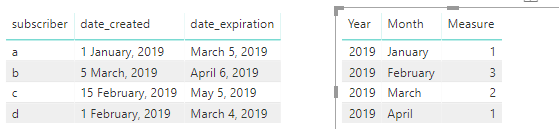
In the database there are 2 different timestamps created when a new subscription occurs:

1)  the 'date_created' field which represents the date the subscription was created and

2) the 'date_expiration' field which represents the date when the subscription expires.


I'm looking to show cumulative subscribers each month that takes into account the subscribers gained(from date_created, and the subscribers lost (from date_expired), but I'm not quite sure how to attack this problem.


Thanks for any help \m/

1 ACCEPTED SOLUTION

Hi @JacktheYeti 

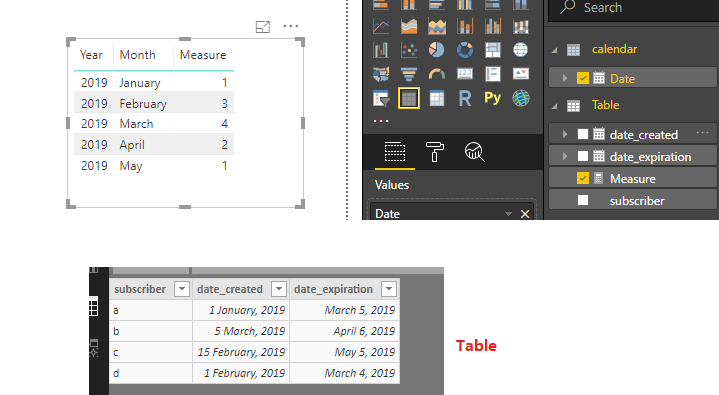
You may modify the formula like below:

Measure =
CALCULATE (
    COUNT ( 'Table'[subscriber] ),
    FILTER (
        GENERATE ( 'calendar', 'Table' ),
        'Table'[date_created] <= 'calendar'[Date]
            && DATE ( YEAR ( 'Table'[date_expiration] ), MONTH ( 'Table'[date_expiration] ), 1 ) > 'calendar'[Date]
    )
)

1.png

Regards,

Community Support Team _ Cherie Chen
If this post helps, then please consider Accept it as the solution to help the other members find it more quickly.

View solution in original post

3 REPLIES 3
JacktheYeti
Helper I
Helper I

@v-cherch-msft  This is great, thanks for much for your help.


The numbers look correct with regards to the # of subscribers who started their subscription that month but it doesn't seem to aggregate the numbers from the previous months.


In other words, if I had 8 subscriptions in January, and an additional 8 subscriptions in February, but 4 of them expire in February, my net subscriptions should be 12.

Hi @JacktheYeti 

You may modify the formula like below:

Measure =
CALCULATE (
    COUNT ( 'Table'[subscriber] ),
    FILTER (
        GENERATE ( 'calendar', 'Table' ),
        'Table'[date_created] <= 'calendar'[Date]
            && DATE ( YEAR ( 'Table'[date_expiration] ), MONTH ( 'Table'[date_expiration] ), 1 ) > 'calendar'[Date]
    )
)

1.png

Regards,

Community Support Team _ Cherie Chen
If this post helps, then please consider Accept it as the solution to help the other members find it more quickly.
v-cherch-msft
Microsoft Employee
Microsoft Employee

Hi @JacktheYeti 

You may create a calendar table and use it.Then create a measure like below:

Measure =
CALCULATE (
    COUNT ( 'Table'[subscriber] ),
    FILTER (
        GENERATE ( 'calendar', 'Table' ),
        'Table'[date_created] <= 'calendar'[Date]
            && 'Table'[date_expiration] >= 'calendar'[Date]
    )
)

1.png

Regards,

Community Support Team _ Cherie Chen
If this post helps, then please consider Accept it as the solution to help the other members find it more quickly.

Helpful resources

Announcements
Fabric Data Days is here Carousel

Fabric Data Days 2026

Don't miss out on Data Days, June 15 through August 7. Learn Fabric, Power BI, SQL, AI and more.

Power BI DataViz World Championships carousel

Power BI DataViz World Championships - June 2026

A new Power BI DataViz World Championship is coming this June! Don't miss out on submitting your entry.