cancel
Showing results for 
Search instead for 
Did you mean: 

The Power BI Data Visualization World Championships is back! Get ahead of the game and start preparing now! Learn more

Reply
Anonymous
Not applicable

Totals showing as 0 instead of the sum

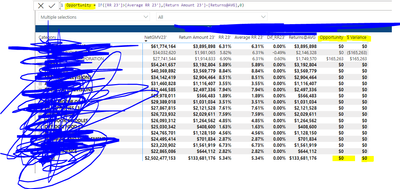
Hi, I am having issued with my formula not summing up at the Total and Subtotal level. I would like to show me the sum in the subtototals and totals instead of Zeros (Because it is doing it linear) 

svallejo_1-1660087019204.png


1 ACCEPTED SOLUTION
v-yanjiang-msft
Community Support
Community Support

Hi @Anonymous ,

According to your description, I create a sample.

vkalyjmsft_0-1660641296606.png

RR23 and Average RR23 are all measures.

RR23 = MAX('Table'[Sales])
Average RR 23 = MAX('Table'[Cost])

Here's my solution, create a measure.

Measure =
SUMX (
    ADDCOLUMNS (
        'Table',
        "Diff",
            IF ( [RR23] > [Average RR 23], [RR23] - [Average RR 23], 0 )
    ),
    [Diff]
)

Get the correct result.

vkalyjmsft_1-1660641493939.png

Best Regards,
Community Support Team _ kalyj

If this post helps, then please consider Accept it as the solution to help the other members find it more quickly.

View solution in original post

4 REPLIES 4
v-yanjiang-msft
Community Support
Community Support

Hi @Anonymous ,

According to your description, I create a sample.

vkalyjmsft_0-1660641296606.png

RR23 and Average RR23 are all measures.

RR23 = MAX('Table'[Sales])
Average RR 23 = MAX('Table'[Cost])

Here's my solution, create a measure.

Measure =
SUMX (
    ADDCOLUMNS (
        'Table',
        "Diff",
            IF ( [RR23] > [Average RR 23], [RR23] - [Average RR 23], 0 )
    ),
    [Diff]
)

Get the correct result.

vkalyjmsft_1-1660641493939.png

Best Regards,
Community Support Team _ kalyj

If this post helps, then please consider Accept it as the solution to help the other members find it more quickly.

ryan_mayu
Super User
Super User

@Anonymous 

pls try this

opportunity 2= IF ( ISFILTER (category), Opportunity, 0)


Did I answer your question? Mark my post as a solution!

Proud to be a Super User!


Anonymous
Not applicable

Hi,
it is not working. I am using the following formula but it does not seems to be calculating correcly. 

VAR VendorData =
    SUMMARIZE(
        '1P_MainDataSet',
        '1P_MainDataSet'[Vendor],
        "AvgReturnAmt", [Returns $@AVG]-[Return Amount]
    )
RETURN
SUMX( VendorData, [AvgReturnAmt] )
 
This is how it looks:
svallejo_0-1660330859123.png

what I essentially need is for the opportunity column to be = Return amount - Return $@ avg... but it is not doing it. 

could you pls provide the sample data and expected output?


Did I answer your question? Mark my post as a solution!

Proud to be a Super User!


Helpful resources

Announcements
Power BI DataViz World Championships

Power BI Dataviz World Championships

The Power BI Data Visualization World Championships is back! Get ahead of the game and start preparing now!

November Power BI Update Carousel

Power BI Monthly Update - November 2025

Check out the November 2025 Power BI update to learn about new features.

FabCon Atlanta 2026 carousel

FabCon Atlanta 2026

Join us at FabCon Atlanta, March 16-20, for the ultimate Fabric, Power BI, AI and SQL community-led event. Save $200 with code FABCOMM.