Join us at FabCon Atlanta from March 16 - 20, 2026, for the ultimate Fabric, Power BI, AI and SQL community-led event. Save $200 with code FABCOMM.
Register now!The Power BI Data Visualization World Championships is back! Get ahead of the game and start preparing now! Learn more
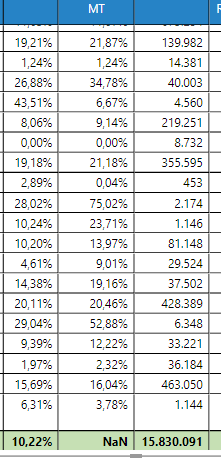
I have the following formula which brings me values for each one of the cells but for totals i get NaN value.
How can i make this DAX formula work on column Totals?
% Cost no MT = IF ( OR(ISBLANK([% Cost]); [% Cost] =0); 0 ; IF(
SUM('Master Table - All Services'[Cost_no_MT]) / SUMX(VALUES(Calculated_Measures[TaskGID]);CALCULATE(SUM('Invoices to Clients'[TurnOver]))) = 0;
SUM('Master Table - All Services'[PONetValue]) / SUMX(VALUES(Calculated_Measures[TaskGID]);CALCULATE(SUM('Invoices to Clients'[TurnOver])));
SUM('Master Table - All Services'[Cost_no_MT]) / SUMX(VALUES(Calculated_Measures[TaskGID]);CALCULATE(SUM('Invoices to Clients'[TurnOver])))
) )Solved! Go to Solution.
Hi @themistoklis,
It seems the denominator returns 0. But we can't find out why unless we have the data. Can you share a sample? Maybe you can check it out. The context of the Total is the whole parts.
SUMX (
VALUES ( Calculated_Measures[TaskGID] );
CALCULATE ( SUM ( 'Invoices to Clients'[TurnOver] ) )
)
Best Regards,
Dale
Hi @themistoklis,
It seems the denominator returns 0. But we can't find out why unless we have the data. Can you share a sample? Maybe you can check it out. The context of the Total is the whole parts.
SUMX (
VALUES ( Calculated_Measures[TaskGID] );
CALCULATE ( SUM ( 'Invoices to Clients'[TurnOver] ) )
)
Best Regards,
Dale
Indeed it was the denominator which was returning zero and also i had quite a few NaN values in various cells after the calculation. I fixed them too.
Thanks a lot
The Power BI Data Visualization World Championships is back! Get ahead of the game and start preparing now!
| User | Count |
|---|---|
| 41 | |
| 38 | |
| 36 | |
| 30 | |
| 28 |
| User | Count |
|---|---|
| 128 | |
| 88 | |
| 79 | |
| 67 | |
| 62 |