Join us at FabCon Atlanta from March 16 - 20, 2026, for the ultimate Fabric, Power BI, AI and SQL community-led event. Save $200 with code FABCOMM.
Register now!The Power BI Data Visualization World Championships is back! Get ahead of the game and start preparing now! Learn more
Hello all,
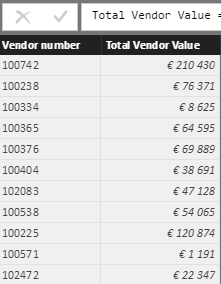
I want to create 'vendor buckets' based on their value. This I already arranged; that for a certain vendor I see the bucket where it belongs to.
In my master data I have created vendor buckets that checks these to total vendor value and independent vendor buckets.
However, creating the following
Total Vendor Value = summarize(Masterdata;Masterdata[Vendor number];"Total Vendor Value";SUM(Masterdata[Value (EUR)]))
it creates buckets on the whole tabel.
I only want to render total vendor value on
- last 12 months
- One Plant; "P010"
- Purchasing groups "110" and "120"
How can I add these constraints to the total vendor value?
In my master data it looks like;
Vendor buckets = CALCULATE( VALUES(Vendorbuckets[Bucket Name]); FILTER(Vendorbuckets;RELATED('Total Vendor Value'[Total Vendor Value])>= Vendorbuckets[start] && RELATED('Total Vendor Value'[Total Vendor Value]) < Vendorbuckets[end]))
where vendor buckets are fixed values as you can see in the table below.
thank you for helping out!
buckets
total vendor value
masterdata
Solved! Go to Solution.
Hi @arnoutdt,
You can add filter function to the table, then use filtered table as the source table of the summarize function.
Total Vendor Value =
SUMMARIZE (
FILTER ( Masterdata; [Plant] = "P010" );
[Vendor number];
"Total Vendor Value"; SUM ( Masterdata[Value (EUR)] )
)
Regards,
Xiaxoin Sheng
I don't see how I can share sample data.
Hi @arnoutdt,
You can upload to onedrive/google drive, then share the file link here.
Regards,
Xiaoxin Sheng
Hello,
Sorry but I can't share this.
how can I add filters to the following?
I have created a table :
Total Vendor Value = summarize(Masterdata;Masterdata[Vendor number];"Total Vendor Value";SUM(Masterdata[Value (EUR)]))
but how can I add some constraints/filters to this value:
Where
- Plant = P010
much appreciated!
Hi @arnoutdt,
You can add filter function to the table, then use filtered table as the source table of the summarize function.
Total Vendor Value =
SUMMARIZE (
FILTER ( Masterdata; [Plant] = "P010" );
[Vendor number];
"Total Vendor Value"; SUM ( Masterdata[Value (EUR)] )
)
Regards,
Xiaxoin Sheng
thank you!
The Power BI Data Visualization World Championships is back! Get ahead of the game and start preparing now!
Check out the November 2025 Power BI update to learn about new features.
| User | Count |
|---|---|
| 59 | |
| 43 | |
| 42 | |
| 23 | |
| 17 |
| User | Count |
|---|---|
| 190 | |
| 122 | |
| 96 | |
| 66 | |
| 47 |