cancel
Showing results for 
Search instead for 
Did you mean: 

View all the Fabric Data Days sessions on demand. View schedule

Reply
arnoutdt
Frequent Visitor

Total vendor Value but with filters

Hello all,


I want to create 'vendor buckets' based on their value. This I already arranged; that for a certain vendor I see the bucket where it belongs to.

In my master data I have created vendor buckets that checks these to total vendor value and independent vendor buckets. 


However, creating the following

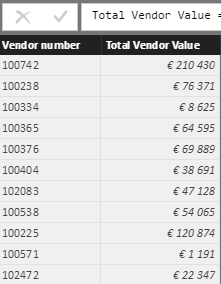
Total Vendor Value = summarize(Masterdata;Masterdata[Vendor number];"Total Vendor Value";SUM(Masterdata[Value (EUR)]))

it creates buckets on the whole tabel.


I only want to render total vendor value on

- last 12 months

- One Plant; "P010"

- Purchasing groups "110" and "120"


How can I add these constraints to the total vendor value? 


In my master data it looks like;

Vendor buckets = CALCULATE( VALUES(Vendorbuckets[Bucket Name]); FILTER(Vendorbuckets;RELATED('Total Vendor Value'[Total Vendor Value])>= Vendorbuckets[start] && RELATED('Total Vendor Value'[Total Vendor Value]) < Vendorbuckets[end]))


where vendor buckets are fixed values as you can see in the table below.


thank you for helping out!

bucketsbucketstotal vendor valuetotal vendor valuemasterdatamasterdata

1 ACCEPTED SOLUTION
Anonymous
Not applicable

Hi @arnoutdt,


You can add filter function to the table, then use filtered table as the source table of the summarize function.

Total Vendor Value =
SUMMARIZE (
    FILTER ( Masterdata; [Plant] = "P010" );
    [Vendor number];
    "Total Vendor Value"; SUM ( Masterdata[Value (EUR)] )
)

Regards,

Xiaxoin Sheng

View solution in original post

6 REPLIES 6
Anonymous
Not applicable

HI @arnoutdt,


Please share the sample data for further testing and analysis.


Regards,

Xiaoxin Sheng

I don't see how I can share sample data. 

Anonymous
Not applicable

Hi @arnoutdt,


You can upload to onedrive/google drive, then share the file link here.


Regards,

Xiaoxin Sheng

Hello,


Sorry but I can't share this.


how can I add filters to the following?


I have created a table :


Total Vendor Value = summarize(Masterdata;Masterdata[Vendor number];"Total Vendor Value";SUM(Masterdata[Value (EUR)]))


but how can I add some constraints/filters to this value:

Where 

- Plant = P010


much appreciated!

Anonymous
Not applicable

Hi @arnoutdt,


You can add filter function to the table, then use filtered table as the source table of the summarize function.

Total Vendor Value =
SUMMARIZE (
    FILTER ( Masterdata; [Plant] = "P010" );
    [Vendor number];
    "Total Vendor Value"; SUM ( Masterdata[Value (EUR)] )
)

Regards,

Xiaxoin Sheng

thank you!

Helpful resources

Announcements
November Power BI Update Carousel

Power BI Monthly Update - November 2025

Check out the November 2025 Power BI update to learn about new features.

Fabric Data Days Carousel

Fabric Data Days

Advance your Data & AI career with 50 days of live learning, contests, hands-on challenges, study groups & certifications and more!

FabCon Atlanta 2026 carousel

FabCon Atlanta 2026

Join us at FabCon Atlanta, March 16-20, for the ultimate Fabric, Power BI, AI and SQL community-led event. Save $200 with code FABCOMM.

Top Solution Authors
Top Kudoed Authors