Get certified for free when you join Fabric Data Days 2026 and dive into Fabric, Power BI, SQL, AI, and other essential data skills.
Join nowJuly 7 - July 17 | Round 2 of the Power BI Dataviz World Championships. Don't miss your chance! Learn more
Hello!
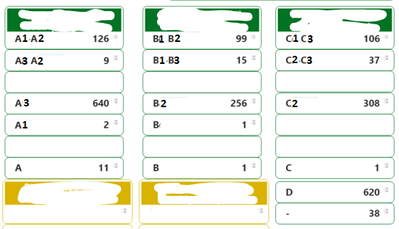
I need to take the Total Line from numerous tables and put them in one table!
Every green box is a table's total which derives from different filters in each table. The task is to create a table that looks like this:
Column1 | Column 2
A1A2 + A3A2 + A3 + A1 + A | 788
B1B2 + B1B3 + B2 + B + B | 372
C1C3 + C2C3 + C2 + C | 452
D | 620
- | 38
Any ideas?
Thanks!
Hi @Anonymous ,
Sorry I'm not very clear about where are the values in green box from. Could you please explain more about the expression "Every green box is a table's total which derives from different filters in each table."
Best Regards,
Community Support Team _ kalyj
Every green box is a table visual. For example the A1A2 is the total counts of this table. I have renamed the "Total" with A1A2, A3, A1 etc. For instance, A1A2 - 126 means that the total counts (sum of the rows) on this table visual is 126. Each table (i.e. each green box) has different filters on it that is why I have different totals. Basically I need to extract the total of each table and then sum it. Please feel free to ask if it isn't still clear.
Another approach that would lead to a possible solution is this:
I want to create a measure that count rows from a table
Measure1 = COUNTROWS(Table1)
and then filter it by three measures:
Measure2 < 0.04
Measure3 < 0.04
Measure4 >= 0.15
Any clues?
Join us in Barcelona for FabCon and SQLCon, the Fabric, Power BI, SQL, and AI community event. Save €200 with code FABCMTY200.
Join Fabric Data Days 2026: 60 days of free live/on-demand sessions, challenges, study groups, and certification opportunities.
| User | Count |
|---|---|
| 22 | |
| 22 | |
| 18 | |
| 16 | |
| 13 |
| User | Count |
|---|---|
| 63 | |
| 42 | |
| 40 | |
| 40 | |
| 40 |