We've captured the moments from FabCon & SQLCon that everyone is talking about, and we are bringing them to the community, live and on-demand. Starts on April 14th. Register now
Hello!
I need to take the Total Line from numerous tables and put them in one table!
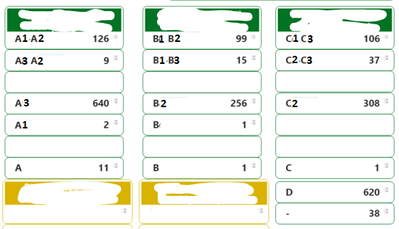
Every green box is a table's total which derives from different filters in each table. The task is to create a table that looks like this:
Column1 | Column 2
A1A2 + A3A2 + A3 + A1 + A | 788
B1B2 + B1B3 + B2 + B + B | 372
C1C3 + C2C3 + C2 + C | 452
D | 620
- | 38
Any ideas?
Thanks!
Hi @alex_smith ,
Sorry I'm not very clear about where are the values in green box from. Could you please explain more about the expression "Every green box is a table's total which derives from different filters in each table."
Best Regards,
Community Support Team _ kalyj
Every green box is a table visual. For example the A1A2 is the total counts of this table. I have renamed the "Total" with A1A2, A3, A1 etc. For instance, A1A2 - 126 means that the total counts (sum of the rows) on this table visual is 126. Each table (i.e. each green box) has different filters on it that is why I have different totals. Basically I need to extract the total of each table and then sum it. Please feel free to ask if it isn't still clear.
Another approach that would lead to a possible solution is this:
I want to create a measure that count rows from a table
Measure1 = COUNTROWS(Table1)
and then filter it by three measures:
Measure2 < 0.04
Measure3 < 0.04
Measure4 >= 0.15
Any clues?
If you have recently started exploring Fabric, we'd love to hear how it's going. Your feedback can help with product improvements.
A new Power BI DataViz World Championship is coming this June! Don't miss out on submitting your entry.
Share feedback directly with Fabric product managers, participate in targeted research studies and influence the Fabric roadmap.
| User | Count |
|---|---|
| 54 | |
| 39 | |
| 32 | |
| 17 | |
| 15 |
| User | Count |
|---|---|
| 64 | |
| 63 | |
| 37 | |
| 36 | |
| 22 |