Join us at FabCon Atlanta from March 16 - 20, 2026, for the ultimate Fabric, Power BI, AI and SQL community-led event. Save $200 with code FABCOMM.
Register now!The Power BI Data Visualization World Championships is back! Get ahead of the game and start preparing now! Learn more
Hi,
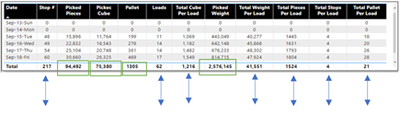
I just found that some of my column value total is not showing total instead I belive doing average even I am not usng average formula. I may need to fix Dax?
Total eleven columns but only four columns answer are correct.
Here is screen short of table and Dax formula. Green highlight box are correct answer and arrow in blue are wrong answer.
Dax formula
@Anonymous This looks like a measure totals problem. Very common. See my post about it here: https://community.powerbi.com/t5/DAX-Commands-and-Tips/Dealing-with-Measure-Totals/td-p/63376
Also, this Quick Measure, Measure Totals, The Final Word should get you what you need:
https://community.powerbi.com/t5/Quick-Measures-Gallery/Measure-Totals-The-Final-Word/m-p/547907
Hi @ Greg_Deckler,
I checked that link but still unable to get it done.
Thanks though
Hi @Anonymous ,
You should use HASONEVALUE function to distinguish between the calculation of each date and the calculation of total. But without your sample data and expected output, I really can't help you well.
Would you please inform us more detailed information( your sample data and expected output (by OneDrive for Business)) if possible?
Best Regards,
Dedmon Dai
The Power BI Data Visualization World Championships is back! Get ahead of the game and start preparing now!
| User | Count |
|---|---|
| 143 | |
| 124 | |
| 101 | |
| 80 | |
| 55 |