Don't miss your chance to take the Fabric Data Engineer (DP-600) exam for FREE! Find out how by watching the DP-600 session on-demand now through April 28th.
Learn moreJoin the FabCon + SQLCon recap series. Up next: Power BI, Real-Time Intelligence, IQ and AI, and Data Factory take center stage. All sessions are available on-demand after the live show. Register now
Hi,
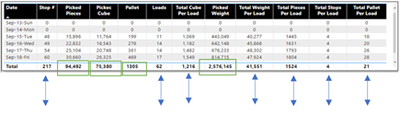
I just found that some of my column value total is not showing total instead I belive doing average even I am not usng average formula. I may need to fix Dax?
Total eleven columns but only four columns answer are correct.
Here is screen short of table and Dax formula. Green highlight box are correct answer and arrow in blue are wrong answer.
Dax formula
@Anonymous This looks like a measure totals problem. Very common. See my post about it here: https://community.powerbi.com/t5/DAX-Commands-and-Tips/Dealing-with-Measure-Totals/td-p/63376
Also, this Quick Measure, Measure Totals, The Final Word should get you what you need:
https://community.powerbi.com/t5/Quick-Measures-Gallery/Measure-Totals-The-Final-Word/m-p/547907
Hi @ Greg_Deckler,
I checked that link but still unable to get it done.
Thanks though
Hi @Anonymous ,
You should use HASONEVALUE function to distinguish between the calculation of each date and the calculation of total. But without your sample data and expected output, I really can't help you well.
Would you please inform us more detailed information( your sample data and expected output (by OneDrive for Business)) if possible?
Best Regards,
Dedmon Dai
Check out the April 2026 Power BI update to learn about new features.
If you have recently started exploring Fabric, we'd love to hear how it's going. Your feedback can help with product improvements.
A new Power BI DataViz World Championship is coming this June! Don't miss out on submitting your entry.
| User | Count |
|---|---|
| 42 | |
| 35 | |
| 35 | |
| 22 | |
| 15 |
| User | Count |
|---|---|
| 65 | |
| 58 | |
| 28 | |
| 27 | |
| 25 |