Join us at FabCon Atlanta from March 16 - 20, 2026, for the ultimate Fabric, Power BI, AI and SQL community-led event. Save $200 with code FABCOMM.
Register now!Get Fabric Certified for FREE during Fabric Data Days. Don't miss your chance! Request now
Reshaping
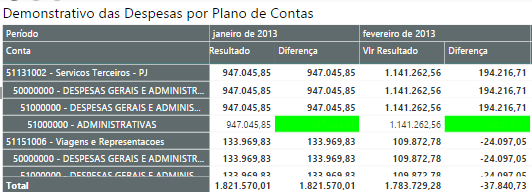
I created a color background formatting of the column with a red red section with less than 0 and green if larger. In this column I subtract from the current month's revenue value from the previous month's value. (so I check, if the value is negative, the value of the current month is lower than the previous month). then I put the font color in the same condition to be transparent. But my problem is with the subtotals that appear above because the column is pivoted, these subtotals are not with the background color I've formatted
Ex:
.
The columm "Diferença" dont have colors in the subtotals lines.
HI @Jacy,
As smoupre said, it will be help if you share some detail contents about your issue.
BTW, it seems like the filter not works properly on your visual, I think you should check your relationships and filters in that formula.
Regards,
Xiaoxin Sheng
Not without more information:
https://community.powerbi.com/t5/Community-Blog/How-to-Get-Your-Question-Answered-Quickly/ba-p/38490
Check out the November 2025 Power BI update to learn about new features.
Advance your Data & AI career with 50 days of live learning, contests, hands-on challenges, study groups & certifications and more!