Hi, I´m having problems to calculate a total average when I use filter context.
I have this TABLE 1 :
I need to group X and Y, because they are the same ml Model, so i ve created the ML GROUPED Column
| Month | ML MODEL | ML GROUPED | DECIL | CALLS | SALES | SALES/CALLS |
| JAN | X | Portin | 1 | | | |
| JAN | X | Portin | 2 | | | |
| JAN | X | Portin | 3 | | | |
| JAN | X | Portin | ... | | | |
| JAN | X | Portin | 10 | | | |
| JAN | Y | Portin | 1 | | | |
| JAN | Y | Portin | 2 | | | |
| ... | ... | Portin | ... | | | |
| JAN | Y | Portin | 10 | | | |
I have this measure :
LIFT = [SALES/CALLS DECIL 10] / [AVG SALES/CALLS]
[SALES/CALLS DECIL 10] = CALCULATE([SALES/CALLS], TABLE1[decil] IN { 10 }, ALLSELECTED((TABLE1[ML MODEL])))
[AVG SALES/CALLS] =
CALCULATE(
AVERAGEX(TABLE1,[SALES/CALLS]), ALLSELECTED(TABLE1[ML MODEL]))
Auxiliary Measures:
[SALES/CALLS] = [SALES] / [CALLS]
[SALES] = SUM(TABLE1[SALES])
[CALLS] = SUM(TABLE1[CALLS])
When i filter MODEL = 'X' i get this results:
| DECIL | CALLS | SALES | SALES/CALLS |
1 | 306 | 11 | 3,59% |
| 2 | 498 | 15 | 3,01% |
| 3 | 755 | 18 | 2,38% |
| 4 | 945 | 17 | 1,8% |
| 5 | 55596 | 139 | 0,25% |
| 6 | 63765 | 134 | 0,21% |
| 7 | .... | ... | ... |
| 8 | | | |
| 9 | | | |
| 10 | 78496 | 528 | 0,67% |
When i filter MODEL = 'Y' i get this results:
| DECIL | CALLS | SALES | SALES/CALLS |
1 | 23794 | 40 | 0,17% |
| 2 | 22038 | 50 | 0,23% |
| 3 | 20130 | 51 | 0,25% |
| 4 | 16826 | 51 | 0,3% |
| 5 | 55596 | 49 | 0,31% |
| 6 | 63765 | 65 | 0,42% |
| 7 | .... | ... | ... |
| 8 | | | |
| 9 | | | |
| 10 | 16807 | 121 | 0,72% |
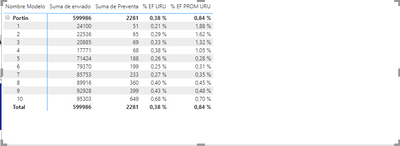
My goal is to apply filter context, ML grouped = 'Portin' and see something like this
| DECIL | CALLS | SALES | SALES/CALLS | SALES/CALLS DECIL 10 | AVG SALES/CALLS |
1 | (306+23794) | (11+40) | 0,21% | 0,68% | |
| 2 | (498+22038) | (15+50) | 0,29% | 0,68% | |
| 3 | (755+20130) | (18+51) | 0,33% | ... | |
| 4 | | | | ... | |
| 5 | | | | | |
| 6 | | | | | |
| 7 | .... | ... | ... | | |
| 8 | | | | | |
| 9 | | | | | |
| 10 | (78496+16807) | (528+121) | 0,68% | 0,68% | |
TOTAL PROBLEM
What i want is that the total for AVG SALES/CALLS be calculated as:
AVG SALES/CALLS = (0,21% + 0,29 % + 0,33% + ... + 0,68%) = 0,35%
What I´m actually getting is
AVG SALES/CALLS = ((3,59% + 3,01% + ... + 0,67%)/10 + (0,17% + 0,23% +...+0,72%)/10)/2