Get certified for free when you join Fabric Data Days 2026 and dive into Fabric, Power BI, SQL, AI, and other essential data skills.
Join nowData Days is here! Join us now for 60+ days of learning, challenges, and connection. Learn more
Hi I want to know how to use the topN function. Currently I am having a count row measure and I only want to display the top 10 results of my group how do I do it?
Solved! Go to Solution.
Hi Weilip,
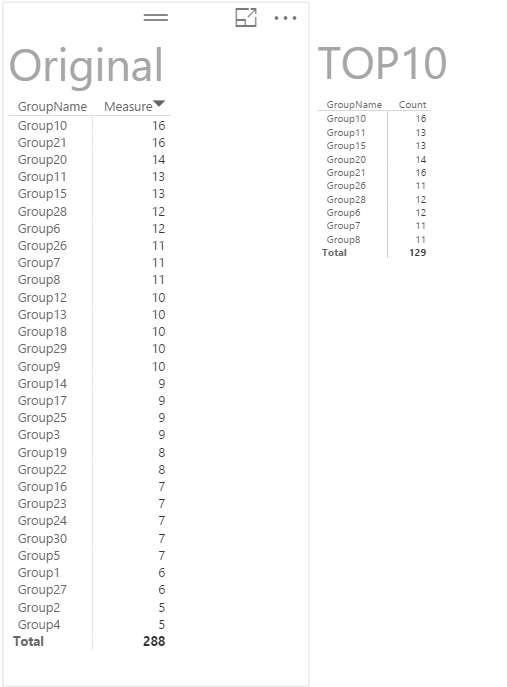
According to your description, you need to get the top 10 count for your group, right?
I have tested it on my local environment, the steps below are for you reference.
Regards,
Charlie Liao
Hi Weilip,
According to your description, you need to get the top 10 count for your group, right?
I have tested it on my local environment, the steps below are for you reference.
Regards,
Charlie Liao
TOP10 = TOPN(10,SUMMARIZE(Original,Original[GroupName]),[Measure])
Can the value ' 10' be dynamically selected? ---topn[topnvalue]
If I try to replace it with [SelectedTopNNumber] where [SelectedTopNNumber]=value(topn[topnvalue]) , it throws me the below error,
MdxScript(Model) (17, 35) A table of multiple values was supplied where a single value was expected
Hi weilip,
Do you want to show Top N Group by Count of Row measures Right ?
If yes please follow the below steps it will help u ...
1. Create new measure
Measure Count = count("Count row of Measures")
2. Create Rank Function
Rank = RankX(Allselected("Group"),Measure Count,,Asc,Dense)
3. Drag the rank field in Visual filter and choose what ever Top value u want.
let me know the feedback
Don't miss out on Data Days, June 15 through August 7. Learn Fabric, Power BI, SQL, AI and more.
Check out the May 2026 Power BI update to learn about new features.
| User | Count |
|---|---|
| 23 | |
| 23 | |
| 21 | |
| 17 | |
| 14 |
| User | Count |
|---|---|
| 58 | |
| 50 | |
| 37 | |
| 29 | |
| 24 |