Join us at FabCon Atlanta from March 16 - 20, 2026, for the ultimate Fabric, Power BI, AI and SQL community-led event. Save $200 with code FABCOMM.
Register now!The Power BI Data Visualization World Championships is back! It's time to submit your entry. Live now!
This is how: https://www.youtube.com/watch?v=nmsf7Cbx3JM
Did I answer your question correctly? Mark my answer as a solution!
Proud to be a Datanaut!
Hi @Anonymous,
Does this topic try to solve the same problem?
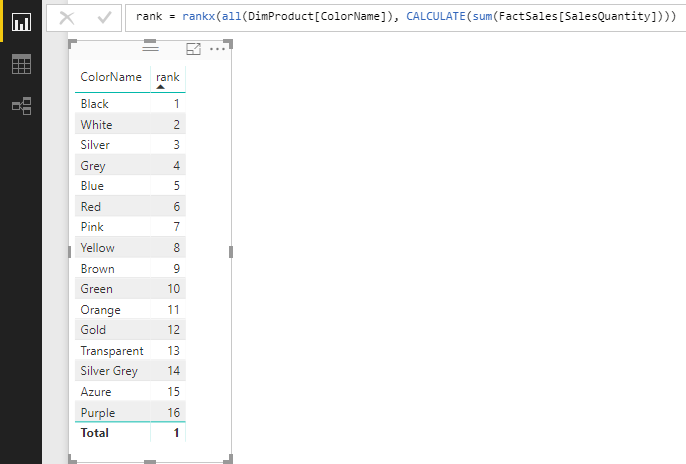
You also can create a measure with the function RANKX. Something like below.
rank =
RANKX (
ALL ( DimProduct[ColorName] ),
CALCULATE ( SUM ( FactSales[SalesQuantity] ) )
)
Best Regards,
Dale
This is how: https://www.youtube.com/watch?v=nmsf7Cbx3JM
Did I answer your question correctly? Mark my answer as a solution!
Proud to be a Datanaut!
Thanks LivioLanzo for the collaboration. Try to download this version of power BI because it is supposed to come with the TopN but it does not give me:
https://powerbi.microsoft.com/en-us/blog/power-bi-desktop-october-feature-summary/preview/#topN
| User | Count |
|---|---|
| 49 | |
| 37 | |
| 31 | |
| 22 | |
| 19 |
| User | Count |
|---|---|
| 134 | |
| 101 | |
| 59 | |
| 37 | |
| 36 |