FabCon is coming to Atlanta
Join us at FabCon Atlanta from March 16 - 20, 2026, for the ultimate Fabric, Power BI, AI and SQL community-led event. Save $200 with code FABCOMM.
Register now!- Power BI forums
- Get Help with Power BI
- Desktop
- Service
- Report Server
- Power Query
- Mobile Apps
- Developer
- DAX Commands and Tips
- Custom Visuals Development Discussion
- Health and Life Sciences
- Power BI Spanish forums
- Translated Spanish Desktop
- Training and Consulting
- Instructor Led Training
- Dashboard in a Day for Women, by Women
- Galleries
- Data Stories Gallery
- Themes Gallery
- Contests Gallery
- QuickViz Gallery
- Quick Measures Gallery
- Visual Calculations Gallery
- Notebook Gallery
- Translytical Task Flow Gallery
- TMDL Gallery
- R Script Showcase
- Webinars and Video Gallery
- Ideas
- Custom Visuals Ideas (read-only)
- Issues
- Issues
- Events
- Upcoming Events
The Power BI Data Visualization World Championships is back! Get ahead of the game and start preparing now! Learn more
- Power BI forums
- Forums
- Get Help with Power BI
- Desktop
- DAX Select all except topN
- Subscribe to RSS Feed
- Mark Topic as New
- Mark Topic as Read
- Float this Topic for Current User
- Bookmark
- Subscribe
- Printer Friendly Page

- Mark as New
- Bookmark
- Subscribe
- Mute
- Subscribe to RSS Feed
- Permalink
- Report Inappropriate Content
DAX Select all except topN
Hello all
Is there a way to select all values from a table except the topN?
Sample data can be found here: sample data onedrive
I want to know the impact of the top 3 worse employees based on time to complete (In sample file that C D & G). Is there a way to exclude the top 3 out of the calculation? I wrote the following but that doesn't seem to work because i don't know how to select the value from a SUMMARIZE table:
Ontimewithouttop5 = CALCULATE(SUM(table1[completedintime])/COUNT(table1[orderid]), FILTER(TOPN(5,SUMMARIZE(table1, table1[employeename], "AboveAverageAgent", AVERAGE(table1[timetocomplete]))), NO IDEA HOW TO SELECT THE RIGHT COLUMN <> table1[employeename]))
Any assistance would be appriciated. DAX has the preference.
Solved! Go to Solution.


- Mark as New
- Bookmark
- Subscribe
- Mute
- Subscribe to RSS Feed
- Permalink
- Report Inappropriate Content
Hi @Anonymous
You may check below measure.
Measure =
VAR a =
    SUMMARIZE (
        sampledata,
        sampledata[employeename],
        "AboveAverageAgent", AVERAGE ( sampledata[timetocomplete] )
    )
VAR b =
    ADDCOLUMNS ( a, "rank", RANKX ( a, [AboveAverageAgent] ) )
RETURN
    CALCULATE (
        SUM ( sampledata[completedintime] ) / DISTINCTCOUNT ( sampledata[orderid] ),
        FILTER ( b, [rank] > 3 )
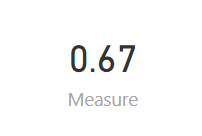
    )
Regards,
Cherie
If this post helps, then please consider Accept it as the solution to help the other members find it more quickly.
- Mark as New
- Bookmark
- Subscribe
- Mute
- Subscribe to RSS Feed
- Permalink
- Report Inappropriate Content
Hi @Anonymous
You may get the table with visual lever filter. For example, you may create a rank measure and use it in visual level filter.
AboveAverageAgent =
CALCULATE (
    SUM ( Table3[timetocomplete] ) / COUNT ( Table3[employeename] ),
    ALLEXCEPT ( Table3, Table3[employeename] )
)
Rank = RANKX(ALL(table3),[AboveAverageAgent],,DESC,Dense)
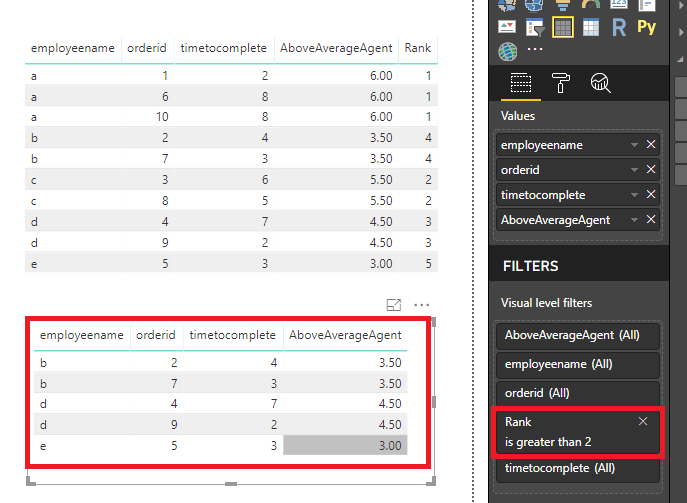
If it is not your case, please share some data sample and expected output.
Regards,
Cherie
If this post helps, then please consider Accept it as the solution to help the other members find it more quickly.
- Mark as New
- Bookmark
- Subscribe
- Mute
- Subscribe to RSS Feed
- Permalink
- Report Inappropriate Content
hi @v-cherch-msft,
Thanks for your answer, but it doesnt quiet fit. It works, but not ideal as i still have to filter "rank" to a top 3.
This file is going to be used for different teams and its not ideal for the end users to manually change the filter in case there are no double rank 1 and 2's.
Let me give some more information, i see that my original post is lacking that.
I want to calculate the SLA with the following calculation SLA = (SUM(completedintime)/DISTINCTCOUNT(orderid))*100
The expected result is the SLA of all employees BUT the top 3 based on worse timetocomplete. To see the impact on the SLA if the Top (or bottom) 3
In the samplefile the SLA would be 62 (%)
without the top 3 (C,D&G) it would be 67 (%)
- Mark as New
- Bookmark
- Subscribe
- Mute
- Subscribe to RSS Feed
- Permalink
- Report Inappropriate Content
Hi @Anonymous
You may check below measure.
Measure =
VAR a =
    SUMMARIZE (
        sampledata,
        sampledata[employeename],
        "AboveAverageAgent", AVERAGE ( sampledata[timetocomplete] )
    )
VAR b =
    ADDCOLUMNS ( a, "rank", RANKX ( a, [AboveAverageAgent] ) )
RETURN
    CALCULATE (
        SUM ( sampledata[completedintime] ) / DISTINCTCOUNT ( sampledata[orderid] ),
        FILTER ( b, [rank] > 3 )
    )
Regards,
Cherie
If this post helps, then please consider Accept it as the solution to help the other members find it more quickly.
- Mark as New
- Bookmark
- Subscribe
- Mute
- Subscribe to RSS Feed
- Permalink
- Report Inappropriate Content
Hi @v-cherch-msft,
Perfect! does the job just how I want it. I didn't know I could use variables in a measure, a new world just opened up for me haha. Going to have some fun with this, thanks!


- Mark as New
- Bookmark
- Subscribe
- Mute
- Subscribe to RSS Feed
- Permalink
- Report Inappropriate Content
@Anonymous It will be great if you can provide us sample data and expected output..... You DON'T need to provide actual data...
Did I answer your question? Mark my post as a solution!
Proud to be a PBI Community Champion
- Mark as New
- Bookmark
- Subscribe
- Mute
- Subscribe to RSS Feed
- Permalink
- Report Inappropriate Content
Added it 🙂
Helpful resources

Power BI Dataviz World Championships
The Power BI Data Visualization World Championships is back! Get ahead of the game and start preparing now!

Power BI Monthly Update - December 2025
Check out the December 2025 Power BI Holiday Recap!

FabCon Atlanta 2026
Join us at FabCon Atlanta, March 16-20, for the ultimate Fabric, Power BI, AI and SQL community-led event. Save $200 with code FABCOMM.

| User | Count |
|---|---|
| 39 | |
| 37 | |
| 33 | |
| 32 | |
| 29 |


| User | Count |
|---|---|
| 132 | |
| 88 | |
| 82 | |
| 68 | |
| 64 |


