This time we’re going bigger than ever. Fabric, Power BI, SQL, AI and more. We're covering it all. You won't want to miss it.
Learn moreLevel up your Power BI skills this month - build one visual each week and tell better stories with data! Get started
Hi,
I have 3 columns of Data (Top 20 customers for 3 years). I would like to sort the table so it starts with the largest customer in the most recent year. Right now it seems like the 20 custoemrs are just presented randomly.
Thanks in advance
Michael
Solved! Go to Solution.
Currently, we can not sort your table by using two different column. To work around this issue, you could create another column.
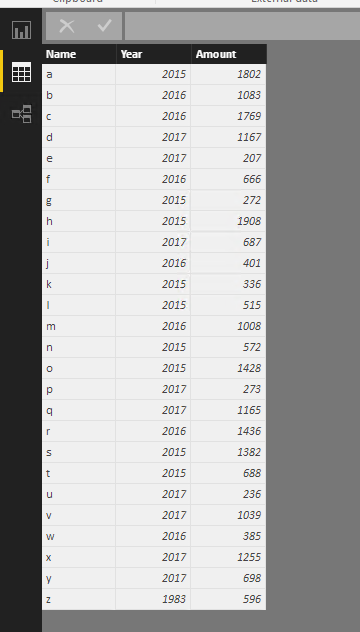
Sample data
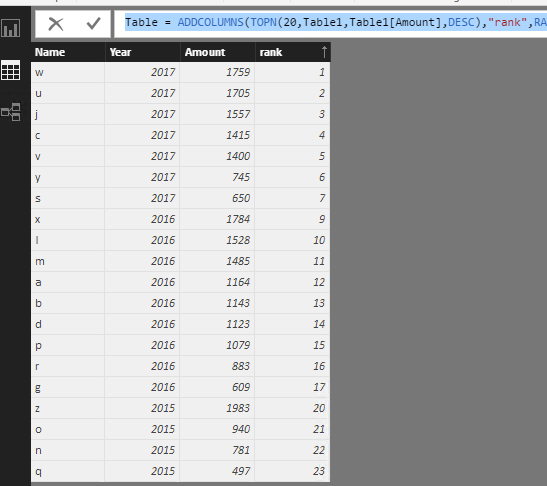
And then create a table bu using the DAX below.
Table =
ADDCOLUMNS (
TOPN ( 20, Table1, Table1[Amount], DESC ),
"rank", RANKX ( Table1, Table1[Year] * 10000 + Table1[Amount] / 10000,, DESC )
)
Regards,
Charlie Liao
Just click on the column header and it will sort automatically
Kind regards
Yes. That will work for the total column for the 3 years, but the total coulm is hidden. I would like to sort on the most recent year - not the total. Nothing happens when clicking on one of the coumns.
Currently, we can not sort your table by using two different column. To work around this issue, you could create another column.
Sample data
And then create a table bu using the DAX below.
Table =
ADDCOLUMNS (
TOPN ( 20, Table1, Table1[Amount], DESC ),
"rank", RANKX ( Table1, Table1[Year] * 10000 + Table1[Amount] / 10000,, DESC )
)
Regards,
Charlie Liao
Check out the April 2026 Power BI update to learn about new features.
Sign up to receive a private message when registration opens and key events begin.
If you have recently started exploring Fabric, we'd love to hear how it's going. Your feedback can help with product improvements.
| User | Count |
|---|---|
| 36 | |
| 29 | |
| 29 | |
| 21 | |
| 18 |
| User | Count |
|---|---|
| 69 | |
| 39 | |
| 33 | |
| 24 | |
| 23 |