cancel
Showing results for 
Search instead for 
Did you mean: 

The Power BI Data Visualization World Championships is back! Get ahead of the game and start preparing now! Learn more

Reply
tracyhopaulson
Resolver I
Resolver I

Top N Ranking for specific year

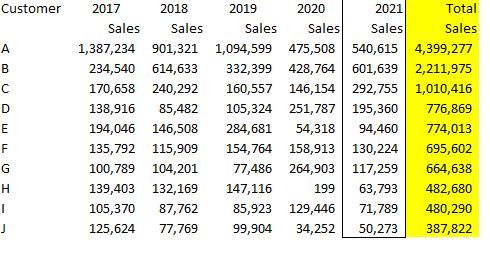
I have a list of customers and need to rank by 2021 sales.  When using Top N function, it ranks by total sales of all years.  Is there a work around to rank sales for specific year?  Thanks


ranking.JPG


1 ACCEPTED SOLUTION
TheoC
Super User
Super User

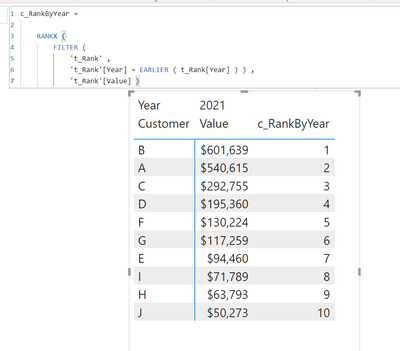
Hi @tracyhopaulson, you can create a rank by category through a Calculated Column that will provide you with a ranking for each Customer by their respective Total Value for each Year.  You can then simply filter out Year column to 2021 by "Fitler Type" in the Filters Pane of the visual.  Hope this helps 🙂 (FYI - I called the table "t_Rank" so you will need to adjust yours accordingly 🙂 )


TheoC_0-1633581389736.png

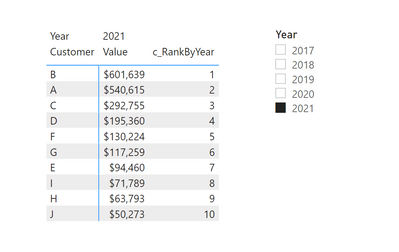
Also, an alternative is to use a Slicer / Filter visual with Years so that you can let the user choose the Year and show the rank accordingly 🙂

TheoC_1-1633581479078.png


Just in addition to the above, I recently put together a solution for dynamic ranking for visuals. This may be of benefit to you as well: https://community.powerbi.com/t5/Desktop/Sort-Legend-Dynamically-By-its-Value/m-p/2112139#M782542

If I have posted a response that resolves your question, please accept it as a solution to formally close the post.

Also, if you are as passionate about Power BI, DAX and data as I am, please feel free to reach out if you have any questions, queries, or if you simply want to connect and talk to another data geek!

Want to connect?www.linkedin.com/in/theoconias

View solution in original post

4 REPLIES 4
DavidLibrando23
New Member

Question with regards to this. What if multiple Selection for year is filltered? how to Top N dynamically?

TheoC
Super User
Super User

Hi @tracyhopaulson, you can create a rank by category through a Calculated Column that will provide you with a ranking for each Customer by their respective Total Value for each Year.  You can then simply filter out Year column to 2021 by "Fitler Type" in the Filters Pane of the visual.  Hope this helps 🙂 (FYI - I called the table "t_Rank" so you will need to adjust yours accordingly 🙂 )


TheoC_0-1633581389736.png

Also, an alternative is to use a Slicer / Filter visual with Years so that you can let the user choose the Year and show the rank accordingly 🙂

TheoC_1-1633581479078.png


Just in addition to the above, I recently put together a solution for dynamic ranking for visuals. This may be of benefit to you as well: https://community.powerbi.com/t5/Desktop/Sort-Legend-Dynamically-By-its-Value/m-p/2112139#M782542

If I have posted a response that resolves your question, please accept it as a solution to formally close the post.

Also, if you are as passionate about Power BI, DAX and data as I am, please feel free to reach out if you have any questions, queries, or if you simply want to connect and talk to another data geek!

Want to connect?www.linkedin.com/in/theoconias

Thank you 🙂

amitchandak
Super User
Super User

@tracyhopaulson , create a measure like this and create rank on that

meausre = calculate(sum(Table[sales]),Table[Year]=2021)

Share with Power BI Enthusiasts: Full Power BI Video (20 Hours) YouTube
Microsoft Fabric Series 60+ Videos YouTube
Microsoft Fabric Hindi End to End YouTube

Helpful resources

Announcements
Power BI DataViz World Championships

Power BI Dataviz World Championships

The Power BI Data Visualization World Championships is back! Get ahead of the game and start preparing now!

December 2025 Power BI Update Carousel

Power BI Monthly Update - December 2025

Check out the December 2025 Power BI Holiday Recap!

FabCon Atlanta 2026 carousel

FabCon Atlanta 2026

Join us at FabCon Atlanta, March 16-20, for the ultimate Fabric, Power BI, AI and SQL community-led event. Save $200 with code FABCOMM.