cancel
Showing results for 
Search instead for 
Did you mean: 

The Power BI Data Visualization World Championships is back! Get ahead of the game and start preparing now! Learn more

Reply
Teena_Pa4
Frequent Visitor

Top 1 to 5 in separate columns

Hi,


Sorry but I was trying this out but I can't seem to find a way. Is it possible to create a column each for Top 1, Top 2, ... Top 5?


Thank you for your help.

1 ACCEPTED SOLUTION

Hi @Teena_Pa4

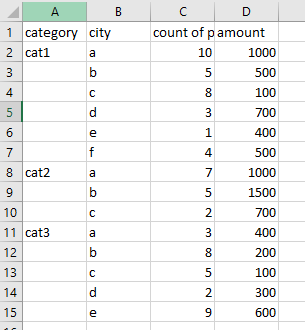
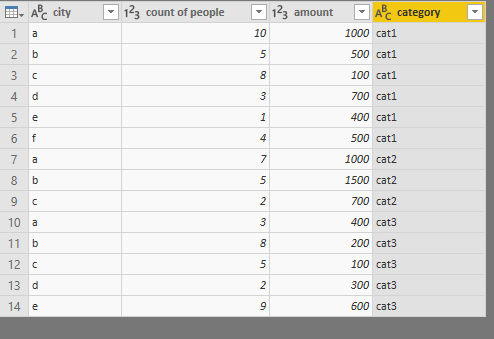
Assume your dataset is like this

9.png


In Queries Editor

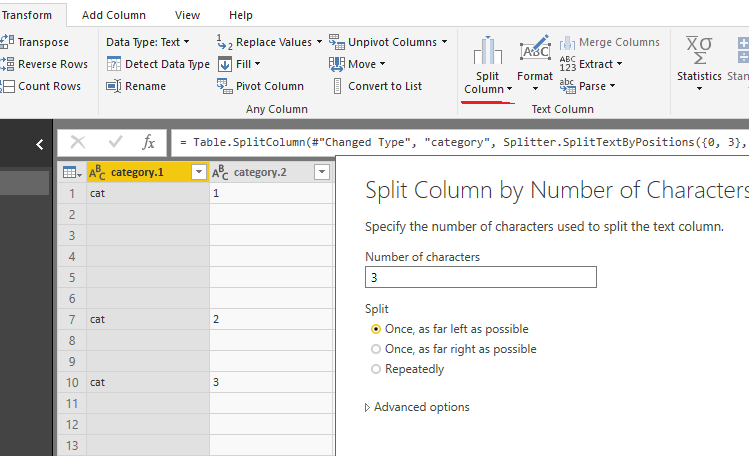
1. Split column on “ category”

3.png


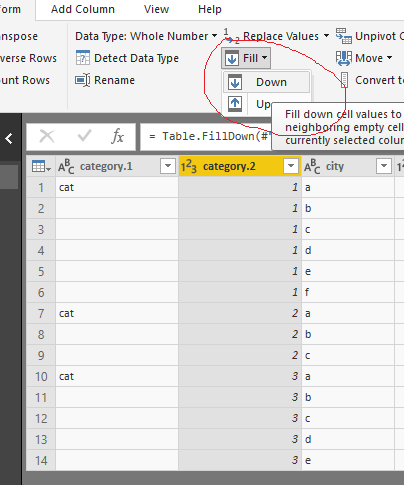
2. Fill down

4.png


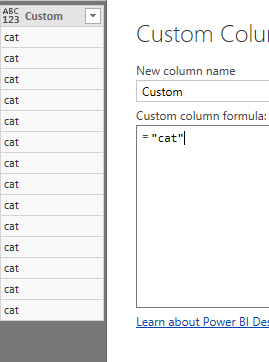
3. Add custom column

5.png


4. Merge column

10.png


5. Rename column “Merged”->”category”

Remove columns  category.1, category.2, Custom.

7.png


Close &&Apply

go back to Data view

create a calculated column

rank = RANKX(FILTER(ALL(Sheet1),[category]=EARLIER(Sheet1[category])),[count of people],,DESC)

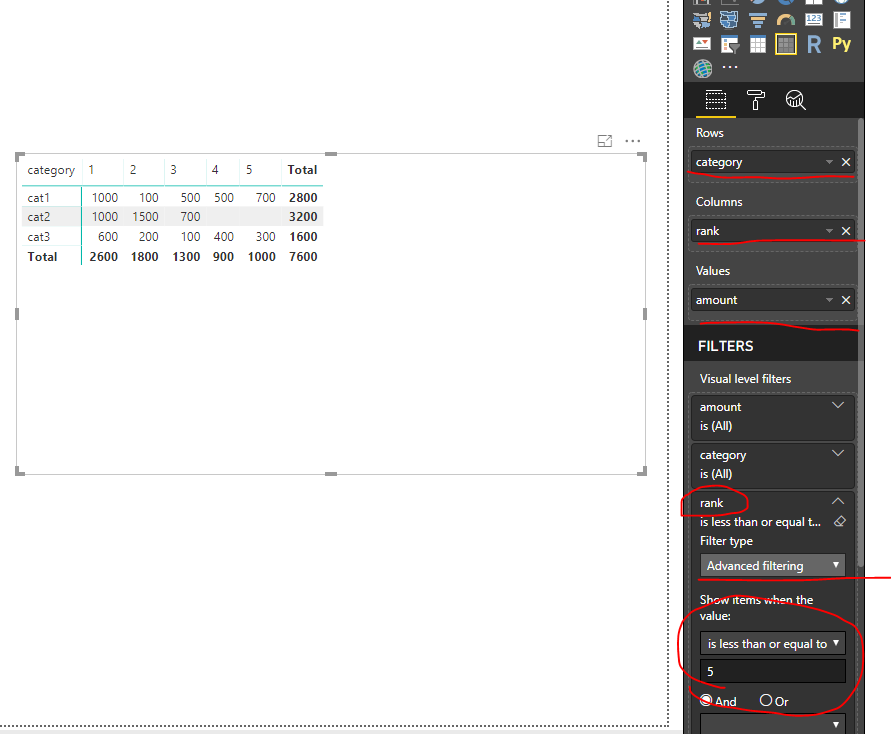
 then add columns in a Matrix visual

8.png


Best Regards

Maggie


View solution in original post

4 REPLIES 4
Greg_Deckler
Community Champion
Community Champion

Most likely, yes.


Please see this post regarding How to Get Your Question Answered Quickly: https://community.powerbi.com/t5/Community-Blog/How-to-Get-Your-Question-Answered-Quickly/ba-p/38490


Follow on LinkedIn
@ me in replies or I'll lose your thread!!!
Instead of a Kudo, please vote for this idea
Become an expert!: Enterprise DNA
External Tools: MSHGQM
YouTube Channel!: Microsoft Hates Greg
Latest book!:
DAX For Humans

DAX is easy, CALCULATE makes DAX hard...

Thank you greg.


I need to get the Top 1 to 5 cities per category and then under each  city, I need to show the total amount. Hope the data below helps:


My data:


category city count of people amount Rank
cat1 a 10 1000 1
b 5 500 3
c 8 100 2
d 3 700 5
e 1 400 6
f 4 500 4
cat2 a 7 1000 1
b 5 1500 2
c 2 700 3
cat3 a 3 400 4
b 8 200 2
c 5 100 3
d 2 300 5
e 9 600 1


Expected result:


                    Top 1   Top 2   Top 3   Top 4   Top 5
category 1   1000    100      500      500      700
category 2   1000    1500    700
category 3   600      200      100      400      300 


Thank you.

Sorry, I accidentally posted the unfinished message.


But here's my data. The ranking will be based on the cities with the highest number of people count.  I need to get the Top 1 to 5 cities per category and then under each  city, I need to show the total amount. Hope the data below helps:


category; city;  count of people;  amount;  Rank
cat1         a      10                        1000         1
                b      5                          500          3
                c      8                          100          2
                d      3                          700          5
                e      1                          400          6
                f       4                          500          4
cat2         a      7                          1000        1
                b     5                           1500       2
                c      2                           700         3
cat3         a      3                           400         4
                b     8                           200          2
                c     5                           100           3
                d    2                            300          5
                e    9                            600          1


Expected result:


                    Top 1   Top 2   Top 3   Top 4   Top 5
category 1   1000    100      500      500      700
category 2   1000    1500    700
category 3   600      200      100      400      300 


Thank you.

Hi @Teena_Pa4

Assume your dataset is like this

9.png


In Queries Editor

1. Split column on “ category”

3.png


2. Fill down

4.png


3. Add custom column

5.png


4. Merge column

10.png


5. Rename column “Merged”->”category”

Remove columns  category.1, category.2, Custom.

7.png


Close &&Apply

go back to Data view

create a calculated column

rank = RANKX(FILTER(ALL(Sheet1),[category]=EARLIER(Sheet1[category])),[count of people],,DESC)

 then add columns in a Matrix visual

8.png


Best Regards

Maggie


Helpful resources

Announcements
Power BI DataViz World Championships

Power BI Dataviz World Championships

The Power BI Data Visualization World Championships is back! Get ahead of the game and start preparing now!

December 2025 Power BI Update Carousel

Power BI Monthly Update - December 2025

Check out the December 2025 Power BI Holiday Recap!

FabCon Atlanta 2026 carousel

FabCon Atlanta 2026

Join us at FabCon Atlanta, March 16-20, for the ultimate Fabric, Power BI, AI and SQL community-led event. Save $200 with code FABCOMM.