cancel
Showing results for 
Search instead for 
Did you mean: 

The Power BI Data Visualization World Championships is back! Get ahead of the game and start preparing now! Learn more

Reply
Grumelo
Advocate II
Advocate II

Too Many Date Tables

My data model is very huge. There are plenty of date fields.

Only very few them are used in various report and agregations. (edit: for these fields the automated date table is perfect).

Is there a way to not generate an automated date table for every single date field?

I don't need the date hierarchy on most of them. 


I don't want to globally turn off the automated date table feature. I 'd like to turn it off on some fields only.


All these automated date tables seem to impact performance and memory usage.


Until now the only solution I've found is to not set the field as date field but then I've to carefully set the format of the field in the queries.

Any better trick ?

5 REPLIES 5
Greg_Deckler
Community Champion
Community Champion

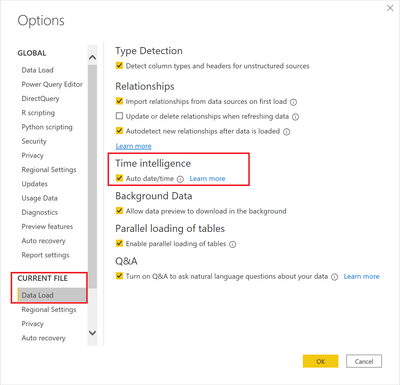
@Grumelo - Uncheck the highlighted box. File | Options and settings | Options

Greg_Deckler_0-1599660497046.png


Follow on LinkedIn
@ me in replies or I'll lose your thread!!!
Instead of a Kudo, please vote for this idea
Become an expert!: Enterprise DNA
External Tools: MSHGQM
YouTube Channel!: Microsoft Hates Greg
Latest book!:
DAX For Humans

DAX is easy, CALCULATE makes DAX hard...

I was maybe not clear enough.

I don't want to to turn the automated date table off on every date fields, only on some of them.

@Grumelo , I doubt I saw option remove hierarchy from one date. You stop one and create a hierarchy as per need

https://stoneridgesoftware.com/creating-hierarchies-in-power-bi/
https://www.youtube.com/watch?v=x6vXVJZ_eTY

Share with Power BI Enthusiasts: Full Power BI Video (20 Hours) YouTube
Microsoft Fabric Series 60+ Videos YouTube
Microsoft Fabric Hindi End to End YouTube
FrankAT
Community Champion
Community Champion

Hi @Grumelo 

a well formed data model needs only one calendar table. This calendar table should be marked as date table so all time and date intelligence functions works well. It is best practice to uncheck the automatic date table functionality as @Greg_Deckler described.

If you need in some circumstances, build your own date hierarchy manually. A mixture of automatic date tables and a calendar table is not recommended.


With kind regards from the town where the legend of the 'Pied Piper of Hamelin' is at home
FrankAT (Proud to be a Datanaut)

amitchandak
Super User
Super User

@Grumelo , In report preference, uncheck Auto Date time

Refer video from Guyinacube -https://www.youtube.com/watch?v=RnDdDlozcdo


Also, you can use the same date table for one or more dates in the table.

Across tables, it is a simple join. within the same table refer - https://youtu.be/e6Y-l_JtCq4

userelation can be used


Share with Power BI Enthusiasts: Full Power BI Video (20 Hours) YouTube
Microsoft Fabric Series 60+ Videos YouTube
Microsoft Fabric Hindi End to End YouTube

Helpful resources

Announcements
Power BI DataViz World Championships

Power BI Dataviz World Championships

The Power BI Data Visualization World Championships is back! Get ahead of the game and start preparing now!

December 2025 Power BI Update Carousel

Power BI Monthly Update - December 2025

Check out the December 2025 Power BI Holiday Recap!

FabCon Atlanta 2026 carousel

FabCon Atlanta 2026

Join us at FabCon Atlanta, March 16-20, for the ultimate Fabric, Power BI, AI and SQL community-led event. Save $200 with code FABCOMM.