cancel
Showing results for 
Search instead for 
Did you mean: 

The Power BI Data Visualization World Championships is back! Get ahead of the game and start preparing now! Learn more

Reply
jamesaaa
Regular Visitor

Timeline slicer error

Hi all. Here is the issue.

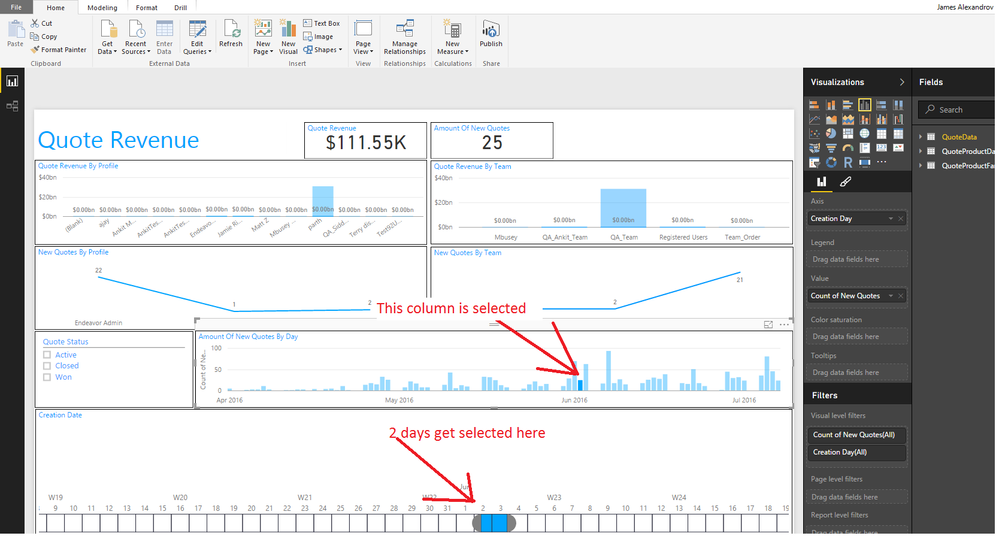
I have a report, I go to a line chart graph which x axis is a date, click on one of the lines so that all visuals are filtered by that date and for some reason there are 2 dates being selected for the timeline slicer. see attachments. 

Now I ran sql profiler, grabbed the sql that is being executed when clicking on a date and the data being returned is correct. Only dates for a single day are being returned.


any ideas? please help

timeline slicer issue step 1.png

1 REPLY 1
v-qiuyu-msft
Community Support
Community Support

Hi @jamesaaa,


Based on my test in Power BI Desktop ( Version: 2.36.4434.381 ), if I select one column in a column chart, the TimeSlicer visual(version 1.3.1) will highlight corresponding date range. In your scenario, Please check if corresponding date you select in the column chart is one day or two days. Please also update the Power BI Desktop as the same version as mine and TimeLine visual to check if the issue persists.


If issue persists, please feel free to ask.


Best Regards,
Qiuyun Yu

Community Support Team _ Qiuyun Yu
If this post helps, then please consider Accept it as the solution to help the other members find it more quickly.

Helpful resources

Announcements
Power BI DataViz World Championships

Power BI Dataviz World Championships

The Power BI Data Visualization World Championships is back! Get ahead of the game and start preparing now!

December 2025 Power BI Update Carousel

Power BI Monthly Update - December 2025

Check out the December 2025 Power BI Holiday Recap!

FabCon Atlanta 2026 carousel

FabCon Atlanta 2026

Join us at FabCon Atlanta, March 16-20, for the ultimate Fabric, Power BI, AI and SQL community-led event. Save $200 with code FABCOMM.