Join us at FabCon Atlanta from March 16 - 20, 2026, for the ultimate Fabric, Power BI, AI and SQL community-led event. Save $200 with code FABCOMM.
Register now!The Power BI Data Visualization World Championships is back! Get ahead of the game and start preparing now! Learn more
Has anyone had any luck using this visual for an elapsed time of dates? For example, I am wanting to use this visual in combination with the Gantt visual so that the user can select to see projects occuring during Q1-Q4 2016. It seems like I can only put one date in as a parameter as I tried "mm/dd/yyyy - mm/dd/yyyy" but it doesn't appear to recognize those dates for the timeline.
Any help would be greatly appreciated!
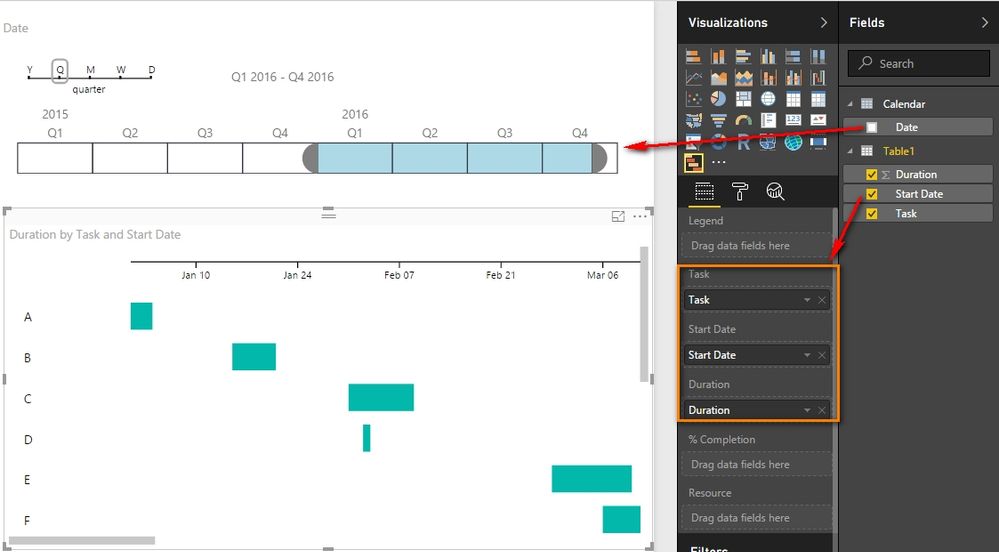
In Timeline visual, you can select Q1-Q4 2016 directly as below. The Date column is from a Calendar table which has relationship with Table1 which includes task duration details. The Gantt will only show the tasks in your selected time period.
Best Regards,
Herbert
Thanks for your comment.
Yes; however, this starts to work incorrectly with my use-case since we have some projects that could expand for years. So I have two dates a start and finish date. If for example the project started in 2014 and ends at the end of this year. If you have the start date as the reported item then it will not show up in the years 2015 and 2016 since it does not take into consideration the span of the finish date or the duration.
That's my biggest problem as I would like to use the timeline to pull up any projects that are scheduled to be active during that time.
Thank you!
Currently Gantt only recognizes the Start Date specified in the dataset. If the start date is not in the selected range in Timeline, we will not be able to see this task duration in the Gantt chart even it is active in this selected date range. I don’t think you can completely get your desired result with current version of Gannt visual chart. And I think your requirement does make sense, maybe you can create an idea in this site.
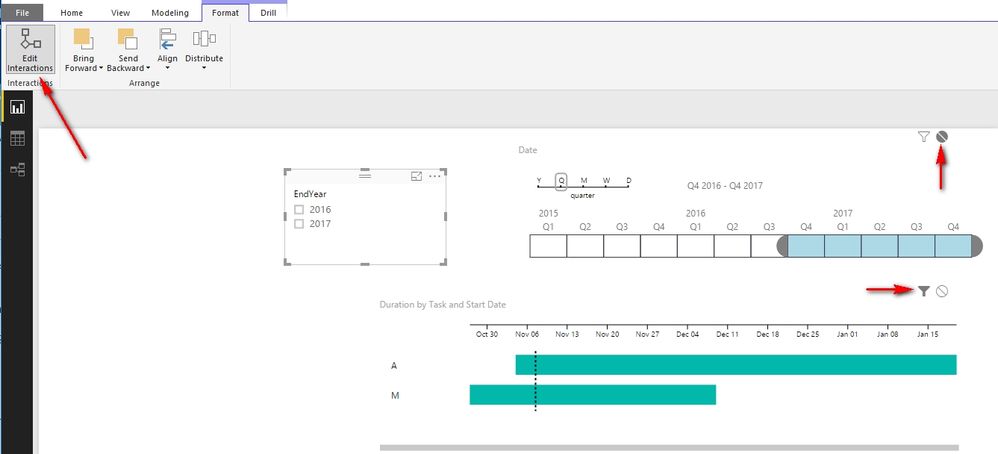
You can also try with another alternative. If we have a table like below, we can create a EndYear column. And use this EndYear column in a slicer to define the EndYear for the tasks, but make it only can filter the Gantt but not the Timeline as below.
Now you can select the date range for the start date and then define the EndYear as below. Hope it helps.
Best Regards,
Herbert
there is a workaround,
create this measure
Active = CALCULATE(COUNTROWS(task),
FILTER(task, ([Start] <= LASTDATE(Mstdate[Date])
&& [finish]>= FIRSTDATE(Mstdate[Date]))))
now in the gantt chart assign the measure active as a filter, when you select the date in the timeline, it will filter the tasks active in that date range.
you can see an example here
Hi Mim,
I came across your post, may I ask how you created the link that held your example?
Thanks,
Does anyone know a potential work around or another solution?
The Power BI Data Visualization World Championships is back! Get ahead of the game and start preparing now!
| User | Count |
|---|---|
| 40 | |
| 37 | |
| 33 | |
| 29 | |
| 27 |
| User | Count |
|---|---|
| 133 | |
| 104 | |
| 61 | |
| 59 | |
| 55 |