Get certified for free when you join Fabric Data Days 2026 and dive into Fabric, Power BI, SQL, AI, and other essential data skills.
Join nowData Days is here! Join us now for 60+ days of learning, challenges, and connection. Learn more
Hello,
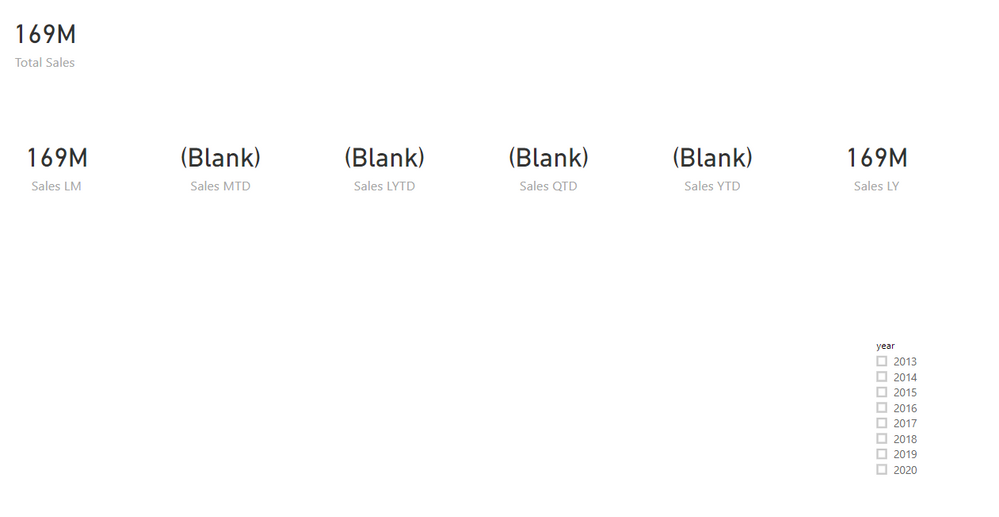
I need a little help. I know something little wrong with my calculations, but my calculation is showing a blank or wrong number. I have sales data with join to the date table. When I add a year as filter most of them work but they give me wrong numbers that do not make sense. Please see my attached formulars and sample files. Can anybody please tell me what I am doing wrong? I could not figure it out.
Formulars
Total Sales = SUM(Sales_Data[TotalPrice]) Sales LM = CALCULATE( [Total Sales], DATEADD(Dates[Date], -1, MONTH ) ) Sales LY = CALCULATE([Total Sales], SAMEPERIODLASTYEAR( Dates[Date] ) ) Sales LYTD = CALCULATE([Total Sales], DATESYTD(Dates[Date]) ) Sales MTD = CALCULATE([Total Sales], DATESMTD( Dates[Date] ) ) Sales QTD = CALCULATE([Total Sales], DATESQTD( Dates[Date] ) ) Sales YTD = CALCULATE( [Total Sales], DATESYTD( Dates[Date] ) )
Please see the sample file over here.
thank you so much for your time and help
Are your dates continous? In case dates are not continuous. It might give some issues.
Make sure the Date calendar is continuous or created using a calendar. Also, it marked as Date dimension in model view.
Appreciate your Kudos. In case, this is the solution you are looking for, mark it as the Solution. In case it does not help, please provide additional information
Thanks.
I do have a complete date set. I have a calendar table and join to the sales table. Thank you
DateMYTD, YTD and QTD go till today or end of the calendar date. Select a date in slicer that should give you data.
Appreciate your Kudos. In case, this is the solution you are looking for, mark it as the Solution. In case it does not help, please provide additional information and mark me with @
Thanks.
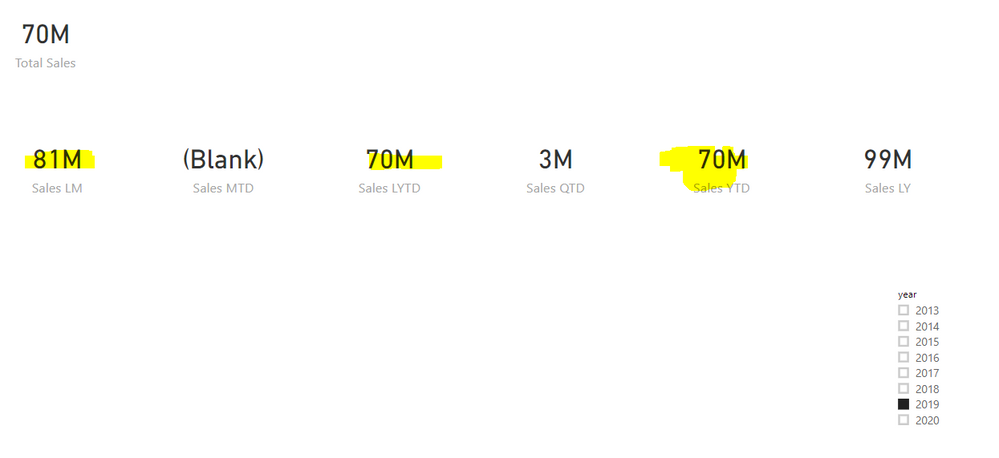
I did select the Year on date slicer. I don't want to put date range on my dashboard. I think time intelligence functions should work without any date selection., but when I do select the date it will give me the wrong data. Please see the below picture. Thank you
Some formula you posted seems to have an issue. They are same
Sales LYTD = CALCULATE([Total Sales], DATESYTD(Dates[Date]) ) Sales YTD = CALCULATE( [Total Sales], DATESYTD( Dates[Date] ) )
use date diff there
Sales LYTD = CALCULATE([Total Sales], DATESYTD(datediff(Dates[Date]),-12,month) ) Sales YTD = CALCULATE( [Total Sales], DATESYTD( Dates[Date] ) )
Appreciate your Kudos. In case, this is the solution you are looking for, mark it as the Solution. In case it does not help, please provide additional information and mark me with @
Thanks.
Other than the last update. You can also restrict your page by using the page-level filter on the date till today. Use relative or advance options.
Appreciate your Kudos. In case, this is the solution you are looking for, mark it as the Solution. In case it does not help, please provide additional information and mark me with @
Thanks.
Don't miss out on Data Days, June 15 through August 7. Learn Fabric, Power BI, SQL, AI and more.
Check out the May 2026 Power BI update to learn about new features.
| User | Count |
|---|---|
| 23 | |
| 23 | |
| 21 | |
| 17 | |
| 13 |
| User | Count |
|---|---|
| 58 | |
| 50 | |
| 37 | |
| 29 | |
| 24 |