Join us at FabCon Atlanta from March 16 - 20, 2026, for the ultimate Fabric, Power BI, AI and SQL community-led event. Save $200 with code FABCOMM.
Register now!The Power BI Data Visualization World Championships is back! Get ahead of the game and start preparing now! Learn more
Hi,
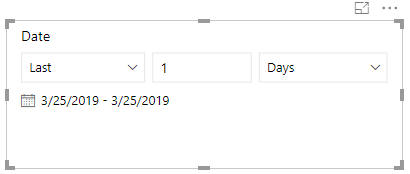
Today is 3/21/2019, but my relative visual shows last 1 day to be 3/22/2019. How do I correct this zone error?
Hi ThePowerBIQueen,
Your relative visual as you said is refer to the relative data slicer visual showing below picture?
Data models in Power BI do not include time zone information. The slicer and filter are always based on the time in UTC, so if you configure a filter in a report and send it to a colleague in a different time zone, you'll both see the same data. However, if you aren't in the UTC time zone, you might see data for a different time offset than you expect.
You can go through the link to learn more: https://docs.microsoft.com/en-us/power-bi/visuals/desktop-slicer-filter-date-range
Best Regards,
Amy
If this post helps, then please consider Accept it as the solution to help the other members find it more quickly.
The Power BI Data Visualization World Championships is back! Get ahead of the game and start preparing now!
Check out the November 2025 Power BI update to learn about new features.
| User | Count |
|---|---|
| 59 | |
| 46 | |
| 42 | |
| 23 | |
| 18 |
| User | Count |
|---|---|
| 193 | |
| 124 | |
| 101 | |
| 67 | |
| 49 |