This time we’re going bigger than ever. Fabric, Power BI, SQL, AI and more. We're covering it all. You won't want to miss it.
Learn moreLevel up your Power BI skills this month - build one visual each week and tell better stories with data! Get started
Hello Everyone,
I am new to Power BI. Looking for some help. Earlier I use Excel and Power Point to present Weekly Report. Now i have started in Power BI. I use to compare average resolve time weekly.
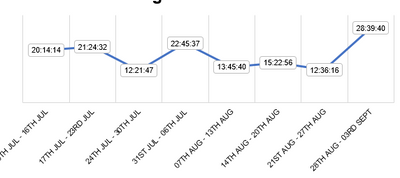
So First I need duration in hh:mm:ss format which includes more that 24 hour (Example 28:40:32). Second I need to plot bar graph with respect to time.
I am attaching screenshot 1 how it use to be appear in Excel.
Problem I am facing if in case I convert duration in HH:MM:SS format then it is in text format so when plotting graph then it take count.
Please help.
Solved! Go to Solution.
Hi @Avichal ,
You can try this:
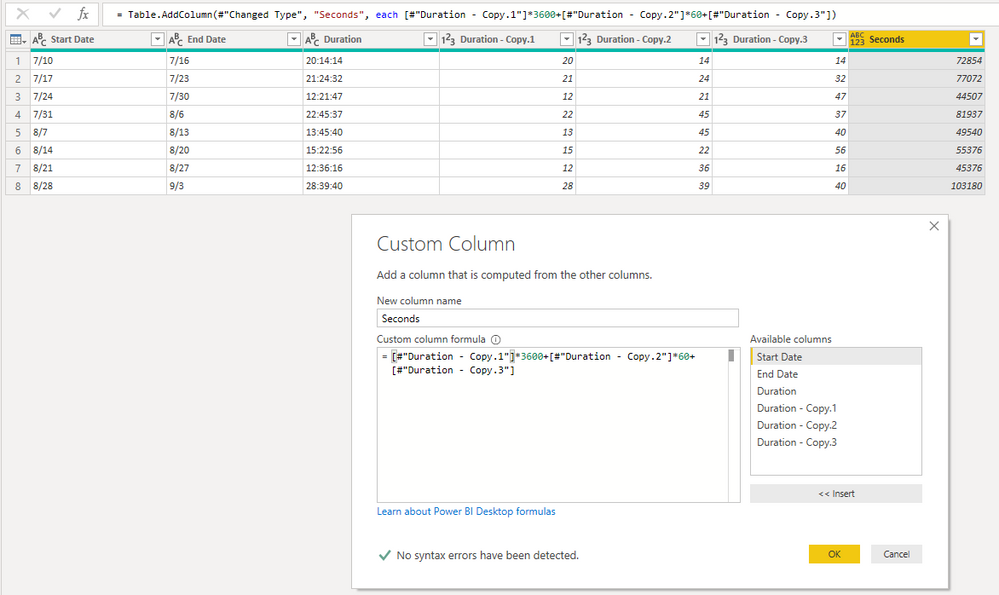
1. Duplicate column of ‘Duration’.
2. Split ‘Duration – Copy’ with ‘:’.
3. Add a custom column.
=[#"Duration - Copy.1"]*3600+[#"Duration - Copy.2"]*60+[#"Duration - Copy.3"]
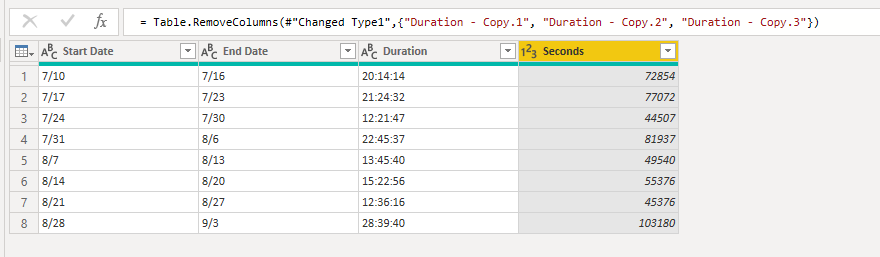
4. Remove columns.
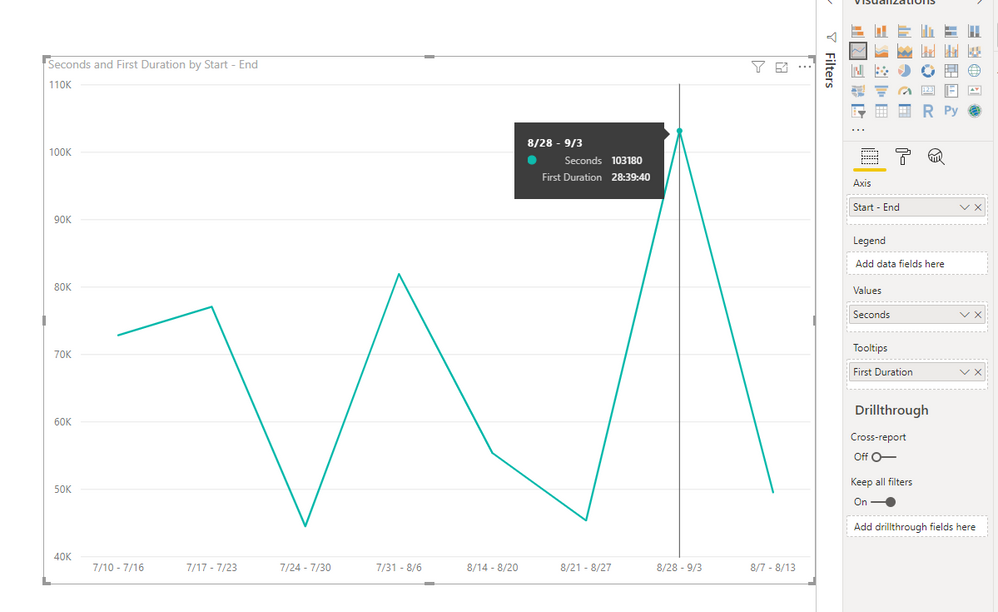
5. Create a line chart, put ‘Seconds’ in ‘Values’ and ‘Duration’ in ‘Tooltips’.
Best Regards,
Icey
If this post helps, then please consider Accept it as the solution to help the other members find it more quickly.
Hello,
I have the same problem: anyone can help please?
I have the same problem: anyone can help ?
Hi @Avichal ,
You can try this:
1. Duplicate column of ‘Duration’.
2. Split ‘Duration – Copy’ with ‘:’.
3. Add a custom column.
=[#"Duration - Copy.1"]*3600+[#"Duration - Copy.2"]*60+[#"Duration - Copy.3"]
4. Remove columns.
5. Create a line chart, put ‘Seconds’ in ‘Values’ and ‘Duration’ in ‘Tooltips’.
Best Regards,
Icey
If this post helps, then please consider Accept it as the solution to help the other members find it more quickly.
Hi Icey,
Thank you for your response. It work for me just if you can help me with one more thing :- Is there a way I can show data label with duration value ?
Hello Amit,
Thanks for your help but it doesn't work 😞
@amitchandak wrote:Have you tried time on the axis? By dragging it into the axis property of the graph and it still shows count.
Check out the April 2026 Power BI update to learn about new features.
Sign up to receive a private message when registration opens and key events begin.
If you have recently started exploring Fabric, we'd love to hear how it's going. Your feedback can help with product improvements.
| User | Count |
|---|---|
| 37 | |
| 28 | |
| 28 | |
| 19 | |
| 18 |
| User | Count |
|---|---|
| 69 | |
| 38 | |
| 32 | |
| 28 | |
| 24 |