Get Fabric or SQL Certified for Free.
Get certified for free when you join Fabric Data Days 2026 and dive into Fabric, Power BI, SQL, AI, and other essential data skills.
Join now- Power BI forums
- Get Help with Power BI
- Desktop
- Service
- Report Server
- Power Query
- Mobile Apps
- Developer
- DAX Commands and Tips
- Custom Visuals Development Discussion
- Health and Life Sciences
- Power BI Spanish forums
- Translated Spanish Desktop
- Training and Consulting
- Instructor Led Training
- Dashboard in a Day for Women, by Women
- Galleries
- Data Stories Gallery
- Themes Gallery
- Contests Gallery
- QuickViz Gallery
- Quick Measures Gallery
- Visual Calculations Gallery
- Fabric Apps Gallery
- Notebook Gallery
- Translytical Task Flow Gallery
- TMDL Gallery
- R Script Showcase
- Webinars and Video Gallery
- Ideas
- Custom Visuals Ideas (read-only)
- Issues
- Issues
- Events
- Upcoming Events
July 7 - July 17 | Round 2 of the Power BI Dataviz World Championships. Don't miss your chance! Learn more
- Power BI forums
- Forums
- Get Help with Power BI
- Desktop
- Re: Time Difference between consecutive rows
- Subscribe to RSS Feed
- Mark Topic as New
- Mark Topic as Read
- Float this Topic for Current User
- Bookmark
- Subscribe
- Printer Friendly Page


- Mark as New
- Bookmark
- Subscribe
- Mute
- Subscribe to RSS Feed
- Permalink
- Report Inappropriate Content
Time Difference between consecutive rows
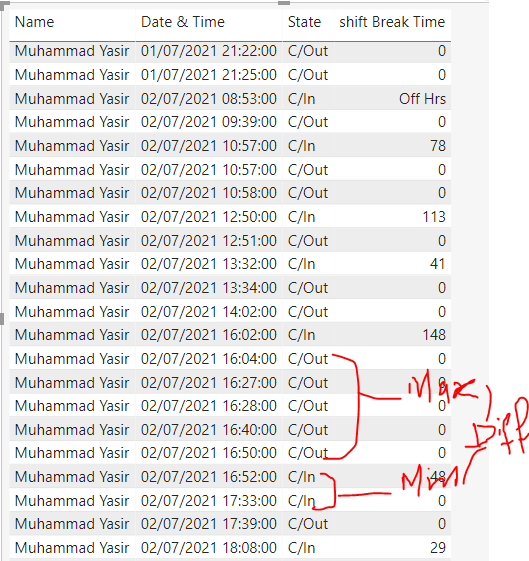
I am getting error when ever consective c/in or C/out occure in calaculating time difference but whenever consecutive occure I want to pick maximum from the C/out and minimum from C/In for further clarification I am attaching a screenshot please help me in this
Thank you
Thank you
Solved! Go to Solution.


- Mark as New
- Bookmark
- Subscribe
- Mute
- Subscribe to RSS Feed
- Permalink
- Report Inappropriate Content
Hi, @ziyabikram96
To create a calculated column like this:
isIN_is0 =
VAR _previouIn =
    CALCULATE (
        MIN ( [Index] ),
        FILTER (
            ALL ( 'Table' ),
            [State] = "C/In"
                && [Index]
                    = EARLIER ( [Index] ) - 1
        )
    )
VAR _if =
    IF ( 'Table'[State] = "C/In", IF ( [Index] - _previouIn = 1, 1 ) )
RETURN
    _if
then the test3 would be like this:
test_3 =
VAR _CurrentIndex =
    FIRSTNONBLANK ('Table'[Index], 1 )
VAR _CurrentStatus =
    FIRSTNONBLANK ( 'Table'[State], 1 )
VAR _IndexOfPreviousCheckIN =
    CALCULATE (
        MAX ( 'Table'[Index] ),
        FILTER (
            ALL ( 'Table' ),
            AND ( 'Table'[Index] < _CurrentIndex, 'Table'[State] = "C/In" )
        ) //,OR('InOutData(PAK)'[Index] < CurrentIndex,
        // 'InOutData(PAK)'[State] = "C/Out")
    )
//*****************************************************************************************
var _lastOut=
        CALCULATE(
        LASTNONBLANK('Table'[Index],MAX('Table'[State])="C/Out"),
        FILTER(ALL('Table'),AND ( 'Table'[Index] < _CurrentIndex, 'Table'[State] = "C/Out" ))
    )
//*****************************************************************************************
//*****************************************************************************************
var _firstIn=
    IF(MAX('Table'[State])="C/In",_lastOut+1)
//*****************************************************************************************
VAR _IndexOfFollowingCheckOut =
    IF (
        ISBLANK ( _IndexOfPreviousCheckIN ),
        0,
        // _IndexOfPreviousCheckIN+1
//*****************************************************************************************
        _lastOut
//*****************************************************************************************
    )
var _result=
        IF (
        OR(
//*****************************************************************************************
            OR ( _CurrentIndex = 0, _CurrentStatus = "C/Out" ),MAX('Table'[isIN_is0])=1),
//*****************************************************************************************
        0,
        DATEDIFF (
            CALCULATE (
                FIRSTNONBLANK ( 'Table'[Date & Time State], 0 ),
                FILTER (
                    ALL ( 'Table' ),
                    'Table'[Index] = _IndexOfFollowingCheckOut
                )
            ),
            // FIRSTNONBLANK ( 'Table'[Date & Time State], 1 ),
//*****************************************************************************************
            CALCULATE(
                MAX('Table'[Date & Time State]),
                FILTER(
                    ALL('Table'),
                    'Table'[Index]=_firstIn
                )
            ),
//*****************************************************************************************
            MINUTE
        )
    )
RETURN _result
result:
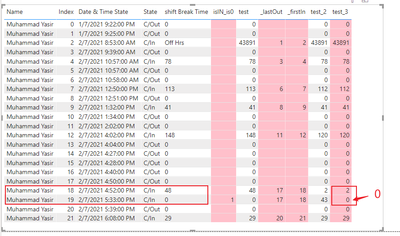
Please refer to the attachment below for details
Hope this helps.
Best Regards,
Community Support Team _ Zeon Zheng
If this post helps, then please consider Accept it as the solution to help the other members find it more quickly.
- Mark as New
- Bookmark
- Subscribe
- Mute
- Subscribe to RSS Feed
- Permalink
- Report Inappropriate Content
Hi, @ziyabikram96
I have made some modifications to the above formula:
test2 =
VAR _CurrentIndex =
    FIRSTNONBLANK ('Table'[Index], 1 )
VAR _CurrentStatus =
    FIRSTNONBLANK ( 'Table'[State], 1 )
VAR _IndexOfPreviousCheckIN =
    CALCULATE (
        MAX ( 'Table'[Index] ),
        FILTER (
            ALL ( 'Table' ),
            AND ( 'Table'[Index] < _CurrentIndex, 'Table'[State] = "C/In" )
        ) //,OR('InOutData(PAK)'[Index] < CurrentIndex,
        // 'InOutData(PAK)'[State] = "C/Out")
    )
//*****************************************************************************************
var _lastOut=
        CALCULATE(
        LASTNONBLANK('Table'[Index],MAX('Table'[State])="C/Out"),
        FILTER(ALL('Table'),AND ( 'Table'[Index] < _CurrentIndex, 'Table'[State] = "C/Out" ))
    )
//*****************************************************************************************
VAR _IndexOfFollowingCheckOut =
    IF (
        ISBLANK ( _IndexOfPreviousCheckIN ),
        0,
        // _IndexOfPreviousCheckIN+1
//*****************************************************************************************
        _lastOut
//*****************************************************************************************
    )
var _result=
        IF (
        OR ( _CurrentIndex = 0, _CurrentStatus = "C/Out" ),
        0,
        DATEDIFF (
            CALCULATE (
                FIRSTNONBLANK ( 'Table'[Date & Time State], 0 ),
                FILTER (
                    ALL ( 'Table' ),
                    'Table'[Index] = _IndexOfFollowingCheckOut
                )
            ),
            FIRSTNONBLANK ( 'Table'[Date & Time State], 1 ),
            MINUTE
        )
    )
RETURN _result
Result:

Please refer to the attachment below for details
Hope this helps.
Best Regards,
Community Support Team _ Zeon Zheng
If this post helps, then please consider Accept it as the solution to help the other members find it more quickly.
- Mark as New
- Bookmark
- Subscribe
- Mute
- Subscribe to RSS Feed
- Permalink
- Report Inappropriate Content
and for more clarification i want difference between
last_Out and First_In
- Mark as New
- Bookmark
- Subscribe
- Mute
- Subscribe to RSS Feed
- Permalink
- Report Inappropriate Content
Hi, @ziyabikram96
To create a calculated column like this:
isIN_is0 =
VAR _previouIn =
    CALCULATE (
        MIN ( [Index] ),
        FILTER (
            ALL ( 'Table' ),
            [State] = "C/In"
                && [Index]
                    = EARLIER ( [Index] ) - 1
        )
    )
VAR _if =
    IF ( 'Table'[State] = "C/In", IF ( [Index] - _previouIn = 1, 1 ) )
RETURN
    _if
then the test3 would be like this:
test_3 =
VAR _CurrentIndex =
    FIRSTNONBLANK ('Table'[Index], 1 )
VAR _CurrentStatus =
    FIRSTNONBLANK ( 'Table'[State], 1 )
VAR _IndexOfPreviousCheckIN =
    CALCULATE (
        MAX ( 'Table'[Index] ),
        FILTER (
            ALL ( 'Table' ),
            AND ( 'Table'[Index] < _CurrentIndex, 'Table'[State] = "C/In" )
        ) //,OR('InOutData(PAK)'[Index] < CurrentIndex,
        // 'InOutData(PAK)'[State] = "C/Out")
    )
//*****************************************************************************************
var _lastOut=
        CALCULATE(
        LASTNONBLANK('Table'[Index],MAX('Table'[State])="C/Out"),
        FILTER(ALL('Table'),AND ( 'Table'[Index] < _CurrentIndex, 'Table'[State] = "C/Out" ))
    )
//*****************************************************************************************
//*****************************************************************************************
var _firstIn=
    IF(MAX('Table'[State])="C/In",_lastOut+1)
//*****************************************************************************************
VAR _IndexOfFollowingCheckOut =
    IF (
        ISBLANK ( _IndexOfPreviousCheckIN ),
        0,
        // _IndexOfPreviousCheckIN+1
//*****************************************************************************************
        _lastOut
//*****************************************************************************************
    )
var _result=
        IF (
        OR(
//*****************************************************************************************
            OR ( _CurrentIndex = 0, _CurrentStatus = "C/Out" ),MAX('Table'[isIN_is0])=1),
//*****************************************************************************************
        0,
        DATEDIFF (
            CALCULATE (
                FIRSTNONBLANK ( 'Table'[Date & Time State], 0 ),
                FILTER (
                    ALL ( 'Table' ),
                    'Table'[Index] = _IndexOfFollowingCheckOut
                )
            ),
            // FIRSTNONBLANK ( 'Table'[Date & Time State], 1 ),
//*****************************************************************************************
            CALCULATE(
                MAX('Table'[Date & Time State]),
                FILTER(
                    ALL('Table'),
                    'Table'[Index]=_firstIn
                )
            ),
//*****************************************************************************************
            MINUTE
        )
    )
RETURN _result
result:
Please refer to the attachment below for details
Hope this helps.
Best Regards,
Community Support Team _ Zeon Zheng
If this post helps, then please consider Accept it as the solution to help the other members find it more quickly.
- Mark as New
- Bookmark
- Subscribe
- Mute
- Subscribe to RSS Feed
- Permalink
- Report Inappropriate Content
Thanks for your time and kind responses I got my expected result
- Mark as New
- Bookmark
- Subscribe
- Mute
- Subscribe to RSS Feed
- Permalink
- Report Inappropriate Content

Thanks for your time and response in C/Out logic is ok as it is highlited in yellow but the problem is occured in C/In as it is marked with black colour , I want minimum C/In and thier respective result and rest of it will return 0


- Mark as New
- Bookmark
- Subscribe
- Mute
- Subscribe to RSS Feed
- Permalink
- Report Inappropriate Content
@ziyabikram96 See my article on Mean Time Between Failure (MTBF) which uses EARLIER: http://community.powerbi.com/t5/Community-Blog/Mean-Time-Between-Failure-MTBF-and-Power-BI/ba-p/3395....
The basic pattern is:
Column =
VAR __Current = [Value]
VAR __PreviousDate = MAXX(FILTER('Table','Table'[Date] < EARLIER('Table'[Date])),[Date])
VAR __Previous = MAXX(FILTER('Table',[Date]=__PreviousDate),[Value])
RETURN
__Current - __Previous
Follow on LinkedIn
@ me in replies or I'll lose your thread!!!
Instead of a Kudo, please vote for this idea
Become an expert!: Enterprise DNA
External Tools: MSHGQM
YouTube Channel!: Microsoft Hates Greg
Latest book!: DAX For Humans
DAX is easy, CALCULATE makes DAX hard...
- Mark as New
- Bookmark
- Subscribe
- Mute
- Subscribe to RSS Feed
- Permalink
- Report Inappropriate Content
Hi, Didn't get the expected result I tried your method but failed to to get it


- Mark as New
- Bookmark
- Subscribe
- Mute
- Subscribe to RSS Feed
- Permalink
- Report Inappropriate Content
Can you please show how are you calculating the time difference?
- Mark as New
- Bookmark
- Subscribe
- Mute
- Subscribe to RSS Feed
- Permalink
- Report Inappropriate Content
Here it is

Helpful resources

FabCon & SQLCon – Barcelona 2026
Join us in Barcelona for FabCon and SQLCon, the Fabric, Power BI, SQL, and AI community event. Save €200 with code FABCMTY200.

Power BI Monthly Update - July 2026
Check out the July 2026 Power BI update to learn about new features.

Data Days 2026
Join Data Days 2026: 60 days of free live/on-demand sessions, challenges, study groups, and certification opportunities.

Power BI DataViz World Championships - June 2026
A new Power BI DataViz World Championship is coming this June! Don't miss out on submitting your entry.

| User | Count |
|---|---|
| 30 | |
| 25 | |
| 23 | |
| 22 | |
| 13 |


| User | Count |
|---|---|
| 50 | |
| 32 | |
| 19 | |
| 19 | |
| 17 |


