Join us in Barcelona for FabCon and SQLCon, September 28 - October 1, 2026.
This is best Fabric, Power BI, SQL and AI community event. How do we know? The last event sold out! Save €200 with code FABCMTY200.
Register now- Power BI forums
- Get Help with Power BI
- Desktop
- Service
- Report Server
- Power Query
- Mobile Apps
- Developer
- DAX Commands and Tips
- Custom Visuals Development Discussion
- Health and Life Sciences
- Power BI Spanish forums
- Translated Spanish Desktop
- Training and Consulting
- Instructor Led Training
- Dashboard in a Day for Women, by Women
- Galleries
- Data Stories Gallery
- Themes Gallery
- Contests Gallery
- QuickViz Gallery
- Quick Measures Gallery
- Visual Calculations Gallery
- Fabric Apps Gallery
- Notebook Gallery
- Translytical Task Flow Gallery
- TMDL Gallery
- R Script Showcase
- Webinars and Video Gallery
- Ideas
- Custom Visuals Ideas (read-only)
- Issues
- Issues
- Events
- Upcoming Events
The Fabric community is upgrading! Read all of the details including the timeline and what you can expect. Learn more
- Power BI forums
- Forums
- Get Help with Power BI
- Desktop
- Re: Time Difference between consecutive rows
- Subscribe to RSS Feed
- Mark Topic as New
- Mark Topic as Read
- Float this Topic for Current User
- Bookmark
- Subscribe
- Printer Friendly Page


- Mark as New
- Bookmark
- Subscribe
- Mute
- Subscribe to RSS Feed
- Permalink
- Report Inappropriate Content
Time Difference between consecutive rows
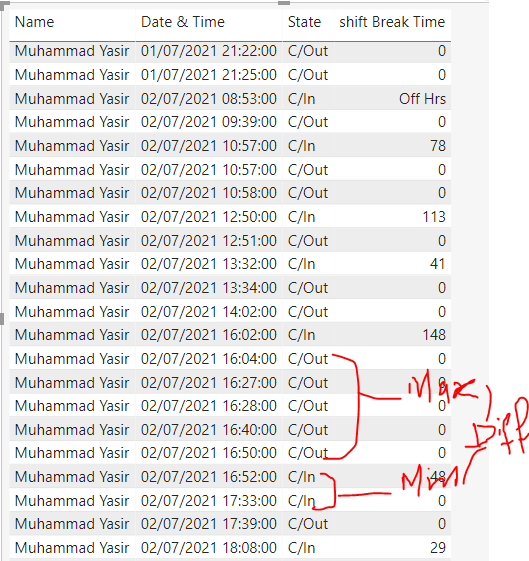
I am getting error when ever consective c/in or C/out occure in calaculating time difference but whenever consecutive occure I want to pick maximum from the C/out and minimum from C/In for further clarification I am attaching a screenshot please help me in this
Thank you
Thank you
Solved! Go to Solution.


- Mark as New
- Bookmark
- Subscribe
- Mute
- Subscribe to RSS Feed
- Permalink
- Report Inappropriate Content
Hi, @ziyabikram96
To create a calculated column like this:
isIN_is0 =
VAR _previouIn =
    CALCULATE (
        MIN ( [Index] ),
        FILTER (
            ALL ( 'Table' ),
            [State] = "C/In"
                && [Index]
                    = EARLIER ( [Index] ) - 1
        )
    )
VAR _if =
    IF ( 'Table'[State] = "C/In", IF ( [Index] - _previouIn = 1, 1 ) )
RETURN
    _if
then the test3 would be like this:
test_3 =
VAR _CurrentIndex =
    FIRSTNONBLANK ('Table'[Index], 1 )
VAR _CurrentStatus =
    FIRSTNONBLANK ( 'Table'[State], 1 )
VAR _IndexOfPreviousCheckIN =
    CALCULATE (
        MAX ( 'Table'[Index] ),
        FILTER (
            ALL ( 'Table' ),
            AND ( 'Table'[Index] < _CurrentIndex, 'Table'[State] = "C/In" )
        ) //,OR('InOutData(PAK)'[Index] < CurrentIndex,
        // 'InOutData(PAK)'[State] = "C/Out")
    )
//*****************************************************************************************
var _lastOut=
        CALCULATE(
        LASTNONBLANK('Table'[Index],MAX('Table'[State])="C/Out"),
        FILTER(ALL('Table'),AND ( 'Table'[Index] < _CurrentIndex, 'Table'[State] = "C/Out" ))
    )
//*****************************************************************************************
//*****************************************************************************************
var _firstIn=
    IF(MAX('Table'[State])="C/In",_lastOut+1)
//*****************************************************************************************
VAR _IndexOfFollowingCheckOut =
    IF (
        ISBLANK ( _IndexOfPreviousCheckIN ),
        0,
        // _IndexOfPreviousCheckIN+1
//*****************************************************************************************
        _lastOut
//*****************************************************************************************
    )
var _result=
        IF (
        OR(
//*****************************************************************************************
            OR ( _CurrentIndex = 0, _CurrentStatus = "C/Out" ),MAX('Table'[isIN_is0])=1),
//*****************************************************************************************
        0,
        DATEDIFF (
            CALCULATE (
                FIRSTNONBLANK ( 'Table'[Date & Time State], 0 ),
                FILTER (
                    ALL ( 'Table' ),
                    'Table'[Index] = _IndexOfFollowingCheckOut
                )
            ),
            // FIRSTNONBLANK ( 'Table'[Date & Time State], 1 ),
//*****************************************************************************************
            CALCULATE(
                MAX('Table'[Date & Time State]),
                FILTER(
                    ALL('Table'),
                    'Table'[Index]=_firstIn
                )
            ),
//*****************************************************************************************
            MINUTE
        )
    )
RETURN _result
result:
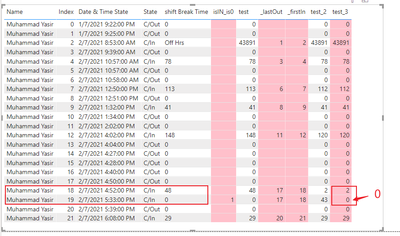
Please refer to the attachment below for details
Hope this helps.
Best Regards,
Community Support Team _ Zeon Zheng
If this post helps, then please consider Accept it as the solution to help the other members find it more quickly.
- Mark as New
- Bookmark
- Subscribe
- Mute
- Subscribe to RSS Feed
- Permalink
- Report Inappropriate Content
Hi, @ziyabikram96
I have made some modifications to the above formula:
test2 =
VAR _CurrentIndex =
    FIRSTNONBLANK ('Table'[Index], 1 )
VAR _CurrentStatus =
    FIRSTNONBLANK ( 'Table'[State], 1 )
VAR _IndexOfPreviousCheckIN =
    CALCULATE (
        MAX ( 'Table'[Index] ),
        FILTER (
            ALL ( 'Table' ),
            AND ( 'Table'[Index] < _CurrentIndex, 'Table'[State] = "C/In" )
        ) //,OR('InOutData(PAK)'[Index] < CurrentIndex,
        // 'InOutData(PAK)'[State] = "C/Out")
    )
//*****************************************************************************************
var _lastOut=
        CALCULATE(
        LASTNONBLANK('Table'[Index],MAX('Table'[State])="C/Out"),
        FILTER(ALL('Table'),AND ( 'Table'[Index] < _CurrentIndex, 'Table'[State] = "C/Out" ))
    )
//*****************************************************************************************
VAR _IndexOfFollowingCheckOut =
    IF (
        ISBLANK ( _IndexOfPreviousCheckIN ),
        0,
        // _IndexOfPreviousCheckIN+1
//*****************************************************************************************
        _lastOut
//*****************************************************************************************
    )
var _result=
        IF (
        OR ( _CurrentIndex = 0, _CurrentStatus = "C/Out" ),
        0,
        DATEDIFF (
            CALCULATE (
                FIRSTNONBLANK ( 'Table'[Date & Time State], 0 ),
                FILTER (
                    ALL ( 'Table' ),
                    'Table'[Index] = _IndexOfFollowingCheckOut
                )
            ),
            FIRSTNONBLANK ( 'Table'[Date & Time State], 1 ),
            MINUTE
        )
    )
RETURN _result
Result:

Please refer to the attachment below for details
Hope this helps.
Best Regards,
Community Support Team _ Zeon Zheng
If this post helps, then please consider Accept it as the solution to help the other members find it more quickly.
- Mark as New
- Bookmark
- Subscribe
- Mute
- Subscribe to RSS Feed
- Permalink
- Report Inappropriate Content
and for more clarification i want difference between
last_Out and First_In
- Mark as New
- Bookmark
- Subscribe
- Mute
- Subscribe to RSS Feed
- Permalink
- Report Inappropriate Content
Hi, @ziyabikram96
To create a calculated column like this:
isIN_is0 =
VAR _previouIn =
    CALCULATE (
        MIN ( [Index] ),
        FILTER (
            ALL ( 'Table' ),
            [State] = "C/In"
                && [Index]
                    = EARLIER ( [Index] ) - 1
        )
    )
VAR _if =
    IF ( 'Table'[State] = "C/In", IF ( [Index] - _previouIn = 1, 1 ) )
RETURN
    _if
then the test3 would be like this:
test_3 =
VAR _CurrentIndex =
    FIRSTNONBLANK ('Table'[Index], 1 )
VAR _CurrentStatus =
    FIRSTNONBLANK ( 'Table'[State], 1 )
VAR _IndexOfPreviousCheckIN =
    CALCULATE (
        MAX ( 'Table'[Index] ),
        FILTER (
            ALL ( 'Table' ),
            AND ( 'Table'[Index] < _CurrentIndex, 'Table'[State] = "C/In" )
        ) //,OR('InOutData(PAK)'[Index] < CurrentIndex,
        // 'InOutData(PAK)'[State] = "C/Out")
    )
//*****************************************************************************************
var _lastOut=
        CALCULATE(
        LASTNONBLANK('Table'[Index],MAX('Table'[State])="C/Out"),
        FILTER(ALL('Table'),AND ( 'Table'[Index] < _CurrentIndex, 'Table'[State] = "C/Out" ))
    )
//*****************************************************************************************
//*****************************************************************************************
var _firstIn=
    IF(MAX('Table'[State])="C/In",_lastOut+1)
//*****************************************************************************************
VAR _IndexOfFollowingCheckOut =
    IF (
        ISBLANK ( _IndexOfPreviousCheckIN ),
        0,
        // _IndexOfPreviousCheckIN+1
//*****************************************************************************************
        _lastOut
//*****************************************************************************************
    )
var _result=
        IF (
        OR(
//*****************************************************************************************
            OR ( _CurrentIndex = 0, _CurrentStatus = "C/Out" ),MAX('Table'[isIN_is0])=1),
//*****************************************************************************************
        0,
        DATEDIFF (
            CALCULATE (
                FIRSTNONBLANK ( 'Table'[Date & Time State], 0 ),
                FILTER (
                    ALL ( 'Table' ),
                    'Table'[Index] = _IndexOfFollowingCheckOut
                )
            ),
            // FIRSTNONBLANK ( 'Table'[Date & Time State], 1 ),
//*****************************************************************************************
            CALCULATE(
                MAX('Table'[Date & Time State]),
                FILTER(
                    ALL('Table'),
                    'Table'[Index]=_firstIn
                )
            ),
//*****************************************************************************************
            MINUTE
        )
    )
RETURN _result
result:
Please refer to the attachment below for details
Hope this helps.
Best Regards,
Community Support Team _ Zeon Zheng
If this post helps, then please consider Accept it as the solution to help the other members find it more quickly.
- Mark as New
- Bookmark
- Subscribe
- Mute
- Subscribe to RSS Feed
- Permalink
- Report Inappropriate Content
Thanks for your time and kind responses I got my expected result
- Mark as New
- Bookmark
- Subscribe
- Mute
- Subscribe to RSS Feed
- Permalink
- Report Inappropriate Content

Thanks for your time and response in C/Out logic is ok as it is highlited in yellow but the problem is occured in C/In as it is marked with black colour , I want minimum C/In and thier respective result and rest of it will return 0


- Mark as New
- Bookmark
- Subscribe
- Mute
- Subscribe to RSS Feed
- Permalink
- Report Inappropriate Content
@ziyabikram96 See my article on Mean Time Between Failure (MTBF) which uses EARLIER: http://community.powerbi.com/t5/Community-Blog/Mean-Time-Between-Failure-MTBF-and-Power-BI/ba-p/3395....
The basic pattern is:
Column =
VAR __Current = [Value]
VAR __PreviousDate = MAXX(FILTER('Table','Table'[Date] < EARLIER('Table'[Date])),[Date])
VAR __Previous = MAXX(FILTER('Table',[Date]=__PreviousDate),[Value])
RETURN
__Current - __Previous
Follow on LinkedIn
@ me in replies or I'll lose your thread!!!
Instead of a Kudo, please vote for this idea
Become an expert!: Enterprise DNA
External Tools: MSHGQM
YouTube Channel!: Microsoft Hates Greg
Latest book!: DAX For Humans
DAX is easy, CALCULATE makes DAX hard...
- Mark as New
- Bookmark
- Subscribe
- Mute
- Subscribe to RSS Feed
- Permalink
- Report Inappropriate Content
Hi, Didn't get the expected result I tried your method but failed to to get it


- Mark as New
- Bookmark
- Subscribe
- Mute
- Subscribe to RSS Feed
- Permalink
- Report Inappropriate Content
Can you please show how are you calculating the time difference?
- Mark as New
- Bookmark
- Subscribe
- Mute
- Subscribe to RSS Feed
- Permalink
- Report Inappropriate Content
Here it is

Helpful resources

FabCon & SQLCon – Barcelona 2026
Join us in Barcelona for FabCon and SQLCon, the Fabric, Power BI, SQL, and AI community event. Save €200 with code FABCMTY200.

Power BI DataViz World Championships - June 2026
A new Power BI DataViz World Championship is coming this June! Don't miss out on submitting your entry.

| User | Count |
|---|---|
| 24 | |
| 22 | |
| 20 | |
| 18 | |
| 14 |


| User | Count |
|---|---|
| 32 | |
| 26 | |
| 23 | |
| 20 | |
| 20 |


