cancel
Showing results for 
Search instead for 
Did you mean: 

The Power BI Data Visualization World Championships is back! Get ahead of the game and start preparing now! Learn more

Reply
AshlerK
Regular Visitor

Time Columns Visual One Time Column Locks into a Time

Hello,


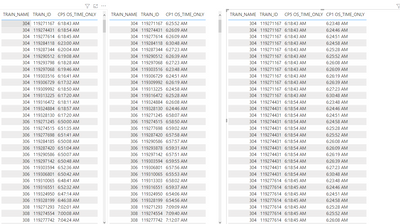
I will have screenshots below displaying the issue. In the first screenshot I have trains by their number and by their line. Each train number hits both checkpoints coming in. I just need to see the time for each train# for when they hit checkpoint 5 and then hit checkpoint 1. I have these times in my two tables. One table is checkpoint 1 times and the other checkpoint 5.


When the two columns are put into the visual the leftmost column locks in a time but the other column properly displays all the different times that train number hit that checkpoint that day. Why won't both columnd show the unique times that the train hit the two checkpoints? My end result is to be a difference between the two columns but I cant even get there yet becasue BI is struggling to give me these two vlaues that are present on the table by category i'm visualizing. 
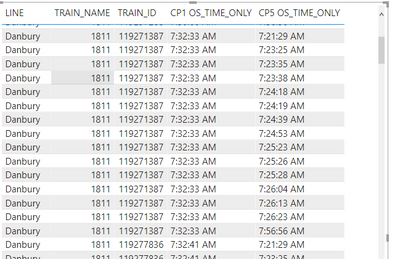
 

AshlerK_1-1653051139064.png


AshlerK_2-1653051172374.png

Same Train#, differnet trainID per train#, each ID represents a different day, and they each have a unique time value for when they hit the checkpoin for that unique trainID. Can;t get it to visualize that way though

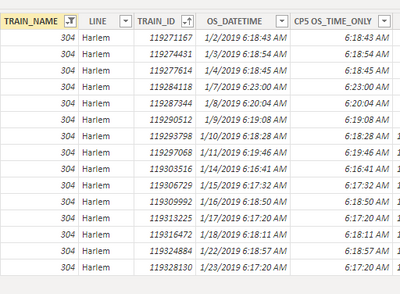
AshlerK_0-1653051829041.png


AshlerK_1-1653051842030.png


AshlerK_3-1653051207866.png


Not sure why the visual wont display the time of arrival for checkpoint 1 and 5 whilst the unique train_ID is present as the train# isn't perfectly unique as it will go up and down the line as the day goes on. It does the same even when I remove the less unique train#
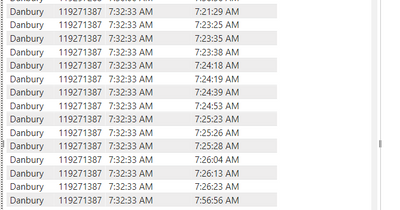
 

AshlerK_4-1653051312652.png


Meanwhile ID ending x1387 only has one row of data but it displays several.....need help as I am still intermediate user with Power Bi. 


1 ACCEPTED SOLUTION
AshlerK
Regular Visitor

Bump for assistance, still having trouble displaying both checkppint times for a filter that is the same at both of those checkpoints. In this screenshot it shows that the combined visual is just repeating the times for those unique TrainIDs down the line and then when it switches to a new TrainID it runs the same list of times....seems strange. 


AshlerK_0-1653055031361.png


View solution in original post

1 REPLY 1
AshlerK
Regular Visitor

Bump for assistance, still having trouble displaying both checkppint times for a filter that is the same at both of those checkpoints. In this screenshot it shows that the combined visual is just repeating the times for those unique TrainIDs down the line and then when it switches to a new TrainID it runs the same list of times....seems strange. 


AshlerK_0-1653055031361.png


Helpful resources

Announcements
Power BI DataViz World Championships

Power BI Dataviz World Championships

The Power BI Data Visualization World Championships is back! Get ahead of the game and start preparing now!

December 2025 Power BI Update Carousel

Power BI Monthly Update - December 2025

Check out the December 2025 Power BI Holiday Recap!

FabCon Atlanta 2026 carousel

FabCon Atlanta 2026

Join us at FabCon Atlanta, March 16-20, for the ultimate Fabric, Power BI, AI and SQL community-led event. Save $200 with code FABCOMM.