

cancel
Showing results for 
Search instead for 
Did you mean: 

The Power BI Data Visualization World Championships is back! Get ahead of the game and start preparing now! Learn more

Reply
mkz81
Frequent Visitor

Text values visible in Power Query but shows blank in Power BI Table

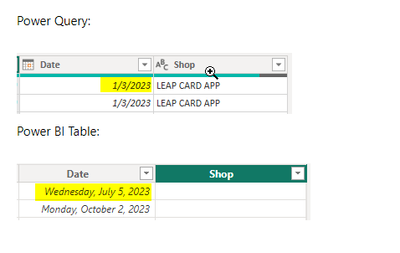
Hi! I'm strugling with the following issue. After loading the data from Excel and and transforming it as needed in Power Query I found that the whole column with text data shows in Power BI as blank. Any ideas how to fix it? 


Power Query:


mkz81_0-1711309716825.png

Power BI Table: 


mkz81_1-1711309762971.png


Thank you!


1 ACCEPTED SOLUTION
PijushRoy
Super User
Super User

Hi @mkz81 

In Your screenshot, the Power Query table and Power BI table is not same rows

PijushRoy_0-1711312128195.png

May be July 5, 2023 having null value as well in Power Query
Please check and rectify
You can share same rows for Power Query and Power BI data if not matching


Let me know if that works for you


If your requirement is solved, please mark THIS ANSWER as SOLUTION ✔️ and help other users find the solution quickly. Please hit the Thumbs Up 👍 button if this comment helps you.

Thanks
Pijush
Linkedin


Did I answer your question? Mark my post as a solution!
Appreciate your Like/Kudos

Proud to be a Super User!


View solution in original post

3 REPLIES 3
PijushRoy
Super User
Super User

Hi @mkz81 

In Your screenshot, the Power Query table and Power BI table is not same rows

PijushRoy_0-1711312128195.png

May be July 5, 2023 having null value as well in Power Query
Please check and rectify
You can share same rows for Power Query and Power BI data if not matching


Let me know if that works for you


If your requirement is solved, please mark THIS ANSWER as SOLUTION ✔️ and help other users find the solution quickly. Please hit the Thumbs Up 👍 button if this comment helps you.

Thanks
Pijush
Linkedin


Did I answer your question? Mark my post as a solution!
Appreciate your Like/Kudos

Proud to be a Super User!


Hi Pijush, thank you for the suggestion. In fact I realized that I made a mistake while joining the tables from Excel as the column titles didn't match and it was causing some issues in both Power Query and Power BI.  

You are welcome @mkz81 


Did I answer your question? Mark my post as a solution!
Appreciate your Like/Kudos

Proud to be a Super User!


Helpful resources

Announcements
November Power BI Update Carousel

Power BI Monthly Update - November 2025

Check out the November 2025 Power BI update to learn about new features.

Fabric Data Days Carousel

Fabric Data Days

Advance your Data & AI career with 50 days of live learning, contests, hands-on challenges, study groups & certifications and more!

FabCon Atlanta 2026 carousel

FabCon Atlanta 2026

Join us at FabCon Atlanta, March 16-20, for the ultimate Fabric, Power BI, AI and SQL community-led event. Save $200 with code FABCOMM.

Top Solution Authors
Top Kudoed Authors