We've captured the moments from FabCon & SQLCon that everyone is talking about, and we are bringing them to the community, live and on-demand. Starts on April 14th. Register now
Hi all,
I'm looking for some help with something I'm struggling with. I am using the text filter visual which uses table 2 phrase as the field. I have created a relationship between Table 1 and Table 2 so that my table visual shows the items when a phrase contains the query term typed in the search box.
What I'm trying to achieve is to exclude the item from showing when the phrase searched is the same as the item? E.g. if item1 was searched for then only item2 would display in this case.
Table 1
| item | column2 | column3 |
| item1 | ||
| item2 | ||
| item3 |
Table 2
| item | phrase | phrase_volume |
| item1 | item1 | 100 |
| item1 | phrase2 | 500 |
| item1 | phrase3 | 300 |
| item2 | item1 | 400 |
| item2 | phrase5 | 500 |
| item2 | phrase6 | 600 |
| item3 | phrase7 | 500 |
| item3 | phrase8 | 300 |
| item3 | phrase9 | 400 |
Thanks in advance!
Solved! Go to Solution.
Hi @badger123,
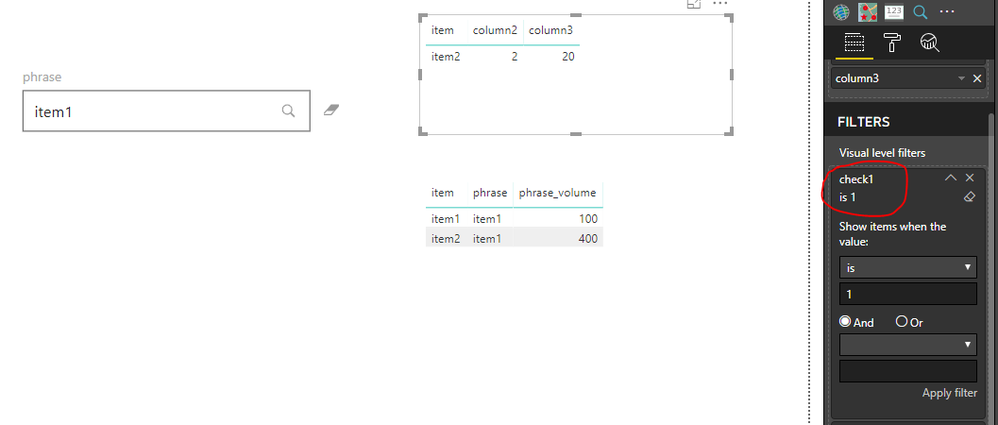
Similar to rajendran's suggestion, but I would prefer to add a measure to visual level filter.
check1 = IF(SELECTEDVALUE(Table_1[item])=SELECTEDVALUE(Table_2[phrase]),0,1)
Best regards,
Yuliana Gu
Hi @badger123,
Similar to rajendran's suggestion, but I would prefer to add a measure to visual level filter.
check1 = IF(SELECTEDVALUE(Table_1[item])=SELECTEDVALUE(Table_2[phrase]),0,1)
Best regards,
Yuliana Gu
HI @badger123
You can create a calculated column
If you have recently started exploring Fabric, we'd love to hear how it's going. Your feedback can help with product improvements.
A new Power BI DataViz World Championship is coming this June! Don't miss out on submitting your entry.
Share feedback directly with Fabric product managers, participate in targeted research studies and influence the Fabric roadmap.
| User | Count |
|---|---|
| 53 | |
| 38 | |
| 33 | |
| 17 | |
| 17 |
| User | Count |
|---|---|
| 67 | |
| 62 | |
| 38 | |
| 34 | |
| 22 |