cancel
Showing results for 
Search instead for 
Did you mean: 

Get Fabric Certified for FREE during AI Skills Fest. This week only. Secure your voucher now.

Reply
NithinBN
Helper II
Helper II

Text based filtering.

Hello All,

I have a table like this,


IndexProductValue
1BikeGreen
2BikeYellow
3BikeGreen
4BikeGreen
5BikeRed
6ClothingRed
7ClothingGreen
8ClothingRed
9ClothingYellow
10ClothingRed
11AccessoriesGreen
12AccessoriesRed
13AccessoriesGreen
14AccessoriesYellow
15AccessoriesGreen


I want to create a measure which count all the Green for product "Bike".


At last I want to have a bar chart, where axis is Product and value is Divide("Number of Green"/("Number of Yellow"+"Number of Red"))


Thanks in advance. 


1 ACCEPTED SOLUTION
Fowmy
Super User
Super User

@NithinBN 

Can you check this measure:

Measure = 
VAR Green = 
CALCULATE(
    COUNTROWS(Table1),
    Table1[Value]= "Green"
)
VAR YellowRed = 
CALCULATE(
    COUNTROWS(Table1),
    Table1[Value] = "Yellow" || Table1[Value] = "Red"
)
RETURN
DIVIDE(
    Green,
    YellowRed
)


________________________

If my answer was helpful, please consider Accept it as the solution to help the other members find it

Click on the Thumbs-Up icon if you like this reply 🙂

YouTube  LinkedIn

Did I answer your question? Mark my post as a solution! and hit thumbs up


Subscribe and learn Power BI from these videos

Website LinkedIn PBI User Group

View solution in original post

3 REPLIES 3
Fowmy
Super User
Super User

@NithinBN 

Can you check this measure:

Measure = 
VAR Green = 
CALCULATE(
    COUNTROWS(Table1),
    Table1[Value]= "Green"
)
VAR YellowRed = 
CALCULATE(
    COUNTROWS(Table1),
    Table1[Value] = "Yellow" || Table1[Value] = "Red"
)
RETURN
DIVIDE(
    Green,
    YellowRed
)


________________________

If my answer was helpful, please consider Accept it as the solution to help the other members find it

Click on the Thumbs-Up icon if you like this reply 🙂

YouTube  LinkedIn

Did I answer your question? Mark my post as a solution! and hit thumbs up


Subscribe and learn Power BI from these videos

Website LinkedIn PBI User Group

@Fowmy : how to split this based on "Product"?

@NithinBN 

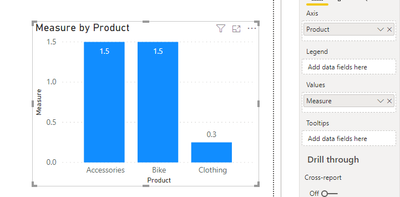
In a bar or column chart, keep the Product on the Axis and Measure on the Value

Fowmy_1-1599375970541.png

________________________

If my answer was helpful, please consider Accept it as the solution to help the other members find it

Click on the Thumbs-Up icon if you like this reply 🙂

YouTube  LinkedIn


Did I answer your question? Mark my post as a solution! and hit thumbs up


Subscribe and learn Power BI from these videos

Website LinkedIn PBI User Group

Helpful resources

Announcements
May Power BI Update Carousel

Power BI Monthly Update - May 2026

Check out the May 2026 Power BI update to learn about new features.

Fabric SQL PBI Data Days

Data Days 2026 coming soon!

Sign up to receive a private message when registration opens and key events begin.

Power BI DataViz World Championships carousel

Power BI DataViz World Championships - June 2026

A new Power BI DataViz World Championship is coming this June! Don't miss out on submitting your entry.