Join us at FabCon Atlanta from March 16 - 20, 2026, for the ultimate Fabric, Power BI, AI and SQL community-led event. Save $200 with code FABCOMM.
Register now!Vote for your favorite vizzies from the Power BI Dataviz World Championship submissions. Vote now!
Hello All,
I have a table like this,
| Index | Product | Value |
| 1 | Bike | Green |
| 2 | Bike | Yellow |
| 3 | Bike | Green |
| 4 | Bike | Green |
| 5 | Bike | Red |
| 6 | Clothing | Red |
| 7 | Clothing | Green |
| 8 | Clothing | Red |
| 9 | Clothing | Yellow |
| 10 | Clothing | Red |
| 11 | Accessories | Green |
| 12 | Accessories | Red |
| 13 | Accessories | Green |
| 14 | Accessories | Yellow |
| 15 | Accessories | Green |
I want to create a measure which count all the Green for product "Bike".
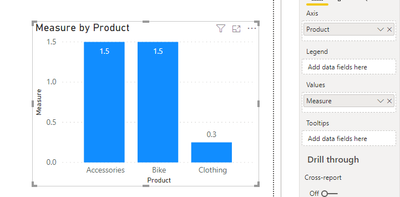
At last I want to have a bar chart, where axis is Product and value is Divide("Number of Green"/("Number of Yellow"+"Number of Red"))
Thanks in advance.
Solved! Go to Solution.
@NithinBN
Can you check this measure:
Measure =
VAR Green =
CALCULATE(
COUNTROWS(Table1),
Table1[Value]= "Green"
)
VAR YellowRed =
CALCULATE(
COUNTROWS(Table1),
Table1[Value] = "Yellow" || Table1[Value] = "Red"
)
RETURN
DIVIDE(
Green,
YellowRed
)
________________________
If my answer was helpful, please consider Accept it as the solution to help the other members find it
Click on the Thumbs-Up icon if you like this reply 🙂
⭕ Subscribe and learn Power BI from these videos
⚪ Website ⚪ LinkedIn ⚪ PBI User Group
@NithinBN
Can you check this measure:
Measure =
VAR Green =
CALCULATE(
COUNTROWS(Table1),
Table1[Value]= "Green"
)
VAR YellowRed =
CALCULATE(
COUNTROWS(Table1),
Table1[Value] = "Yellow" || Table1[Value] = "Red"
)
RETURN
DIVIDE(
Green,
YellowRed
)
________________________
If my answer was helpful, please consider Accept it as the solution to help the other members find it
Click on the Thumbs-Up icon if you like this reply 🙂
⭕ Subscribe and learn Power BI from these videos
⚪ Website ⚪ LinkedIn ⚪ PBI User Group
@NithinBN
In a bar or column chart, keep the Product on the Axis and Measure on the Value
________________________
If my answer was helpful, please consider Accept it as the solution to help the other members find it
Click on the Thumbs-Up icon if you like this reply 🙂
⭕ Subscribe and learn Power BI from these videos
⚪ Website ⚪ LinkedIn ⚪ PBI User Group
Vote for your favorite vizzies from the Power BI World Championship submissions!
If you love stickers, then you will definitely want to check out our Community Sticker Challenge!
Check out the January 2026 Power BI update to learn about new features.
| User | Count |
|---|---|
| 58 | |
| 53 | |
| 40 | |
| 17 | |
| 16 |
| User | Count |
|---|---|
| 116 | |
| 105 | |
| 41 | |
| 34 | |
| 25 |