Get Fabric or SQL Certified for Free.
Get certified for free when you join Fabric Data Days 2026 and dive into Fabric, Power BI, SQL, AI, and other essential data skills.
Join now- Power BI forums
- Get Help with Power BI
- Desktop
- Service
- Report Server
- Power Query
- Mobile Apps
- Developer
- DAX Commands and Tips
- Custom Visuals Development Discussion
- Health and Life Sciences
- Power BI Spanish forums
- Translated Spanish Desktop
- Training and Consulting
- Instructor Led Training
- Dashboard in a Day for Women, by Women
- Galleries
- Data Stories Gallery
- Themes Gallery
- Contests Gallery
- QuickViz Gallery
- Quick Measures Gallery
- Visual Calculations Gallery
- Notebook Gallery
- Translytical Task Flow Gallery
- TMDL Gallery
- R Script Showcase
- Webinars and Video Gallery
- Ideas
- Custom Visuals Ideas (read-only)
- Issues
- Issues
- Events
- Upcoming Events
Try your skills in the Power BI Dataviz World Championship! Round one ends June 26. Join now
- Power BI forums
- Forums
- Get Help with Power BI
- Desktop
- Re: Teams Integration Problem:
- Subscribe to RSS Feed
- Mark Topic as New
- Mark Topic as Read
- Float this Topic for Current User
- Bookmark
- Subscribe
- Printer Friendly Page

- Mark as New
- Bookmark
- Subscribe
- Mute
- Subscribe to RSS Feed
- Permalink
- Report Inappropriate Content
Teams Integration Problem:
Teams Integration Problem:
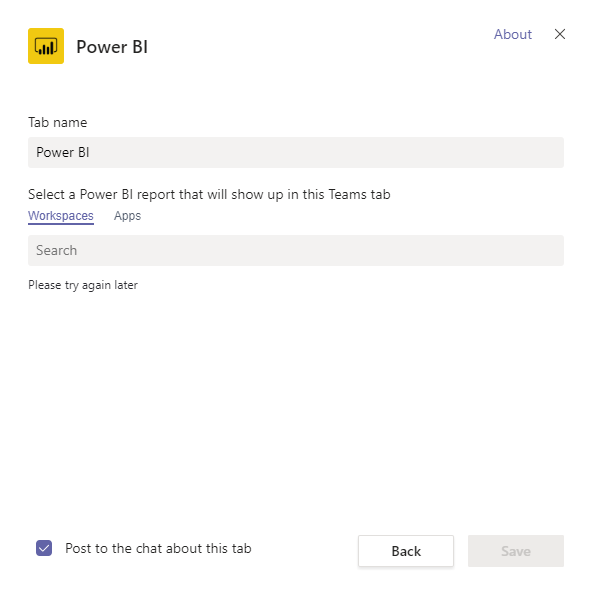
Have you tried adding Power BI to your teams? I had an error. "Please try again later".
1. Is there a proper way of integrating Power BI to Teams?
2. Is the RLS working with Teams?
3. Can I a different Email for Teams and a different Email for Power BI?
Solved! Go to Solution.


- Mark as New
- Bookmark
- Subscribe
- Mute
- Subscribe to RSS Feed
- Permalink
- Report Inappropriate Content
Hi @Anonymous ,
Sorry for late back.
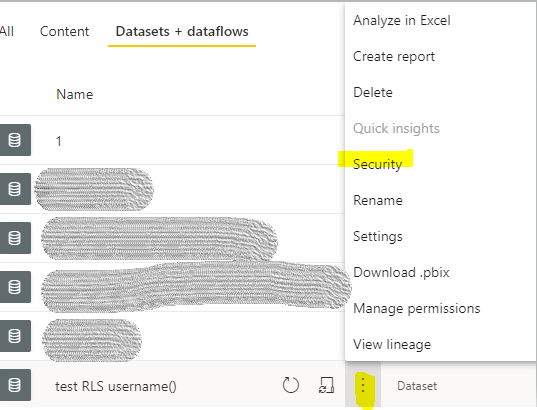
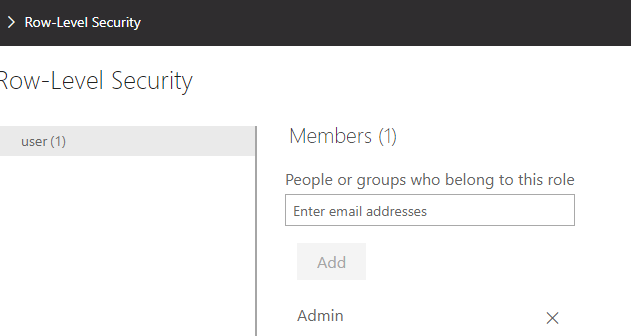
We still need to add users in security of dataset to strict data. If the users are not in the organization, you could grant them a guest role in AAD(Azure Active Directry). And they don't need a pro license to view the reports. You also could create a group to manage if there are many users.
Reference:
Distribute Power BI content to external guest users with Azure AD B2B
Note: If you have configured the workspace so that members have edit permissions, the RLS roles will not be applied to them. Users will be able to see all of the data.
Xue Ding
If this post helps, then please consider Accept it as the solution to help the other members find it more quickly.
- Mark as New
- Bookmark
- Subscribe
- Mute
- Subscribe to RSS Feed
- Permalink
- Report Inappropriate Content
Hi @Anonymous ,
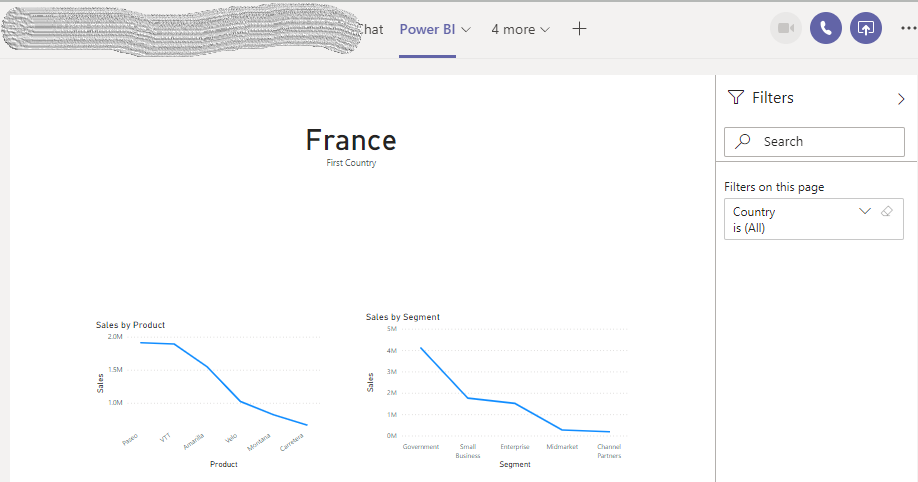
I try embedding a report in MS Teams. It works fine in my site. Please check the network and try again later.
- Is there a proper way of integrating Power BI to Teams?
You could reference the document: Embed reports in Microsoft Teams with the Power BI tab to have a try.
- Is the RLS working with Teams?
Yes, it is.
Note: If you have granted access users to workspace, please to enforce row-level security (RLS) for users browsing content, use the Viewer role. (Reference: Roles in the new workspaces )
- Can I a different Email for Teams and a different Email for Power BI?
No. While embedding, Power BI will sign in the account of Teams by default.
Xue Ding
If this post helps, then please consider Accept it as the solution to help the other members find it more quickly.
- Mark as New
- Bookmark
- Subscribe
- Mute
- Subscribe to RSS Feed
- Permalink
- Report Inappropriate Content
Hi, thanks for your reply.
Regarding the RSL, will it still work if the users that I am going to share my report with in Teams are not PowerBI pro users and do not have an organization email (only gmail)? As I understand it, RSL needs an email address for role assignments.
Or... Do they even need to be a Registered PowerBI user? I am planning to share my report to many users who doesn't even know what Power BI is.
- Mark as New
- Bookmark
- Subscribe
- Mute
- Subscribe to RSS Feed
- Permalink
- Report Inappropriate Content
Hi @Anonymous ,
Sorry for late back.
We still need to add users in security of dataset to strict data. If the users are not in the organization, you could grant them a guest role in AAD(Azure Active Directry). And they don't need a pro license to view the reports. You also could create a group to manage if there are many users.
Reference:
Distribute Power BI content to external guest users with Azure AD B2B
Note: If you have configured the workspace so that members have edit permissions, the RLS roles will not be applied to them. Users will be able to see all of the data.
Xue Ding
If this post helps, then please consider Accept it as the solution to help the other members find it more quickly.


- Mark as New
- Bookmark
- Subscribe
- Mute
- Subscribe to RSS Feed
- Permalink
- Report Inappropriate Content
- Mark as New
- Bookmark
- Subscribe
- Mute
- Subscribe to RSS Feed
- Permalink
- Report Inappropriate Content
No, not yet. I will try this first.
Helpful resources

Fabric Data Days 2026
Don't miss out on Data Days, June 15 through August 7. Learn Fabric, Power BI, SQL, AI and more.

Power BI DataViz World Championships - June 2026
A new Power BI DataViz World Championship is coming this June! Don't miss out on submitting your entry.

| User | Count |
|---|---|
| 23 | |
| 21 | |
| 21 | |
| 17 | |
| 11 |


| User | Count |
|---|---|
| 58 | |
| 55 | |
| 43 | |
| 36 | |
| 35 |


