cancel
Showing results for 
Search instead for 
Did you mean: 

Learn from the best! Meet the four finalists headed to the FINALS of the Power BI Dataviz World Championships! Register now

Reply
Anonymous
Not applicable

Teams Integration Problem:

Teams Integration Problem:
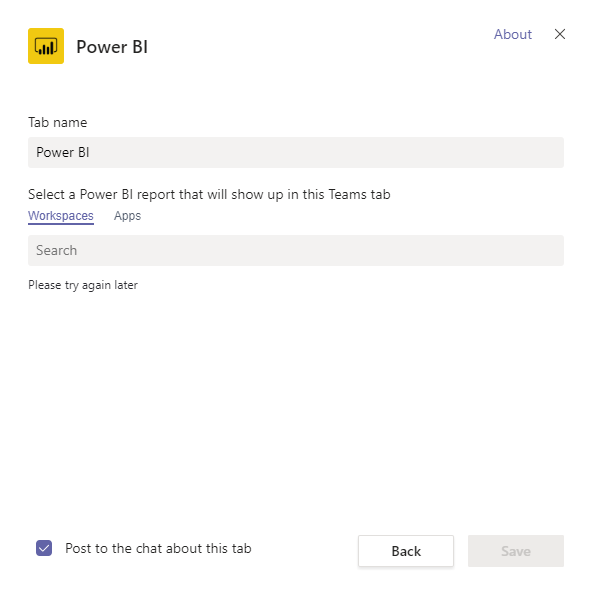
Have you tried adding Power BI to your teams? I had an error. "Please try again later".
1. Is there a proper way of integrating Power BI to Teams?
2. Is the RLS working with Teams?
3. Can I a different Email for Teams and a different Email for Power BI?2020-05-11 11 11 07.png

1 ACCEPTED SOLUTION

Hi @Anonymous ,


Sorry for late back. 


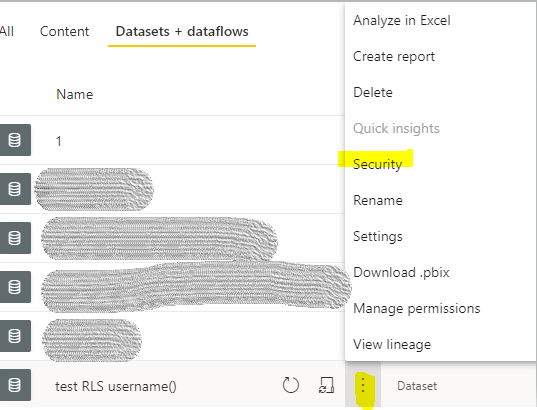
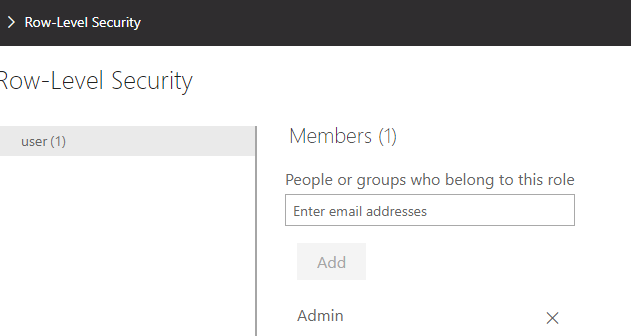
We still need to add users in security of dataset to strict data. If the users are not in the organization, you could grant them a guest role in  AAD(Azure Active Directry). And they don't need a pro license to view the reports. You also could create a group to manage if there are many users.

2.PNG1.PNG

Reference:

Distribute Power BI content to external guest users with Azure AD B2B 

Compare groups 


Note: If you have configured the workspace so that members have edit permissions, the RLS roles will not be applied to them. Users will be able to see all of the data.


Best Regards,
Xue Ding
If this post helps, then please consider Accept it as the solution to help the other members find it more quickly.

View solution in original post

5 REPLIES 5
v-xuding-msft
Community Support
Community Support

Hi @Anonymous ,


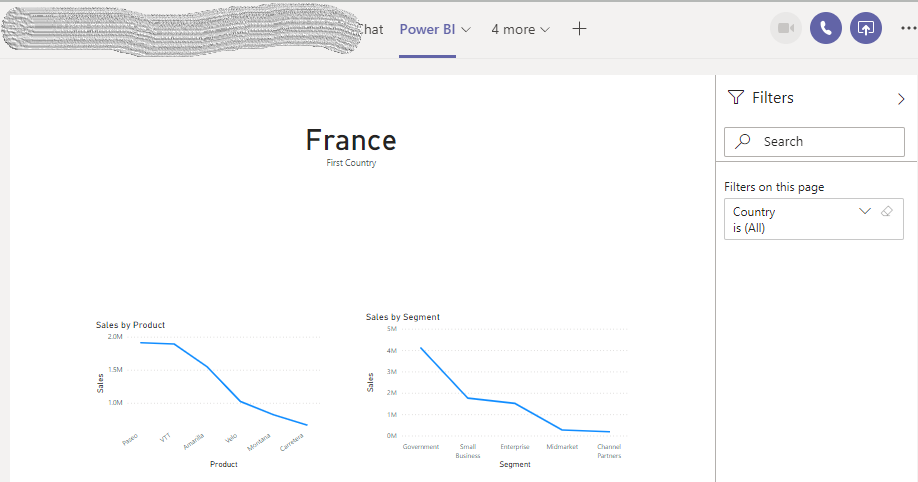
I try embedding a report in MS Teams. It works fine in my site. Please check the network and try again later.

1.PNG

  • Is there a proper way of integrating Power BI to Teams?

You could reference the document: Embed reports in Microsoft Teams with the Power BI tab to have a try.


  • Is the RLS working with Teams?

Yes, it is. 

Note: If you have granted access users to workspace, please to enforce row-level security (RLS) for users browsing content, use the Viewer role. (Reference: Roles in the new workspaces )


  • Can I a different Email for Teams and a different Email for Power BI?

No. While embedding, Power BI will sign in the account of Teams by default. 


Best Regards,
Xue Ding
If this post helps, then please consider Accept it as the solution to help the other members find it more quickly.
Anonymous
Not applicable

Hi, thanks for your reply. 


Regarding the RSL, will it still work if the users that I am going to share my report with in Teams are not PowerBI pro users and do not have an organization email (only gmail)? As I understand it, RSL needs an email address for role assignments.


Or... Do they even need to be a Registered PowerBI user? I am planning to share my report to many users who doesn't even know what Power BI is. 


Hi @Anonymous ,


Sorry for late back. 


We still need to add users in security of dataset to strict data. If the users are not in the organization, you could grant them a guest role in  AAD(Azure Active Directry). And they don't need a pro license to view the reports. You also could create a group to manage if there are many users.

2.PNG1.PNG

Reference:

Distribute Power BI content to external guest users with Azure AD B2B 

Compare groups 


Note: If you have configured the workspace so that members have edit permissions, the RLS roles will not be applied to them. Users will be able to see all of the data.


Best Regards,
Xue Ding
If this post helps, then please consider Accept it as the solution to help the other members find it more quickly.
amitchandak
Super User
Super User

@Anonymous , have you published some reports in this workspace using the same email, you are using in teams.

Share with Power BI Enthusiasts: Full Power BI Video (20 Hours) YouTube
Microsoft Fabric Series 60+ Videos YouTube
Microsoft Fabric Hindi End to End YouTube
Anonymous
Not applicable

No, not yet. I will try this first. 

Helpful resources

Announcements
Join our Fabric User Panel

Join our Fabric User Panel

Share feedback directly with Fabric product managers, participate in targeted research studies and influence the Fabric roadmap.

February Power BI Update Carousel

Power BI Monthly Update - February 2026

Check out the February 2026 Power BI update to learn about new features.

FabCon Atlanta 2026 carousel

FabCon Atlanta 2026

Join us at FabCon Atlanta, March 16-20, for the ultimate Fabric, Power BI, AI and SQL community-led event. Save $200 with code FABCOMM.