This is best Fabric, Power BI, SQL and AI community event. How do we know? The last event sold out! Save €200 with code FABCMTY200.
Register nowA new Data Days event is coming soon! This time we’re going bigger than ever. Fabric, Power BI, SQL, AI and more. Don't miss out.
Hello,
I have a Target Table in EUR as follows
| Month | Target |
| Apr | 20,965,000 |
| May | 18,876,560 |
| Jun | 17,987,908 |
| Jul | 16,897,789 |
| Aug | 25,987,654 |
| Sep | 23,765,456 |
| Oct | 18,907,654 |
| Nov | 24,908,765 |
| Dec | 23,876,543 |
| Jan | 25,678,654 |
| Feb | 19,876,546 |
| Mar | 27,890,989 |
My objective is to allocate the target by Day.
I have been able to get the allocatedDayTarget by dividing the TargetAmount per mth by the no days in each Month.
Hello,
Just to clarity that the wrong dax code was posted yesterday.
In fact to calculate the no of days in the month I have used the following:
Hi @VeemalS ,
My Date table is as below.
Date =
ADDCOLUMNS( CALENDAR(DATE(2022,01,01),DATE(2022,12,31)),"Year",YEAR([Date]),"Month",MONTH([Date]),"MonthName",FORMAT([Date],"MMM"))
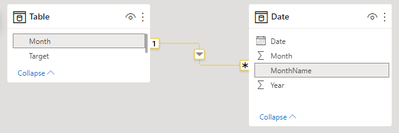
Relationship:
Measure:
Target by Day =
VAR _COUNT =
COUNT ( 'Date'[Date] )
VAR _TARGET =
CALCULATE (
SUM ( 'Table'[Target] ),
FILTER ( 'Table', 'Table'[Month] = MAX ( 'Date'[MonthName] ) )
)
RETURN
DIVIDE ( _TARGET, _COUNT )
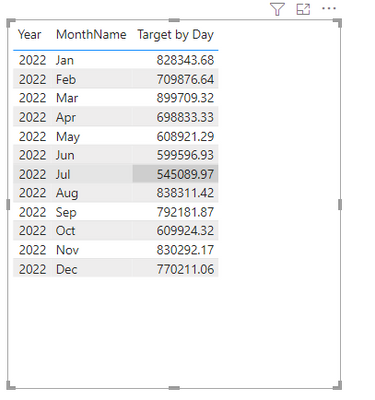
Result is as below.
Best Regards,
Rico Zhou
If this post helps, then please consider Accept it as the solution to help the other members find it more quickly.
Unfortunately this has not resolved the issue that I am having
Thanks. The allocated amount by day is ok. However, from this how do I calculate an MTD amount?
Brgds
Veemal
Sign up to receive a private message when registration opens and key events begin.
If you have recently started exploring Fabric, we'd love to hear how it's going. Your feedback can help with product improvements.
| User | Count |
|---|---|
| 33 | |
| 26 | |
| 23 | |
| 21 | |
| 15 |
| User | Count |
|---|---|
| 63 | |
| 43 | |
| 28 | |
| 24 | |
| 22 |