Hi
I'm being asked for a ranking measure that will take account of the filtering choices. The model has many tables, but the relevant ones here (I believe) are a Dates table, a dimension table (Shareclasses) and a fact table (Fact_DailyAnalytics).
The primary column on the table visual is a field from Shareclasses called InvestmentManager (the first, purposely narrowed in the screenshots below). In that same table is another field of interest, MN_Category. The value comes from a measure in the fact table.
Because the users are interested in ranking by InvestmentManager, that's what I've used for the table argument. The expression argument is the measure from the fact table. That on its own wasn't giving me correct rankings, so some reading and experimentation led me to add an ALLEXCEPT to the expression argument.
I started with just Shareclasses[InvestmentManager] per several discussions in this forum and elsewhere. I then read the article at https://www.sqlbi.com/articles/managing-all-functions-in-dax-all-allselected-allnoblankrow-allexcept... and found I should be including some fields from related tables here as well, specifically the ones I was filtering on. The final formula is as follows:
Rank Funds 2 =
RANKX (
    ALL ( Shareclasses[InvestmentManager] ),
    CALCULATE (
        [Shareclass Assets ($m)],
        ALLEXCEPT (
            Fact_DailyAnalytics,
            Shareclasses[InvestmentManager],
            Shareclasses[MN_Category],
            Dates[FullDate]
        )
    )
)
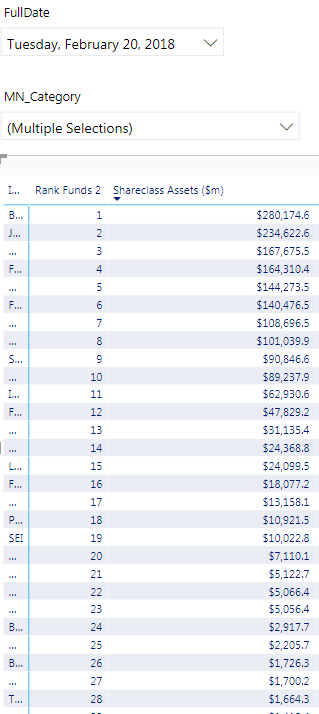
With slicers for date and MN_Category, that works well:
However, the users only want to see the top 25 entries. I've tried doing this two ways - first by setting a visual level filter on the rank measure ('is less than 26'). I've also used a TOPN visual level filter on the InvestmentManager field, selecting Top 25 and specifying the value field from the fact table.
As soon as I do either, the ranking goes amiss. Rather than contiguous numbers, I see (per the screenshot below) a couple of 6s, 11s and 14s:
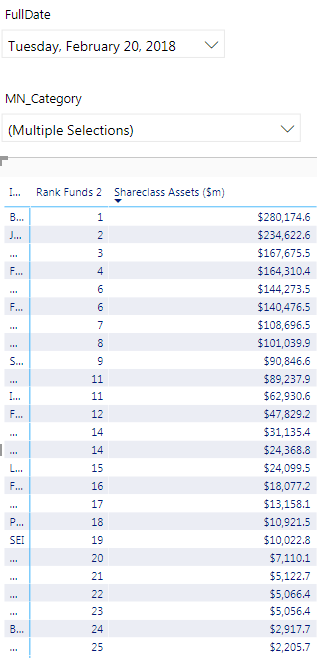
The InvestmentManager order is exactly the same, the measure values match exactly, but the rankings are off.
The users expect a regular sequence, from 1 to 25. I'd be very grateful for any suggestions as to why the rank formula seems to break when a visual level filter is applied.
With thanks and regards
Sebastian Crewe


