FabCon is coming to Atlanta
Join us at FabCon Atlanta from March 16 - 20, 2026, for the ultimate Fabric, Power BI, AI and SQL community-led event. Save $200 with code FABCOMM.
Register now!- Power BI forums
- Get Help with Power BI
- Desktop
- Service
- Report Server
- Power Query
- Mobile Apps
- Developer
- DAX Commands and Tips
- Custom Visuals Development Discussion
- Health and Life Sciences
- Power BI Spanish forums
- Translated Spanish Desktop
- Training and Consulting
- Instructor Led Training
- Dashboard in a Day for Women, by Women
- Galleries
- Data Stories Gallery
- Themes Gallery
- Contests Gallery
- QuickViz Gallery
- Quick Measures Gallery
- Visual Calculations Gallery
- Notebook Gallery
- Translytical Task Flow Gallery
- TMDL Gallery
- R Script Showcase
- Webinars and Video Gallery
- Ideas
- Custom Visuals Ideas (read-only)
- Issues
- Issues
- Events
- Upcoming Events
Get Fabric Certified for FREE during Fabric Data Days. Don't miss your chance! Request now
- Power BI forums
- Forums
- Get Help with Power BI
- Desktop
- Re: Taking Blank Value from Date Column
- Subscribe to RSS Feed
- Mark Topic as New
- Mark Topic as Read
- Float this Topic for Current User
- Bookmark
- Subscribe
- Printer Friendly Page


- Mark as New
- Bookmark
- Subscribe
- Mute
- Subscribe to RSS Feed
- Permalink
- Report Inappropriate Content
Taking Blank Value from Date Column
Hi everyone,
Can someone please help me to calculate the following from below table.
1. If Name Value is not selected, it should calculate from finish date and return "In Progress" because there is no final date in the last item and item E is still in progress.
2. If any Name Value selected, it should show relevant date or N/A in case of Blank.
I want to put these values on card.
Thank you.
| Name | Start Date | Finish Date |
| A | 25/08/20 | 05/09/20 |
| B | 15/09/20 | 15/02/21 |
| C | 07/12/20 | 15/03/21 |
| D | 20/12/20 | 18/04/21 |
| E | 20/12/20 |
Solved! Go to Solution.

- Mark as New
- Bookmark
- Subscribe
- Mute
- Subscribe to RSS Feed
- Permalink
- Report Inappropriate Content
Hi @mohammadyousaf ,
Hope below is what you expected:
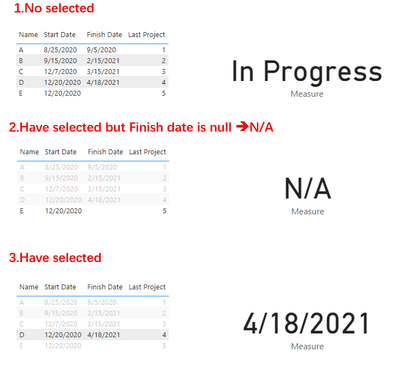
1. Create a rank measure:
Rank =
VAR _last =
    RANKX (
        ALLSELECTED ( 'Table' ),
        CALCULATE ( MAX ( ( 'Table'[Start Date] ) ) ),
        ,
        ASC,
        DENSE
    )
RETURN
    IF (
        MAX ( 'Table'[Finish Date] ) = BLANK (),
        MAXX ( ALLSELECTED ( 'Table' ), _last ) + 1,
        _last
    )
2. A measure for Card visual:
Measure =
VAR _lastFinish =
    CALCULATE (
        MAX ( 'Table'[Finish Date] ),
        FILTER ( 'Table', [Rank] = MAXX ( ALL ( 'Table' ), [Rank] ) )
    )
VAR _ifinprogress =
    IF (
        _lastFinish = BLANK (),
        "In Progress",
        FORMAT ( _lastFinish, "m/dd/yyyy" )
    )
RETURN
    IF (
        ISFILTERED ( 'Table'[Name] ),
        IF (
            MAX ( 'Table'[Finish Date] ) = BLANK (),
            "N/A",
            FORMAT ( MAX ( 'Table'[Finish Date] ), "m/dd/yyyy" )
        ),
        _ifinprogress
    )
Best Regards,
Eyelyn Qin
If this post helps, then please consider Accept it as the solution to help the other members find it more quickly.
- Mark as New
- Bookmark
- Subscribe
- Mute
- Subscribe to RSS Feed
- Permalink
- Report Inappropriate Content
Hi @mohammadyousaf ,
Hope below is what you expected:
1. Create a rank measure:
Rank =
VAR _last =
    RANKX (
        ALLSELECTED ( 'Table' ),
        CALCULATE ( MAX ( ( 'Table'[Start Date] ) ) ),
        ,
        ASC,
        DENSE
    )
RETURN
    IF (
        MAX ( 'Table'[Finish Date] ) = BLANK (),
        MAXX ( ALLSELECTED ( 'Table' ), _last ) + 1,
        _last
    )
2. A measure for Card visual:
Measure =
VAR _lastFinish =
    CALCULATE (
        MAX ( 'Table'[Finish Date] ),
        FILTER ( 'Table', [Rank] = MAXX ( ALL ( 'Table' ), [Rank] ) )
    )
VAR _ifinprogress =
    IF (
        _lastFinish = BLANK (),
        "In Progress",
        FORMAT ( _lastFinish, "m/dd/yyyy" )
    )
RETURN
    IF (
        ISFILTERED ( 'Table'[Name] ),
        IF (
            MAX ( 'Table'[Finish Date] ) = BLANK (),
            "N/A",
            FORMAT ( MAX ( 'Table'[Finish Date] ), "m/dd/yyyy" )
        ),
        _ifinprogress
    )
Best Regards,
Eyelyn Qin
If this post helps, then please consider Accept it as the solution to help the other members find it more quickly.
- Mark as New
- Bookmark
- Subscribe
- Mute
- Subscribe to RSS Feed
- Permalink
- Report Inappropriate Content
it worked as intended, it was my undertanding that I didnt get it.. adjust few tables and I am good to go.
Once Again, thank you.
- Mark as New
- Bookmark
- Subscribe
- Mute
- Subscribe to RSS Feed
- Permalink
- Report Inappropriate Content
Really Thank you, take a bow... worked perfectly. Thank you for the hardwork. Much appreciated.
I have another question:
Just in case Filter is applied and multiple values selected
If Actual completion of any of multiple values is null, it should show "In Progress" , otherwise if all values are present in completion date, it should show the Max completion date.
Thank you so much.
- Mark as New
- Bookmark
- Subscribe
- Mute
- Subscribe to RSS Feed
- Permalink
- Report Inappropriate Content
Yes last itme is defined agains the name column.
I am assuming system checks names, than check the dates, if all dates are present, pick the Max date, if not all dates are present agains the names, display "NA".
OR
I will have to do it for each page but below can also help me to resolve.
If row E in column name has blank finish date, Actual Completion should be "In Progress", else date.


- Mark as New
- Bookmark
- Subscribe
- Mute
- Subscribe to RSS Feed
- Permalink
- Report Inappropriate Content
@mohammadyousaf you have to have logical explanation of what defines the last? We are not working with assumptions, everything has to be logical, no?
Subscribe to the @PowerBIHowTo YT channel for an upcoming video on List and Record functions in Power Query!!
Learn Power BI and Fabric - subscribe to our YT channel - Click here: @PowerBIHowTo
If my solution proved useful, I'd be delighted to receive Kudos. When you put effort into asking a question, it's equally thoughtful to acknowledge and give Kudos to the individual who helped you solve the problem. It's a small gesture that shows appreciation and encouragement! ❤
Did I answer your question? Mark my post as a solution. Proud to be a Super User! Appreciate your Kudos 🙂
Feel free to email me with any of your BI needs.
- Mark as New
- Bookmark
- Subscribe
- Mute
- Subscribe to RSS Feed
- Permalink
- Report Inappropriate Content
Hi Parry, there is no rule of it but the last column is usually the last item to be finished off.. let's assume E is the item if it has the date, it means this item is completed.
I have already manged to get all finished dates when any item from name column is slected, but I yet to get the blank date if no item is selected on my slicer.
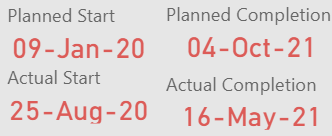
Here in the below screnshot, it is taking the last finish date which is D (Max Date), however actually the project is not finished so I want to replace the Actual finish date with "In Progress" unless item E has a date.
- Mark as New
- Bookmark
- Subscribe
- Mute
- Subscribe to RSS Feed
- Permalink
- Report Inappropriate Content
@mohammadyousaf how do you define the last item? Is it the name column, sorted alphabetically?
Subscribe to the @PowerBIHowTo YT channel for an upcoming video on List and Record functions in Power Query!!
Learn Power BI and Fabric - subscribe to our YT channel - Click here: @PowerBIHowTo
If my solution proved useful, I'd be delighted to receive Kudos. When you put effort into asking a question, it's equally thoughtful to acknowledge and give Kudos to the individual who helped you solve the problem. It's a small gesture that shows appreciation and encouragement! ❤
Did I answer your question? Mark my post as a solution. Proud to be a Super User! Appreciate your Kudos 🙂
Feel free to email me with any of your BI needs.
Helpful resources

Power BI Monthly Update - November 2025
Check out the November 2025 Power BI update to learn about new features.

Fabric Data Days
Advance your Data & AI career with 50 days of live learning, contests, hands-on challenges, study groups & certifications and more!

FabCon Atlanta 2026
Join us at FabCon Atlanta, March 16-20, for the ultimate Fabric, Power BI, AI and SQL community-led event. Save $200 with code FABCOMM.


