cancel
Showing results for 
Search instead for 
Did you mean: 

The Power BI Data Visualization World Championships is back! Get ahead of the game and start preparing now! Learn more

Reply
rank32
Frequent Visitor

Take MIN value for every date for each employee

Hello,


I have a problem where I have billable hours and available hours by employee and project.  Every record has 8 hours available built into it.  The issue comes into play when a single employee works on multiple projects in a single day. Since there is a value of 8 available hours in each record, when an employee shows up more than once in a single day (under multiple projects) this causes available hours to be inflated (8 * however many times the employee shows up in single day).  I am looking to create a measure to take the min value for each date for each employee.  This way, I can sum the billable hours against a constant 8 hours available and get a correct utilization measure.  I want this to work both at the individual employee level, but also aggregate correctly when looking at the dataset in it's entirety.  I can't seem to attach a workbook as a new user but here is a link to the workbook in google drive.  Any help is greatly appreciated!

3 REPLIES 3
DOLEARY85
Resident Rockstar
Resident Rockstar

Hi,


you could create a date table and use something like the below to create a measure of the number of hours per day:


CALCULATE(min(SampleData[AvailableHours]),ALLEXCEPT('date table','date table'[Date]))
 
If I answered your question, please mark my post as solution, Appreciate your Kudos 👍
 

Appreciate the idea. Correct me if I'm wrong, but I don't think this accounts for the individual employee aspect of this.  This will give me a total value of 8 available hours for the entire org each day.

Apologies, try this measure=


Measure = var min1 =  CALCULATE(min(SampleData[AvailableHours]))
var totalselectedemp = CALCULATE(DISTINCTCOUNT(SampleData[EmployeeID]))
return
min1*totalselectedemp
 
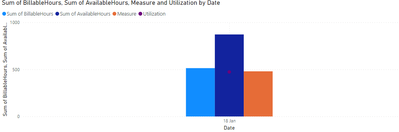
just replace it with your available hours in the chart, i've tested against a few dates and the whole chart and it looks like it's working:
 
DOLEARY85_0-1685517747748.png


If I answered your question, please mark my post as solution, Appreciate your Kudos 👍

Helpful resources

Announcements
Power BI DataViz World Championships

Power BI Dataviz World Championships

The Power BI Data Visualization World Championships is back! Get ahead of the game and start preparing now!

November Power BI Update Carousel

Power BI Monthly Update - November 2025

Check out the November 2025 Power BI update to learn about new features.

FabCon Atlanta 2026 carousel

FabCon Atlanta 2026

Join us at FabCon Atlanta, March 16-20, for the ultimate Fabric, Power BI, AI and SQL community-led event. Save $200 with code FABCOMM.