Join us at FabCon Atlanta from March 16 - 20, 2026, for the ultimate Fabric, Power BI, AI and SQL community-led event. Save $200 with code FABCOMM.
Register now!The Power BI Data Visualization World Championships is back! Get ahead of the game and start preparing now! Learn more
Hi!
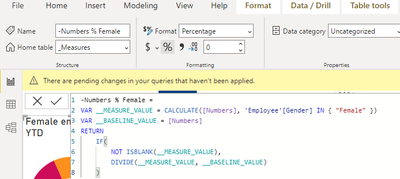
I have a meaure which is formatted as %:
My tachometer callout value insists on being a decimal!
Any ideas?
Solved! Go to Solution.
Hi @AnnaKi ,
You are refering to the Tachometer by E&A, to what I could test out if I add the percentage on a chart that already has values for everything (start, end, goal, and so on) the value stick has what you have so the call out is decimal.
If I start a new one with the measure first and then add the rest of the values the callout stays in percentage.
Regards
Miguel Félix
Proud to be a Super User!
Check out my blog: Power BI em PortuguêsThis does not work. The tachometer callout value formatting does not save properly in the service. It does not matter what order of measures I add to the visual, the formatting does not perform. I will see the callout value as a percentage, save the report (at which point the value is still a percentage), but when I refresh the browser page, it returns to show "1".
Hi @AnnaKi ,
You are refering to the Tachometer by E&A, to what I could test out if I add the percentage on a chart that already has values for everything (start, end, goal, and so on) the value stick has what you have so the call out is decimal.
If I start a new one with the measure first and then add the rest of the values the callout stays in percentage.
Regards
Miguel Félix
Proud to be a Super User!
Check out my blog: Power BI em PortuguêsOh Brilliant! Thank you so much! I hope this can save others hours of frustration! Cheers 🙂
The Power BI Data Visualization World Championships is back! Get ahead of the game and start preparing now!
| User | Count |
|---|---|
| 41 | |
| 38 | |
| 36 | |
| 30 | |
| 28 |
| User | Count |
|---|---|
| 129 | |
| 88 | |
| 79 | |
| 68 | |
| 63 |