Get certified for free when you join Fabric Data Days 2026 and dive into Fabric, Power BI, SQL, AI, and other essential data skills.
Join nowJuly 7 - July 17 | Round 2 of the Power BI Dataviz World Championships. Don't miss your chance! Learn more
Hi there!
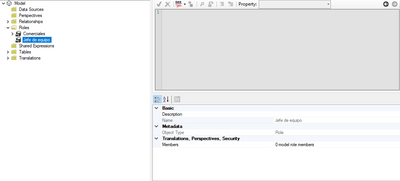
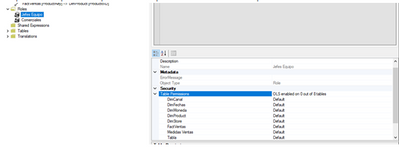
I am actually trying to use the OLS. Well, i created the roles as if they were normal RLS ones, but when i try in tabular editor to select the Table permissions they don´t appear. I´m quite new using this tool and I don´t really get why this happends. I´m using a pro trial account.
Here are the screenshot of what I see and what I want to see:
Thank you for your time, if anyone knows please let me know.
Solved! Go to Solution.
@Anonymous , on the latest version of both, when I clicked on tabular editor from external tools, I get the second option.
Hope you opened it from power bi external tools
I already solved, it was a version problem. Thank you all for your time!!
Hi @Anonymous ,
Please make sure you have opened Tabular Editor for the corresponding report using 'External tools' as @ amitchandak mentioned to set Object Level Security.
For more details about OLS in tabular editor, please refer:
Best Regards,
Community Support Team _ Yingjie Li
If this post helps, then please consider Accept it as the solution to help the other members find it more quickly.
@Anonymous , on the latest version of both, when I clicked on tabular editor from external tools, I get the second option.
Hope you opened it from power bi external tools
Join us in Barcelona for FabCon and SQLCon, the Fabric, Power BI, SQL, and AI community event. Save €200 with code FABCMTY200.
Join Fabric Data Days 2026: 60 days of free live/on-demand sessions, challenges, study groups, and certification opportunities.
| User | Count |
|---|---|
| 23 | |
| 22 | |
| 18 | |
| 17 | |
| 13 |
| User | Count |
|---|---|
| 67 | |
| 48 | |
| 46 | |
| 41 | |
| 39 |