cancel
Showing results for 
Search instead for 
Did you mean: 

Vote for your favorite vizzies from the Power BI Dataviz World Championship submissions. Vote now!

Reply
Anonymous
Not applicable

Tabular editor syntax chart datalabels

hello,


I'm new to Power Bi and Tabular editor. 

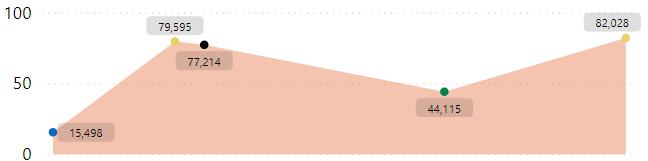
I have created a graph which plots the historical value of a parameter. each value corresponds to an event (called EVENT_TYPE)graphe.PNG


I want to replace current datalabels with event type name on the graph.

Note that I have a table containing historical values of the parameter calld : HISTORICAL. Waht is the syntax to write in tabular editor calculation item to show the vent type.


Thanks in advance 🙂

3 REPLIES 3
amitchandak
Super User
Super User

@Anonymous , refer if that can help


Dynamic Label
https://www.esbrina-ba.com/time-intelligence-dynamic-legend-in-line-charts/


Custom label
https://www.youtube.com/watch?v=IH4bcHhxunw

Share with Power BI Enthusiasts: Full Power BI Video (20 Hours) YouTube
Microsoft Fabric Series 60+ Videos YouTube
Microsoft Fabric Hindi End to End YouTube
Anonymous
Not applicable

@amitchandak First, I would to thank you for your feedback. I know the process. but I can't write the expression taht mathc each value with its category. Could you help me I'm lost!

amitchandak
Super User
Super User

@Anonymous , refer if that can help


Dynamic Label
https://www.esbrina-ba.com/time-intelligence-dynamic-legend-in-line-charts/


Custom label
https://www.youtube.com/watch?v=IH4bcHhxunw

Share with Power BI Enthusiasts: Full Power BI Video (20 Hours) YouTube
Microsoft Fabric Series 60+ Videos YouTube
Microsoft Fabric Hindi End to End YouTube

Helpful resources

Announcements
Power BI DataViz World Championships

Power BI Dataviz World Championships

Vote for your favorite vizzies from the Power BI World Championship submissions!

Sticker Challenge 2026 Carousel

Join our Community Sticker Challenge 2026

If you love stickers, then you will definitely want to check out our Community Sticker Challenge!

January Power BI Update Carousel

Power BI Monthly Update - January 2026

Check out the January 2026 Power BI update to learn about new features.

FabCon Atlanta 2026 carousel

FabCon Atlanta 2026

Join us at FabCon Atlanta, March 16-20, for the ultimate Fabric, Power BI, AI and SQL community-led event. Save $200 with code FABCOMM.