Join us at FabCon Atlanta from March 16 - 20, 2026, for the ultimate Fabric, Power BI, AI and SQL community-led event. Save $200 with code FABCOMM.
Register now!The Power BI Data Visualization World Championships is back! It's time to submit your entry. Live now!
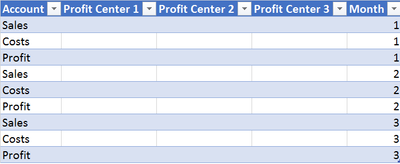
I'm working with a table that has profit centers as columns and P&L accounts as rows. Here's a simplified sample data:
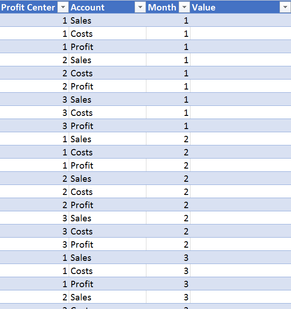
I'm trying to transpose this table and unpivot the columns so that the data would look like this:
But the problem is the date column which I have to transpose into a row first. Then I have separate account columns for each month which is indicated within the month row but this doesn't really help me. Any ideas how this could be done?
I could transpose the table in Excel first and add the date coulmn afterwards but this isn't ideal as the accounts are different between months.
Solved! Go to Solution.
Hi @Tuna123,
In the query editor select all the Profit center column and choose unpivot this will give you expected result.
Regards,
MFelix
Regards
Miguel Félix
Proud to be a Super User!
Check out my blog: Power BI em PortuguêsHi @Tuna123,
In the query editor select all the Profit center column and choose unpivot this will give you expected result.
Regards,
MFelix
Regards
Miguel Félix
Proud to be a Super User!
Check out my blog: Power BI em PortuguêsThanks!
The Power BI Data Visualization World Championships is back! It's time to submit your entry.
| User | Count |
|---|---|
| 52 | |
| 40 | |
| 31 | |
| 24 | |
| 22 |
| User | Count |
|---|---|
| 133 | |
| 115 | |
| 56 | |
| 45 | |
| 40 |