Join us in Barcelona for FabCon and SQLCon, September 28 - October 1, 2026.
This is best Fabric, Power BI, SQL and AI community event. How do we know? The last event sold out! Save €200 with code FABCMTY200.
Register now- Power BI forums
- Get Help with Power BI
- Desktop
- Service
- Report Server
- Power Query
- Mobile Apps
- Developer
- DAX Commands and Tips
- Custom Visuals Development Discussion
- Health and Life Sciences
- Power BI Spanish forums
- Translated Spanish Desktop
- Training and Consulting
- Instructor Led Training
- Dashboard in a Day for Women, by Women
- Galleries
- Data Stories Gallery
- Themes Gallery
- Contests Gallery
- QuickViz Gallery
- Quick Measures Gallery
- Visual Calculations Gallery
- Fabric Apps Gallery
- Notebook Gallery
- Translytical Task Flow Gallery
- TMDL Gallery
- R Script Showcase
- Webinars and Video Gallery
- Ideas
- Custom Visuals Ideas (read-only)
- Issues
- Issues
- Events
- Upcoming Events
July 28 - August 9 | Final Round of the Power BI Dataviz World Championships. This is your chance. Learn more
- Power BI forums
- Forums
- Get Help with Power BI
- Desktop
- Table transformation
- Subscribe to RSS Feed
- Mark Topic as New
- Mark Topic as Read
- Float this Topic for Current User
- Bookmark
- Subscribe
- Printer Friendly Page


- Mark as New
- Bookmark
- Subscribe
- Mute
- Subscribe to RSS Feed
- Permalink
- Report Inappropriate Content
Table transformation
Hello,
I am trying to transform a table which is:
| Client | Estat | Any | Import |
| EU | Línea base | 2017 | 10000 |
| EU | Adjudicat | 2017 | 3000 |
| EU | En contractació | 2017 | 2000 |
| EU | En contractació | 2018 | 5000 |
| EU | Adjudicat | 2018 | 10000 |
| EU | Línea base | 2018 | 20000 |
And I would like to transform it, so that I had a new "Estat" called "Pendent" with the calculation "Pendent" = "Línea base" - "Adjudicat" - "En contractació". The resulting table would be:
| Client | Estat | Any | Import |
| EU | Pendent | 2017 | 5000 |
| EU | Adjudicat | 2017 | 3000 |
| EU | En contractació | 2017 | 2000 |
| EU | En contractació | 2018 | 5000 |
| EU | Adjudicat | 2018 | 10000 |
| EU | Pendent | 2018 | 5000 |
This transformation would enable me to represent a stacked column chart I am looking for.
Could anyone shed a light please?
Thank you in advance!
Àlex
Solved! Go to Solution.


- Mark as New
- Bookmark
- Subscribe
- Mute
- Subscribe to RSS Feed
- Permalink
- Report Inappropriate Content
The suggested (un)pivot solution could look like this:
let
    Source = Table1,
    #"Pivoted Column" = Table.Pivot(Source, List.Distinct(Source[Estat]), "Estat", "Import"),
    #"Added Custom" = Table.AddColumn(#"Pivoted Column", "Pendent", each [Línea base] - [Adjudicat] - [En contractació], Int64.Type),
    #"Removed Columns" = Table.RemoveColumns(#"Added Custom",{"Línea base"}),
    #"Reordered Columns" = Table.ReorderColumns(#"Removed Columns",{"Client", "Any", "Pendent", "Adjudicat", "En contractació"}),
    #"Unpivoted Columns" = Table.UnpivotOtherColumns(#"Reordered Columns", {"Client", "Any"}, "Attribute", "Value")
in
    #"Unpivoted Columns"


- Mark as New
- Bookmark
- Subscribe
- Mute
- Subscribe to RSS Feed
- Permalink
- Report Inappropriate Content
Hi @pect,
Could you please mark the proper answer as solution? That will be a big help to the others.
Best Regards!
Dale
If this post helps, then please consider Accept it as the solution to help the other members find it more quickly.


- Mark as New
- Bookmark
- Subscribe
- Mute
- Subscribe to RSS Feed
- Permalink
- Report Inappropriate Content
Hi @pect,
go to the query Editor:
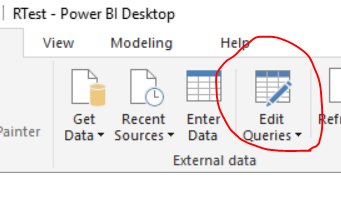
and add a "Custom Column"
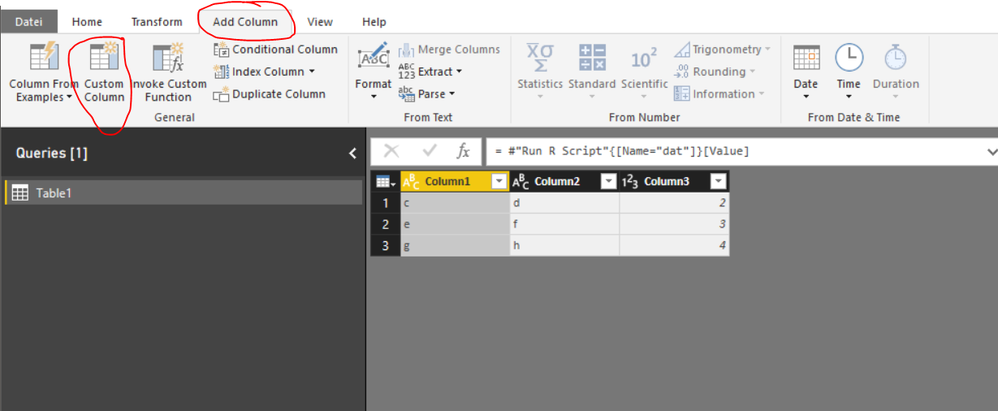
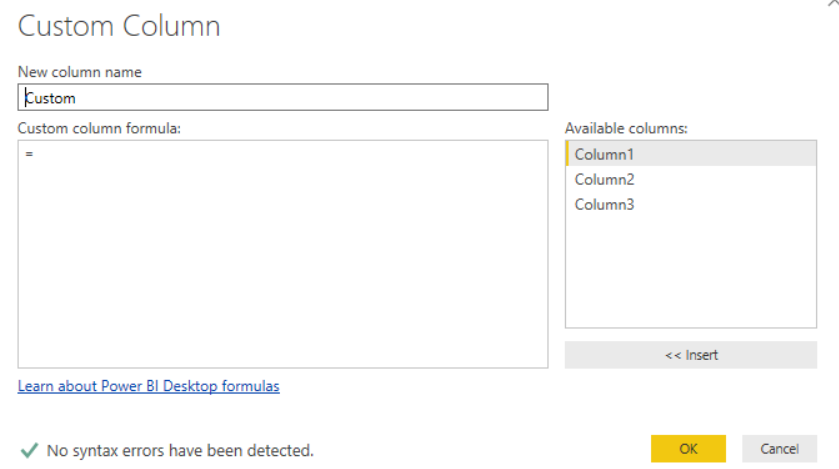
Than you can craete a new, custom column with the formular you stated:
- Mark as New
- Bookmark
- Subscribe
- Mute
- Subscribe to RSS Feed
- Permalink
- Report Inappropriate Content
Hi,
Thanks but I am afraid this doesn't work with my request. My calculation depends on only one column "Import".
I appreciate any other help you could provide me!
Thank you very much.
- Mark as New
- Bookmark
- Subscribe
- Mute
- Subscribe to RSS Feed
- Permalink
- Report Inappropriate Content
Now I understand!
- Right Click on the table in query Editor and Click "Rerence". Do this 3 times and call every tables coresponding to the "Estat" Values "Línea base" ,"Adjudicat", "En contractació" for example.
- Filter every table to only display the corresponding Estat value "Línea base" ,"Adjudicat", "En contractació". (Click on the Arrow in the column header and filter it) and call the coumns "Línea base" - "Adjudicat" - "En contractació".
- Now you can join the tables based on the columns "client" and "any" or any other kind of identification column(s) in one new table.
- Now you have 3 columns next to each other with the values of "Línea base" ,"Adjudicat", "En contractació" and you can use a custom column.
- Dont forgeht to disable "Enable Load" on the intermediate querys which you dont need in your final data model and RAM (Right click on querys and Disable"Enable Load").
Does this help you`?
- Mark as New
- Bookmark
- Subscribe
- Mute
- Subscribe to RSS Feed
- Permalink
- Report Inappropriate Content
How do I join the 3 tables?
- Mark as New
- Bookmark
- Subscribe
- Mute
- Subscribe to RSS Feed
- Permalink
- Report Inappropriate Content
Joining was the wrong word, in Power BI its called "Appending".
Click on the black arrow next to it and use "append as new"

- Mark as New
- Bookmark
- Subscribe
- Mute
- Subscribe to RSS Feed
- Permalink
- Report Inappropriate Content
The suggested (un)pivot solution could look like this:
let
    Source = Table1,
    #"Pivoted Column" = Table.Pivot(Source, List.Distinct(Source[Estat]), "Estat", "Import"),
    #"Added Custom" = Table.AddColumn(#"Pivoted Column", "Pendent", each [Línea base] - [Adjudicat] - [En contractació], Int64.Type),
    #"Removed Columns" = Table.RemoveColumns(#"Added Custom",{"Línea base"}),
    #"Reordered Columns" = Table.ReorderColumns(#"Removed Columns",{"Client", "Any", "Pendent", "Adjudicat", "En contractació"}),
    #"Unpivoted Columns" = Table.UnpivotOtherColumns(#"Reordered Columns", {"Client", "Any"}, "Attribute", "Value")
in
    #"Unpivoted Columns"
- Mark as New
- Bookmark
- Subscribe
- Mute
- Subscribe to RSS Feed
- Permalink
- Report Inappropriate Content
Thank you very much! It works!
- Mark as New
- Bookmark
- Subscribe
- Mute
- Subscribe to RSS Feed
- Permalink
- Report Inappropriate Content
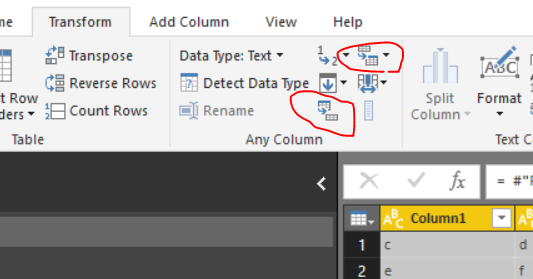
Alternative: (you have to try this, i´m not exactly sure)
fondle around with "unpivot column" or "pivot column"

Helpful resources

FabCon & SQLCon – Barcelona 2026
Join us in Barcelona for FabCon and SQLCon, the Fabric, Power BI, SQL, and AI community event. Save €200 with code FABCMTY200.

Fabric Community Sticker Challenge - Barcelona 2026
If you love stickers, then you will definitely want to check out our community sticker challenge, Barcelona edition!

Power BI Monthly Update - July 2026
Check out the July 2026 Power BI update to learn about new features.

Power BI DataViz World Championships - June 2026
A new Power BI DataViz World Championship is coming this June! Don't miss out on submitting your entry.

| User | Count |
|---|---|
| 25 | |
| 23 | |
| 19 | |
| 17 | |
| 14 |


| User | Count |
|---|---|
| 24 | |
| 23 | |
| 20 | |
| 20 | |
| 19 |


