
Join us at FabCon Atlanta from March 16 - 20, 2026, for the ultimate Fabric, Power BI, AI and SQL community-led event. Save $200 with code FABCOMM.
Register now!Vote for your favorite vizzies from the Power BI Dataviz World Championship submissions. Vote now!
@Anonymous
You have helped me so well with this topic:
https://community.powerbi.com/t5/Desktop/Tabel-tansformation-need-help/m-p/1734060#M683562
that I wonder if you also have an idea here:
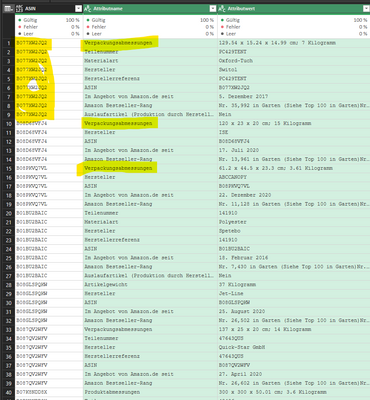
I have a second table:
first row -> Artikelnumber
second row -> Attribute Name
third row -> Attribute Value
I would like to build the following data structure from this data:
Article number; Attribute-Name_1; Attribute_Name_2; etc ..... depends dynamically on the number of attribute names, i.e. my target table gets wider and wider depending on the existing attribute names
Solved! Go to Solution.
Hi,
You can do this using pivot transformaiton in the Query editor.
Appreciate a Kudos! 🙂
If this helps and resolves the issue, please mark it as a Solution! 🙂
Regards,
N V Durga Prasad
Hi,
You can do this using pivot transformaiton in the Query editor.
Appreciate a Kudos! 🙂
If this helps and resolves the issue, please mark it as a Solution! 🙂
Regards,
N V Durga Prasad
Vote for your favorite vizzies from the Power BI World Championship submissions!
If you love stickers, then you will definitely want to check out our Community Sticker Challenge!
Check out the January 2026 Power BI update to learn about new features.
| User | Count |
|---|---|
| 57 | |
| 52 | |
| 40 | |
| 17 | |
| 16 |
| User | Count |
|---|---|
| 112 | |
| 108 | |
| 39 | |
| 34 | |
| 27 |