Join us in Barcelona for FabCon and SQLCon, September 28 - October 1, 2026.
This is best Fabric, Power BI, SQL and AI community event. How do we know? The last event sold out! Save €200 with code FABCMTY200.
Register now- Power BI forums
- Get Help with Power BI
- Desktop
- Service
- Report Server
- Power Query
- Mobile Apps
- Developer
- DAX Commands and Tips
- Custom Visuals Development Discussion
- Health and Life Sciences
- Power BI Spanish forums
- Translated Spanish Desktop
- Training and Consulting
- Instructor Led Training
- Dashboard in a Day for Women, by Women
- Galleries
- Data Stories Gallery
- Themes Gallery
- Contests Gallery
- QuickViz Gallery
- Quick Measures Gallery
- Visual Calculations Gallery
- Fabric Apps Gallery
- Notebook Gallery
- Translytical Task Flow Gallery
- TMDL Gallery
- R Script Showcase
- Webinars and Video Gallery
- Ideas
- Custom Visuals Ideas (read-only)
- Issues
- Issues
- Events
- Upcoming Events
July 28 - August 9 | Final Round of the Power BI Dataviz World Championships. This is your chance. Learn more
- Power BI forums
- Forums
- Get Help with Power BI
- Desktop
- Re: Table problem
- Subscribe to RSS Feed
- Mark Topic as New
- Mark Topic as Read
- Float this Topic for Current User
- Bookmark
- Subscribe
- Printer Friendly Page

- Mark as New
- Bookmark
- Subscribe
- Mute
- Subscribe to RSS Feed
- Permalink
- Report Inappropriate Content
Table problem
Hi there,
I have a small problem on Power BI: I want to create three new filters with buyers, project managers, and one on requesters. However, in my table, I only have the IDs of these people and it makes no sense for my search. Let me explain: I have a 'UsersInformations' table with in it a list of names associated with an ID, and in the 'Prep_budget' table (the one I use to filter my tables) I only have the IDs of These persons. I can't get it to be the names that I see when scrolling my filter and not the IDs... do I have to create a new column?
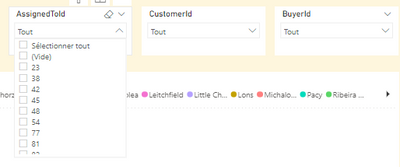
Thanks !
Emilie
Solved! Go to Solution.
- Mark as New
- Bookmark
- Subscribe
- Mute
- Subscribe to RSS Feed
- Permalink
- Report Inappropriate Content
Ok everyone I managed to find! it was "just" enough to link the tables in fact lol
- Mark as New
- Bookmark
- Subscribe
- Mute
- Subscribe to RSS Feed
- Permalink
- Report Inappropriate Content
You May merge the two columns (ID and the Names), I guess it would help!
- Mark as New
- Bookmark
- Subscribe
- Mute
- Subscribe to RSS Feed
- Permalink
- Report Inappropriate Content
Hi @Anonymous , thank you for your answer but it does not work...
- Mark as New
- Bookmark
- Subscribe
- Mute
- Subscribe to RSS Feed
- Permalink
- Report Inappropriate Content
let me get it clear! do you have two columns one with ID and another one with the related name?
or you don't have the names at all?
- Mark as New
- Bookmark
- Subscribe
- Mute
- Subscribe to RSS Feed
- Permalink
- Report Inappropriate Content
@Anonymous
- Mark as New
- Bookmark
- Subscribe
- Mute
- Subscribe to RSS Feed
- Permalink
- Report Inappropriate Content
I'm sorry if I wasn't clear earlier... I'll try to explain myself better! So basically, I have two tables: one with the user information 'UsersInformation' (so it is in this table that the two columns Name and ID are located) and a second with only the IDs For example: I have a “food security” project. I associate three people: a project manager whose ID is 212, a buyer whose ID is 216 and a customer whose ID is 328. Now we make the link with the second table 'user info ' which associates each ID with a name. So ID 212 = Monsieur Quoi, ID 216 = Monsieur Bidule and ID 328 = Monsieur Truc (you should know that a buyer can also be a customer, a customer can also be a project manager... In short, we can find names in several columns). So going back to my problem, when I apply my filters, I only have numbers (so 216, 212, 328...) and what I want is the list of names.
- Mark as New
- Bookmark
- Subscribe
- Mute
- Subscribe to RSS Feed
- Permalink
- Report Inappropriate Content
Ok everyone I managed to find! it was "just" enough to link the tables in fact lol
Helpful resources

FabCon & SQLCon – Barcelona 2026
Join us in Barcelona for FabCon and SQLCon, the Fabric, Power BI, SQL, and AI community event. Save €200 with code FABCMTY200.

Power BI DataViz World Championships - June 2026
A new Power BI DataViz World Championship is coming this June! Don't miss out on submitting your entry.

| User | Count |
|---|---|
| 27 | |
| 22 | |
| 20 | |
| 18 | |
| 14 |


| User | Count |
|---|---|
| 25 | |
| 20 | |
| 20 | |
| 20 | |
| 20 |


