
Get certified for free when you join Fabric Data Days 2026 and dive into Fabric, Power BI, SQL, AI, and other essential data skills.
Join nowJuly 7 - July 17 | Round 2 of the Power BI Dataviz World Championships. Don't miss your chance! Learn more
Hi @Suryaann111
You can use Matrix visual for this.
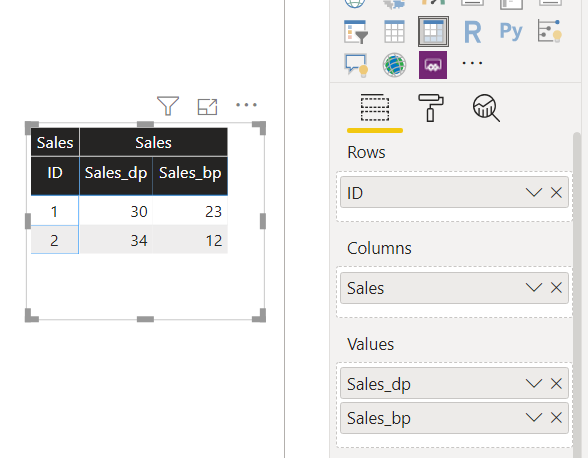
Also I believe you want to show these values against some dimension. I have taken "ID" as dimension here and the source table schema is:
Create a Calculated Column for your main header i.e. [Sales]="Sales"
Then use Matrix as shown below:
Note: Instead of ID you can use the dimension/attributes you have in your table for which you want o show this data.
Mann
<If this post helps, then please consider Accept it as the solution to help the other members find it more quickly>
| User | Count |
|---|---|
| 23 | |
| 22 | |
| 20 | |
| 20 | |
| 12 |
| User | Count |
|---|---|
| 63 | |
| 56 | |
| 47 | |
| 44 | |
| 37 |